These 96 ChatGPT prompts cover 12 everyday work jobs, from email, sales and support to spreadsheets, resumes and photo edits. Each has [PLACEHOLDERS] for your own details, one line on why it works and one on what to check in the answer. On October 28, 2026 we ran 24 of them with made-up business details on Claude Haiku 5.5, rewrote the 7 that broke a rule or came close, and ran those again.
Updated
Showing 96 of 96 prompts
Writing and email prompts
Replies, follow-ups and announcements that say exactly what you mean, with nothing promised that you did not offer.
Write a reply to the email below. I am [YOUR ROLE] and the sender is [WHO THEY ARE TO YOU].
What I want to happen next: [THE OUTCOME YOU WANT].
What I can offer: [WHAT YOU CAN OFFER].
Tone: calm, direct and polite. Under 150 words. Do not promise anything beyond what I can offer.
If the email asks something I have not answered above, write [CHECK: the question] in that spot instead of guessing.

Email:
[PASTE THE EMAIL]
Why it works
Naming the outcome and your offer keeps the reply from apologizing its way into promises.
What to check
Every promise in the reply is one you listed, and any [CHECK] marks are filled in before you send.
Cut a long email in half
Rewrite my email below so it is half as long and easier to act on.
Keep every fact, date, number and name exactly as written. Put the request in the first two sentences.
Use short paragraphs, and bullets only for three or more separate items.
After the rewrite, list everything you removed so I can check it.

Email:
[PASTE YOUR DRAFT]
Why it works
The list of what was cut makes the shortening checkable instead of a silent rewrite.
What to check
Dates and numbers match your draft, and nothing on the removed list is something the reader needs.
Follow up when someone has not replied
Write a short follow-up email to [NAME], [THEIR ROLE], who has not replied to my message from [DATE] about [TOPIC].
Remind them of the one decision I need: [THE DECISION], and by when: [DEADLINE].
Offer an easy option: [EASY OPTION, e.g. a 10-minute call].
80 words at most, friendly, without phrases like "just following up" or "as per my last email". Give me two subject lines.
Why it works
One named decision and a deadline give the reader something they can answer in a single line.
What to check
The decision and deadline are yours, and it does not invent details of your earlier message.
Help me say no to [THE REQUEST] from [WHO ASKED].
My real reason, in a few words: [YOUR REASON].
What I can offer instead: [ALTERNATIVE, or "nothing"].
Write it as a [EMAIL / CHAT MESSAGE / TEXT], warm but firm, under 100 words.
Make the no clear in the first two sentences. Apologize at most once, and do not hint at a yes I have not offered.
Why it works
Giving your real reason and your alternative stops the AI from inventing excuses for you.
What to check
The no is clear early, and no alternative appears that you did not offer.
Announce a change to customers or staff
Write an announcement about [THE CHANGE] for [AUDIENCE]. It takes effect on [DATE].
What changes for them: [WHAT CHANGES]
What stays the same: [WHAT STAYS]
What they need to do: [ACTION, or "nothing"]
Where to ask questions: [CONTACT]
Format: a one-line headline, one short paragraph, then "What this means for you" as 2 to 4 bullets.
Plain words, 150 words at most. Do not add reasons or benefits I have not given.
Why it works
Splitting what changes from what stays the same answers the first question every reader has.
What to check
No reasons or benefits were added, and the date and contact are exactly yours.
Proofread and explain every fix
Proofread the text below for [AUDIENCE] in [US / UK] English.
Fix spelling, grammar and unclear sentences, but keep my voice and add no new content.
Return: 1) the corrected text, 2) a table with each change: original, fix and a reason of five words or fewer.
If a sentence could mean two things, ask me instead of choosing.

Text:
[PASTE TEXT]
Why it works
A change table lets you accept or reject each edit instead of trusting a silent rewrite.
What to check
The table covers every change, and none of your sentences changed meaning.
Rewrite a message in three tones
Rewrite the message below in three labelled versions: [TONE 1, e.g. formal], [TONE 2, e.g. friendly] and [TONE 3, e.g. very short].
Keep the facts and the request identical in all three. Keep each version under [WORD LIMIT] words.

Message:
[PASTE MESSAGE]
Why it works
OpenAI's own ChatGPT guide suggests naming the tone with adjectives; three labelled versions let you compare.
What to check
The facts and the request are the same in all three versions; only the wording changes.
Turn my notes below into an email to [RECIPIENT] about [TOPIC].
The goal of the email: [GOAL].
Under [WORD LIMIT] words, in the order that makes the request clearest, ending with one clear next step.
Use only what is in my notes. If a note is unclear or a detail is missing, write [CHECK] there and keep going.

Notes:
[PASTE NOTES]
Why it works
"Use only what is in my notes" plus [CHECK] marks stops the AI from filling gaps with guesses.
What to check
Every sentence traces back to a note, and you fill every [CHECK] before sending.
Marketing and social media prompts
Posts, ads and product copy built from your own facts, with the limits each channel needs.
A week of social posts from one idea
I run [BUSINESS] for [AUDIENCE]. Write 5 posts for [PLATFORM] from this one idea: [THE IDEA OR OFFER].
Each post: a hook under 12 words, a body of 40 to 80 words, and one call to action: [THE ACTION].
Give each post a different angle: a tip, a mistake to avoid, a short story, a question, behind the scenes.
No hashtags or emojis, and no numbers, results or testimonials I have not given you.
Why it works
Fixed lengths and five named angles stop you getting five versions of the same post.
What to check
Each post has its own angle, and none contains a statistic or quote you did not supply.
Write a product description for [PRODUCT] for [WHERE IT APPEARS, e.g. my Shopify product page].
Facts: [MATERIALS, SIZES, PRICE, WHAT IS INCLUDED]
Ideal buyer: [WHO]
Format: a benefit headline of one line, one paragraph of 3 or 4 short sentences (80 words at most), then 4 bullets that each pair a feature with what it means for the buyer.
Do not invent certifications, awards, reviews, origins or measurements.
Why it works
Feature-to-benefit bullets make the copy persuasive, and the do-not-invent list blocks the usual fabrications.
What to check
Every measurement and claim matches your facts; in our test it still added "breathable" to a merino throw, so read for small claims too.
Write [NUMBER] versions of a [PLATFORM, e.g. Meta] ad for [OFFER] aimed at [AUDIENCE].
Each version: primary text under 125 characters, a headline under 40 characters, and its angle in brackets: pain, result, proof or objection.
Use only these facts and proof: [FACTS AND PROOF YOU HAVE].
No "best", "number one" or other superlatives unless my facts prove them.
Why it works
Character limits match the ad slots, and the angle label makes your test results readable later.
What to check
Count the characters yourself and drop any version that leans on proof you do not have.
Draft a newsletter issue
Draft this month's newsletter for [BUSINESS] to [WHO THE SUBSCRIBERS ARE].
Items, most important first: [ITEM 1], [ITEM 2], [ITEM 3].
Voice: [3 ADJECTIVES].
Give me 3 subject lines under 45 characters, one preview line, then the issue in about [WORD COUNT] words, with a short heading per item and one main call to action: [ACTION].
Why it works
Ranking the items tells the AI what to lead with and what to keep short.
What to check
The items follow your order and only one call to action is pushed.
Plan a campaign you can actually run
Plan a [NUMBER]-week campaign for [OFFER] that ends on [END DATE].
Channels I use: [CHANNELS]. Time I have per week: [HOURS].
Return a table: week, channel, message, format and the one number to watch.
Keep it within my hours. If the plan does not fit, tell me what to drop.
Why it works
Giving your weekly hours makes it plan for your capacity, not an agency's.
What to check
The total work fits your hours, and the weeks count back correctly from your end date.
Sharpen who you are selling to
Here is what I know about my customers: [PASTE NOTES, REVIEWS OR SURVEY ANSWERS].
Write a one-page customer profile for [PRODUCT]: the job they buy it for, what they tried before, the words they use for the problem (quoted from my notes), their top 3 objections, and where they spend time online.
Mark anything that is your guess rather than from my notes as [GUESS].
Why it works
The [GUESS] label separates evidence from assumptions, which customer profiles usually blur.
What to check
Quotes really appear in your notes, and every [GUESS] line is something to verify.
Turn one piece into five formats
Turn the piece below into:
1) a LinkedIn post under 200 words
2) 3 short posts for [X / THREADS / BLUESKY]
3) an email teaser of about 80 words
4) a 30-second video script with on-screen text
5) 5 quote cards of under 15 words each
Keep my main point: [MAIN POINT]. Use only claims that are in the original.

Original:
[PASTE ARTICLE, TRANSCRIPT OR POST]
Why it works
Naming every format with its limit gets five usable pieces in one pass.
What to check
The quote cards are lines you actually wrote or said, not new ones.
Headlines and hooks to choose from
Give me 10 headline options for [PAGE, POST OR EMAIL] about [TOPIC] for [AUDIENCE].
Mix the styles: 3 plain and specific, 3 with a number, 2 questions, 2 that name a mistake.
Each under [CHARACTER LIMIT] characters.
Then pick the two you would test first, with a one-line reason each.
Why it works
Mixing styles avoids ten near-identical lines, and the pick forces a reason.
What to check
The limits hold, and no headline promises something your content does not deliver.
Sales prompts
Outreach, proposals and follow-ups that use only the proof you really have.
Write a cold email to a [ROLE] at a [TYPE OF COMPANY].
What I sell: [OFFER]. The problem it solves for them: [PROBLEM].
Proof I can mention: [PROOF, or "none yet"]. The ask: [THE ASK, e.g. a 15-minute call].
Describe the offer only as I wrote it: no extra features, statistics or claims about their industry.
Under 120 words, plain text, no flattering opener and no fake familiarity.
Leave [PERSONAL LINE] where I will add one real detail about them. Give two subject lines.
Why it works
The [PERSONAL LINE] slot keeps the AI from inventing facts about the person you are writing to.
What to check
No made-up results or product features: our first version invented a reply-to-reschedule feature we never mentioned.
Answers to the objections you hear
I sell [OFFER] to [AUDIENCE] at [PRICE].
The objections I hear most: [OBJECTION 1], [OBJECTION 2], [OBJECTION 3].
For each one: what the buyer may really mean, a reply of 2 to 3 sentences in plain words, and one question to ask back.
No pressure tactics and no false urgency.
Why it works
Asking what the buyer really means gets answers to the cause, not just the words.
What to check
Replies are honest about price and limits and promise no result you cannot back up.
Questions for a discovery call
I have a discovery call with a [PROSPECT ROLE] at a [COMPANY TYPE] about [OFFER].
Write 10 open questions in the order I should ask them: situation, problem, impact, how they decide, budget, timing.
After each question, add one line on what a useful answer sounds like.
Why it works
The order follows how a real call builds trust before it gets to money.
What to check
The questions are open, not yes-or-no, and none assumes facts about this prospect.
Write a one-page proposal summary for [CLIENT] for [PROJECT].
Their goal, in their words: [GOAL]
Included: [SCOPE]
Not included: [WHAT IS NOT INCLUDED]
Timeline: [TIMELINE]
Price and terms: [PRICE AND TERMS]
Next step: [NEXT STEP]
Use these headings: Your goal, What we will do, Not included, Timeline, Investment, Next step.
Under 350 words. No guarantees of results.
Why it works
A separate "Not included" heading heads off scope arguments later.
What to check
Price, dates and scope match your input, and no selling points were added: ours added one about homeowners and phones.
Follow-up emails after a sales call
After a call with [NAME] at [COMPANY] about [OFFER], write 3 follow-up emails:
day 1, a recap and the next step; day 4, one useful resource: [RESOURCE]; day 10, a direct yes-or-no question.
Each under 90 words. Here is what they told me on the call: [CALL NOTES].
Refer only to what is in my notes.
Why it works
Each email has one job, so the sequence does not repeat itself.
What to check
The recap matches your notes, and nothing new is put in the prospect's mouth.
LinkedIn connection note
Write 3 versions of a LinkedIn connection request to a [ROLE] in [INDUSTRY], each under 280 characters.
Why I am reaching out: [REASON]. Our real common ground: [SHARED GROUP, EVENT OR CONTACT].
No pitch in the first message.
Why it works
A short limit and no pitch make it read like a person, not a sequence.
What to check
Count the characters, and the common ground is only what you gave.
Learn from a lost deal
Here are my notes on a deal I lost: [PASTE NOTES, EMAILS OR CALL SUMMARY].
List the 3 most likely reasons I lost it, each with the evidence from my notes.
Then 3 things to do differently next time, and one question I could still ask the buyer to learn the real reason.
Keep facts from my notes separate from your guesses.
Why it works
Asking for evidence behind each reason keeps the review grounded in what happened.
What to check
Each reason points to something that is actually in your notes.
Tell clients about a price increase
Write an email to existing clients: my price for [SERVICE] goes from [OLD PRICE] to [NEW PRICE] on [DATE].
The real reasons: [REASONS]. What I offer existing clients, if anything: [OFFER, e.g. the old price until a date].
Confident and appreciative, not apologetic. Under 150 words, with the new price and the date in the first three lines.
Why it works
Price and date up front respect the reader, and your reasons stop invented justifications.
What to check
The prices and the date are correct, and no extra discount appears.
Customer support prompts
Replies, macros and help articles that stay inside your policy.
Write a reply to this customer complaint for [BUSINESS].
Our policy: [RELEVANT POLICY]. What I can offer: [REMEDY].
Warm, accountable and specific, without corporate phrases like "we apologize for any inconvenience". Under 140 words.
Name the specific problem they describe, state the fix and the next step with a timeframe.
Use only the policy and remedy above: no other commitments, such as callbacks, follow-ups, causes or what a visit will fix.
Before you finish, delete any sentence that commits us to something not in the remedy.

Complaint:
[PASTE MESSAGE]
Why it works
The policy and the remedy make the reply kind and safe at the same time.
What to check
Read for added commitments or a stated cause of the problem: 4 of our 8 test replies added one, such as a callback or "the fault is on our side".
Here are recent customer questions: [PASTE QUESTIONS].
Group them into the most common topics, up to 8. For each topic, write the question the way customers phrase it and an answer of 2 to 4 sentences using only these facts: [PASTE POLICIES, PRICES, HOURS].
If my facts do not answer a question, write [NEEDS ANSWER] instead of making one up.
Why it works
Customer wording makes the FAQ findable, and [NEEDS ANSWER] exposes gaps in your policies.
What to check
Every answer is backed by your facts, and you write the [NEEDS ANSWER] items yourself.
Saved replies for common questions
Write saved replies for these situations: [LIST, e.g. where is my order, how to return, change my address].
For each: a short title, a reply under 90 words with [CUSTOMER NAME] and [ORDER NUMBER] left as placeholders, and one line on when not to use it.
Our facts: [SHIPPING TIMES, RETURN WINDOW, CONTACT].
Why it works
The "when not to use it" line stops a template from going to the wrong case.
What to check
Times and windows match your policy, and the placeholders are still there.
Calm a heated live chat
A customer on [CHANNEL] is upset about [ISSUE] and wrote: [PASTE MESSAGES].
Give me my next 2 messages: the first acknowledges the problem and asks one clarifying question; the second comes after their answer, in two versions, for [OUTCOME A] and [OUTCOME B].
Each under 50 words. Plain and human, nothing that sounds like a script.
Why it works
Short, staged replies fit live chat better than one long answer.
What to check
Neither message admits fault or offers compensation you have not approved.
Turn a customer report into a bug ticket
Turn this customer message into a bug ticket for [TEAM OR TOOL].
Fields: summary (under 12 words), steps to reproduce, expected result, actual result, device or browser if mentioned, customer impact, and the information we still need to ask the customer for.
Use only details from the message.

Message:
[PASTE MESSAGE]
Why it works
Fixed fields make the ticket usable, and the last field tells you what to ask next.
What to check
No steps or device details were invented.
Reply to a public review
Write a public reply to this [STAR RATING]-star review of [BUSINESS] on [PLATFORM].
Thank them, answer the specific point they raise, and [INVITE THEM TO CONTACT US AT ... / SAY WHAT WE CHANGED: ...].
Under 80 words. Never share private details about the customer or their order in public.

Review:
[PASTE REVIEW]
Why it works
The privacy line matters because a public reply stays online.
What to check
No order details or names beyond what the reviewer wrote themselves.
Write a help-center article
Write a help article titled "[HOW TO ...]" for [PRODUCT]. Readers: [WHO, e.g. new users on a phone].
The steps as I do them: [ROUGH STEPS].
Format: a one-sentence answer at the top, numbered steps that start with a verb, then an "If it does not work" section covering [COMMON PROBLEMS].
Use the exact button and menu names I gave; do not invent any.
Why it works
Invented menu names are the most common error in AI-written help docs, so the rule targets them.
What to check
Every button and menu name matches your product.
Sort feedback by theme and mood
Sort these customer comments into themes and mark each comment positive, negative or mixed:
[PASTE COMMENTS]
Return a table: theme, number of comments, mood split, and one representative quote copied word for word.
Then the top 3 fixes the comments point to. Count each comment once.
Why it works
Word-for-word quotes keep the summary honest about what customers said.
What to check
The counts add up to your number of comments, and the quotes are exact.
SEO and content prompts
Outlines, titles and briefs that leave room for your own proof.
Outline an article for the search "[KEYWORD]". Readers: [WHO]. What they should be able to do after reading: [OUTCOME].
Start with 3 title options, each under 60 characters with the keyword near the start and its character count in brackets. Then give a direct answer of 2 sentences for the top, H2 headings phrased like real questions, and under each H2 the points to cover.
Mark the points where I need my own data, screenshots or examples with [MY PROOF].
Do not state fees, statistics or rules of thumb as facts: write them as [VERIFY: the claim] so I can check them.
Why it works
[MY PROOF] marks the places where first-hand material beats generic text.
What to check
Recount the titles: before we asked for three counted options, 3 of 4 test runs gave a title over 60 characters.
Write 3 title tags of 50 to 60 characters and 3 meta descriptions of 140 to 155 characters for the page below.
Main keyword: [KEYWORD]. What the page offers that others do not: [UNIQUE POINT].
Show the character count after each one.

Page:
[PASTE PAGE TEXT OR SUMMARY]
Why it works
Asking for the count makes the AI check its own length.
What to check
Count again yourself: in our test, 2 of the 6 counts the AI gave were off by 1 or 2 characters.
FAQ section from questions people ask
Write 5 FAQ entries for a page about [TOPIC], using questions real people ask, such as these from search suggestions: [PASTE QUESTIONS].
Each answer is 2 to 3 sentences and starts with a direct yes, no or number where possible.
Use only facts from this text: [PASTE FACTS].
Why it works
Answers that open with yes, no or a number are easy for readers and search features to quote.
What to check
Every answer is supported by your facts.
Update an old blog post
Here is a blog post from [YEAR]: [PASTE POST].
List everything likely to be out of date (prices, tools, dates, statistics) as a checklist for me to verify; do not guess the new values.
Then suggest 3 sections a reader today would need, and a new intro of 2 to 3 sentences.
Why it works
A checklist instead of guessed numbers keeps the update factual.
What to check
Verify every checklist item on its source before you change it.
Find spots for internal links
Here is my new article: [PASTE ARTICLE].
Here are my existing pages, one per line as title and URL: [PASTE LIST].
Suggest up to 6 internal links: the exact sentence in the new article, the link text (3 to 6 words that describe the target page) and the URL.
Only use pages from my list.
Why it works
Limiting it to your list prevents made-up URLs.
What to check
Every URL is on your list, and every link text describes its target.
Brief for a freelance writer
Write a brief for a freelance writer: an article on [TOPIC] for the search [KEYWORD].
Include: the reader and their problem, the angle ([ANGLE]), points that must be covered, things to avoid, the sources the writer must use ([SOURCES]), a word range, and a checklist the writer ticks before submitting.
Why it works
A submission checklist makes the brief enforceable.
What to check
The sources are the ones you named, not new ones.
Make a page easier to read
Rewrite the section below for readers who [READER LEVEL, e.g. are new to the topic].
Sentences under 20 words, one idea per paragraph, and explain any jargon in one line the first time it appears.
Keep every fact and keep the phrase [KEYWORD]. Return the rewrite, then the list of terms you explained.

Section:
[PASTE TEXT]
Why it works
Concrete readability rules work better than "make it simpler".
What to check
The facts did not change and the phrase still appears.
Map a topic into articles
I want to cover [TOPIC] for [AUDIENCE] on my site.
List 10 article ideas, each for a different search intent, with a working title, the question it answers and its type: how-to, comparison, list or definition.
Flag any two ideas that would compete for the same search, so I can merge them.
Why it works
Flagging overlaps keeps two of your pages from competing for one search.
What to check
Each idea answers a different question; merge the flagged pairs.
Research and summary prompts
Summaries, comparisons and extractions that point back to the source.
Summarize the document below for [WHO, e.g. my manager], who needs to decide [DECISION].
Give: a 3-sentence summary, the 5 points that matter for the decision, numbers and dates exactly as written, and the questions the document leaves open.
Say which section each point comes from. Add nothing that is not in the document.

Document:
[PASTE OR ATTACH]
Why it works
Tying the summary to a decision tells the AI what to keep and what to drop.
Compare [OPTION A], [OPTION B] and [OPTION C] for [PURPOSE].
My criteria, most important first: [CRITERIA].
Use only the information I paste below, and write "not stated" where it is missing.
Return a table, then a recommendation of up to 3 sentences on which option fits which situation.

Information:
[PASTE SPECS, QUOTES OR NOTES]
Why it works
"Not stated" makes gaps visible instead of quietly filled.
What to check
Every cell in the table is backed by what you pasted.
Pull the numbers out of a report
From the text below, extract every [TYPE OF FACT, e.g. price, date, deadline, figure] into a table: fact, value, unit, and a quote of 5 to 10 words showing where it appears.
Do not round or convert anything. List any value that is ambiguous under "Unclear".

Text:
[PASTE TEXT]
Why it works
The quote column makes every number traceable to the source.
What to check
The values match the source exactly, units included.
Plan your research before you search
I need to find out [QUESTION] for [PURPOSE] by [DEADLINE].
Break it into 5 to 7 sub-questions. For each, say what kind of source would answer it best (official site, government data, reviews, interviews) and the search terms to use.
Do not answer the questions yet.
Why it works
Splitting the question first gives you better searches than asking for the answer.
What to check
The sub-questions cover the whole question and the source types are realistic.
A researched answer with sources
Search the web and answer: [QUESTION].
Use sources from [TIME RANGE, e.g. the last 12 months] and prefer [SOURCE TYPE, e.g. official pages].
For each claim, give the source name, its date and the link. If sources disagree, show both sides.
End with what you could not confirm.
Needs web search switched on in ChatGPT.
Why it works
OpenAI's own prompting page suggests asking for sources so you can verify the result.
What to check
Open the links and make sure each source says what the answer claims.
Find what to ask about in a contract
Read this [CONTRACT TYPE] from the side of [MY ROLE].
List the payment terms, deadlines, renewal and cancellation terms, liability, and anything unusual, each with its clause number and a plain-English explanation.
Then list the questions I should ask [THE OTHER PARTY / A LAWYER]. Flag anything you are unsure about.

Contract:
[PASTE OR ATTACH]
Why it works
Clause numbers let you check every point in the original.
What to check
Each explanation matches the clause it cites, and a lawyer still reviews anything you sign.
Summarize open survey answers
Here are open-ended answers to the survey question "[QUESTION]": [PASTE ANSWERS].
Group them into themes. Give each theme a count and 2 quotes copied word for word, and list surprising answers separately.
Then write 3 findings of one sentence each, with the count behind each.
Why it works
Counts and exact quotes keep the findings tied to what people said.
What to check
The theme counts add up and the quotes are exact.
Think through a decision
I am deciding whether to [DECISION]. My situation: [CONTEXT, BUDGET, TIMELINE].
List the strongest arguments for and against, the main risk of each choice, what I would need to believe for each to be right, and a cheap way to test it before I commit.
Do not make the decision for me.
Why it works
"What you would need to believe" turns pros and cons into assumptions you can test.
What to check
The arguments use your situation, not generic advice.
Spreadsheet and data prompts
Formulas, clean-ups and analysis you can check one row at a time.
Write a formula for [EXCEL / GOOGLE SHEETS] that [WHAT IT SHOULD DO].
My data: column [LETTER] has [WHAT], column [LETTER] has [WHAT], rows [FIRST] to [LAST], headers in row 1.
Give the formula, explain each part in one line, and show the result it gives for these sample rows: [SAMPLE ROWS].
Why it works
Exact columns and a sample row let you test the formula before you trust it.
What to check
Paste it into one cell and confirm it gives the sample result.
Clean this list: [PASTE DATA].
Rules: [e.g. trim spaces, names in Title Case, phone numbers as +1 555 010 0100, dates as YYYY-MM-DD].
Return it as a table I can paste into a spreadsheet, then list every row you could not clean and why.
Do not guess missing values; leave them empty.
Why it works
The list of rows it could not clean stops silent guessing.
What to check
The row count matches your input, and missing values are still empty.
Here is my data as CSV: [PASTE DATA].
I want to know: [QUESTION, e.g. which product grew fastest].
Calculate the answer and show the calculation step by step. Then give the 3 most notable patterns with the numbers behind them.
Say so if the data is too small to conclude anything.
Why it works
Showing the calculation lets you catch arithmetic slips.
What to check
Recalculate one number and reread the patterns: in our test every figure was right, but one trend was described wrongly.
Plan a one-page dashboard
I track [BUSINESS AREA] in a spreadsheet with these columns: [COLUMNS].
Suggest 5 metrics for a one-page dashboard that answers [THE QUESTION I CARE ABOUT].
For each: how to calculate it (formula or pivot table), the chart type, and what a good or a bad number looks like.
Why it works
Tying every metric to one question keeps the dashboard short.
What to check
Each metric can be calculated from the columns you actually have.
Split one column into several
In [EXCEL / GOOGLE SHEETS], column A has values like these: [3 TO 5 REAL EXAMPLES].
I want them split into [NEW COLUMNS].
Give the formula for each new column (or the menu steps if that is simpler), and say which of my examples would break them.
Why it works
Real examples expose the edge cases that break formulas.
What to check
Test it on your examples, starting with the ones it says may break.
Lay out a budget spreadsheet
Design a monthly budget spreadsheet for [PURPOSE, e.g. a 3-person agency]. Categories: [CATEGORIES].
Give the column layout, the formulas for totals, variance and percent of budget, and conditional formatting rules that flag overspending.
Show a sample of 3 rows with made-up numbers clearly labelled as examples.
Why it works
Labelled sample rows show the formulas working without being mistaken for your data.
What to check
The formulas point at the right cells in the sample.
Write a database query from plain English
Write a [SQL DIALECT, e.g. PostgreSQL] query.
Tables and columns: [TABLE NAMES AND COLUMNS].
I need: [WHAT YOU WANT, e.g. monthly revenue per customer for 2026].
Explain the query in plain words and list every assumption about the data you had to make.
Why it works
The list of assumptions shows where the query may not match your data.
What to check
Run it on a copy or with a LIMIT first, and check one row by hand.
Explain a table to your team
Here is a table from our [REPORT]: [PASTE TABLE].
Write an explanation of about 100 words for [AUDIENCE]: what changed, the likely reasons (marked as possible, not certain) and one question we should look into.
Use the numbers exactly as given.
Why it works
Marking reasons as possible stops guesses from being presented as causes.
What to check
The numbers match the table and the reasons are clearly marked as possible.
Meeting and project management prompts
Agendas, action items and plans with real owners and dates.
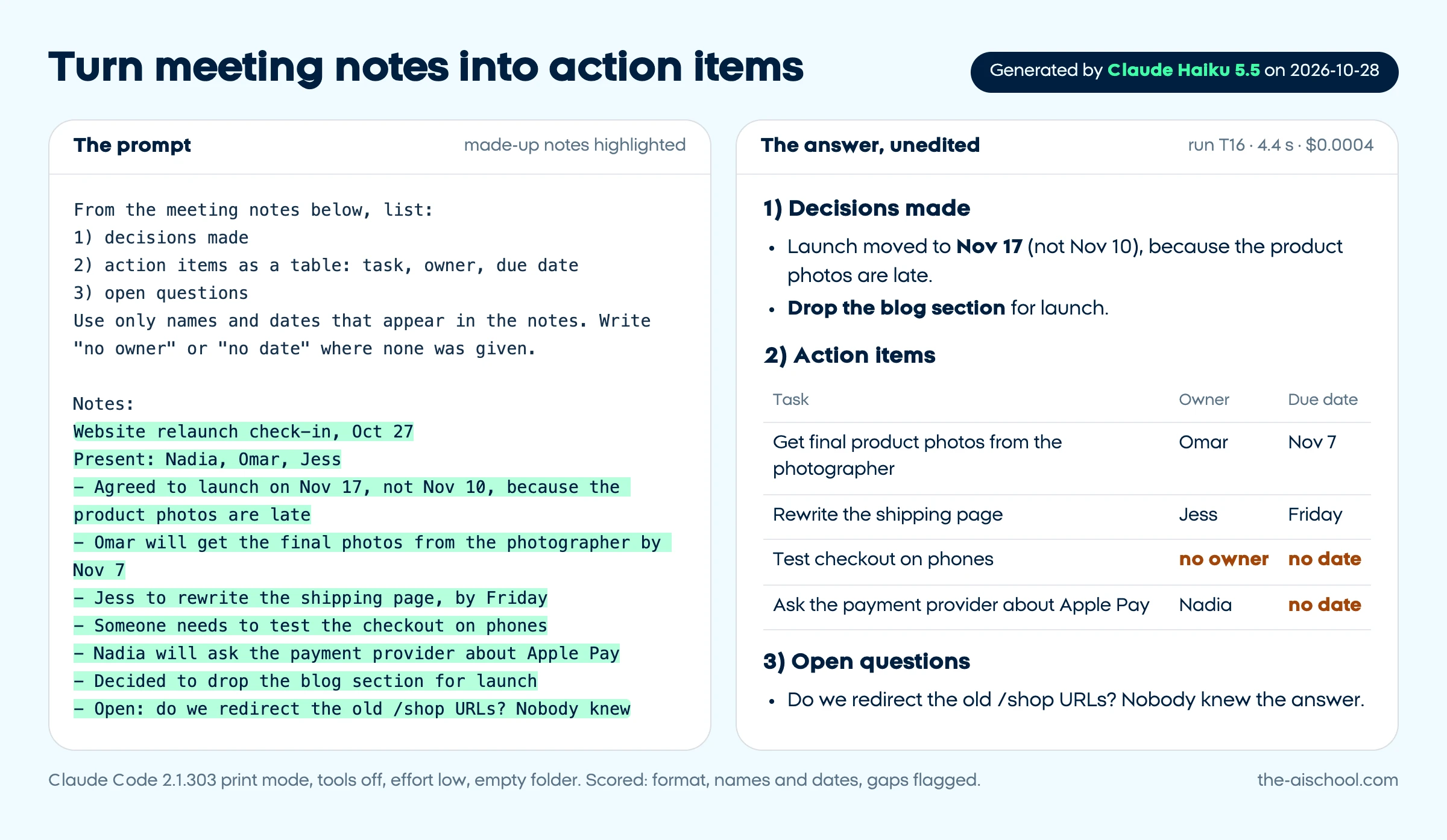
From the meeting notes below, list:
1) decisions made
2) action items as a table: task, owner, due date
3) open questions
Use only names and dates that appear in the notes. Write "no owner" or "no date" where none was given.

Notes:
[PASTE NOTES OR TRANSCRIPT]
Why it works
"No owner" entries reveal the tasks that would otherwise be dropped.
What to check
No owner or date was invented.
Write a meeting agenda
Write an agenda for a [LENGTH]-minute meeting about [TOPIC] with [ATTENDEES].
The decision we must leave with: [DECISION].
Give a time for each item, who leads it, and what people should prepare. Put the decision item before the halfway mark.
Why it works
Putting the decision early protects it from the clock.
What to check
The times add up to the length of the meeting.
Break a project into a plan
Turn this project into a plan: [PROJECT], due [DEADLINE], team: [PEOPLE AND ROLES].
Give phases, tasks with an owner and a time estimate, dependencies, and the 3 biggest risks with one way to reduce each.
Flag any part where my deadline looks too tight.
Why it works
Asking it to flag tight spots gets honesty instead of a plan that only looks tidy.
What to check
The estimates are realistic for your team, and dependencies come in the right order.
Write a weekly status update on [PROJECT] for [AUDIENCE].
This week's raw notes: [NOTES]
Format: overall status (on track, at risk or late) with one reason; done this week; next week; blockers, each with what I need from whom.
Under 150 words. Do not soften bad news.
Why it works
"Do not soften bad news" keeps the update useful to the people reading it.
What to check
The status matches your notes and every blocker is real: ours added a request to managers that the notes never made.
Recap email after a meeting
Write a recap email to [ATTENDEES] after our meeting about [TOPIC].
Notes: [NOTES]
Include the decisions, who does what by when, and the next meeting date if one was set.
Under 150 words, easy to skim, no "thanks everyone for a great meeting" opener.
Why it works
A recap built on decisions and owners is the one people act on.
What to check
Owners and dates match your notes.
Run a project retrospective
Here is what happened on [PROJECT]: [TIMELINE, ISSUES AND RESULTS].
Write retrospective notes: what went well, what did not, the root cause of the biggest problem (ask "why" up to 5 times and show each step), and 3 changes for the next project, each with an owner.
Blame processes, not people.
Why it works
Showing each "why" makes the root cause something you can check.
What to check
The root cause follows from your facts, not from a guess.
Prioritize a messy to-do list
Here is my to-do list: [PASTE LIST].
My goals this month: [GOALS]. My fixed commitments: [MEETINGS, DEADLINES].
Sort the list into do today, this week, delegate and drop, with a one-line reason for each.
Tell me plainly what to drop.
Why it works
Giving your goals makes the sorting about your priorities, not generic urgency.
What to check
The items in "drop" really do not serve your goals.
Who does what: a RACI chart
For [PROJECT OR PROCESS], create a RACI table (Responsible, Accountable, Consulted, Informed) for these tasks: [TASKS] and these people: [PEOPLE OR ROLES].
Exactly one Accountable person per task. After the table, point out anyone who is overloaded.
Why it works
The one-Accountable rule is the part teams break most often.
What to check
Every row has exactly one A.
Hiring and HR prompts
Job posts, interviews and team policies in plain, fair language.
Write a job description for a [ROLE] at [COMPANY: what it does and its size].
Main responsibilities: [RESPONSIBILITIES]
Must-haves: [3 TO 5 REQUIREMENTS]. Nice-to-haves: [LIST]. Salary range: [RANGE]. Location and hours: [DETAILS].
Plain, inclusive language, no "rockstar" or "ninja". Describe what the first 90 days look like.
Do not add requirements, duties, benefits, legal statements or facts about the company that I did not give. Where a section needs more, write [ADD: what is missing].
Why it works
Keeping requirements to your list avoids the inflated wish lists that put good candidates off.
What to check
Nothing about the company is invented: our first version made up the studio's clients and an equal opportunity statement.
Write 8 interview questions for a [ROLE] that test [SKILLS].
Mix: 4 behavioral questions that ask for a real past example, 2 practical tasks, 2 about working with others.
For each, list what a strong answer includes and one red flag.
Nothing about age, family, religion, health or other personal characteristics.
Why it works
Notes on what a strong answer includes make interviews comparable between candidates.
What to check
No question touches personal or protected characteristics.
Interview scorecard
Create a candidate scorecard for [ROLE] with 5 criteria taken from this job description: [PASTE JOB DESCRIPTION].
For each criterion, describe what a score of 1, 3 and 5 looks like in behavior an interviewer can observe. Add space for evidence notes.
Why it works
Observable descriptions for each score reduce gut-feel ratings.
What to check
The criteria come from your job description, not generic traits.
Turn down a candidate kindly
Write a rejection email to [CANDIDATE NAME], who interviewed for [ROLE] and reached [STAGE].
One specific, true positive from their interview: [POSITIVE].
Would we consider them for future roles: [YES / NO].
Under 120 words, warm, with the decision clear in the first two lines. No feedback I have not given here.
Why it works
One true positive is kinder than generic praise, and nothing is invented.
What to check
The decision is clear early, and no feedback was made up.
First-week onboarding plan
Create a first-week onboarding plan for a new [ROLE] joining [TEAM].
Tools they need: [TOOLS]. People to meet: [PEOPLE]. First real task: [TASK].
Give a day-by-day plan with one goal per day, plus a checklist for me, the manager, to finish before day one.
Why it works
One goal per day keeps the first week from becoming a week of reading.
What to check
Only your tools and your people appear in the plan.
Draft a simple team policy
Draft a one-page [POLICY TOPIC, e.g. remote work] policy for a team of [SIZE] in [COUNTRY].
Our rules: [YOUR RULES].
Sections: purpose, who it applies to, the rules as numbered points, exceptions, who to ask. Plain language.
Mark anything that may need a legal check with [LEGAL CHECK].
Why it works
[LEGAL CHECK] marks keep a draft from passing as legal advice.
What to check
Someone qualified in your country reviews every [LEGAL CHECK] item.
Prepare a feedback conversation
Help me prepare feedback for a [THEIR ROLE] about [BEHAVIOR OR RESULT].
Specific examples: [EXAMPLES]. What I want to change: [GOAL].
Write an opening line, how to describe the impact using my examples, 2 open questions to hear their side, and how to agree on next steps.
No labels like "lazy" or "negative".
Why it works
Describing behavior and impact keeps the talk about facts, not character.
What to check
It uses your examples and assumes nothing about the person's motives.
Short job post for social media
Turn this job description into a post for [PLATFORM] of under [WORD LIMIT] words: [PASTE JOB DESCRIPTION].
Lead with what the person will do, then the 3 must-haves, the salary range and how to apply: [HOW TO APPLY].
No emojis and no hype.
Why it works
Job seekers scan for the work itself, so the post leads with it.
What to check
The salary and the way to apply match the job description.
ChatGPT prompts for resumes and your career
Resume bullets, cover letters and interview practice, without invented achievements.
Rewrite these resume bullets for a [TARGET ROLE] application: [PASTE BULLETS].
Each bullet starts with a strong verb, stays under 25 words and shows a result.
Keep my level of responsibility: if I wrote "helped", do not write "led".
Use only numbers I gave. Where a number would help but I did not give one, write [ADD NUMBER: what to measure] instead of inventing it.
Why it works
The [ADD NUMBER] slots stop invented metrics, the biggest risk in an AI-written resume.
What to check
Every number and every role is yours: our first version turned "helped move inventory" into "led the migration", which is why the prompt now forbids it.
Tailor your resume to a job post
Here is a job post: [PASTE JOB POST]
Here is my resume: [PASTE RESUME]
List the 8 most important requirements in the post. For each, quote the part of my resume that matches it, mark gaps honestly, and suggest how to reword my existing bullets in the post's language.
Do not add experience I do not have.
Why it works
Going requirement by requirement shows the real gaps instead of padding them.
Write a cover letter for [ROLE] at [COMPANY].
Why this company, in my words: [YOUR REASON].
My two most relevant achievements: [ACHIEVEMENT 1]; [ACHIEVEMENT 2].
Under 250 words in 3 paragraphs. No "I am writing to apply" opener and no clichés like "passionate team player".
Why it works
Your own reason for wanting this company is the line generic letters lack.
What to check
The facts about you and the company are only the ones you gave.
LinkedIn About section
Write the About section of my LinkedIn profile.
What I do: [WHAT YOU DO] for [WHO]. Proof: [2 TO 3 RESULTS]. What I want people to contact me about: [GOAL].
First person, under 200 words. The first two lines must work on their own, because LinkedIn shows only the opening lines before "see more". End with how to reach me.
Why it works
Writing for the cut-off makes the visible lines count.
What to check
The results are yours and it sounds like you.
Practice interview with feedback
Act as an interviewer for a [ROLE] at a [COMPANY TYPE].
Ask me one question at a time and wait for my answer. After each answer, give feedback in 3 lines: what worked, what was missing, and a stronger version of one sentence.
Start with [QUESTION TYPE, e.g. "tell me about yourself"]. After 5 questions, summarize my strongest and weakest areas.
Why it works
One question at a time turns it into real practice instead of a list to read.
What to check
The feedback refers to what you actually said.
Prepare a salary negotiation
I have an offer for [ROLE] at [SALARY]. My target: [TARGET].
My evidence for that number: [MARKET DATA, A COMPETING OFFER, EXPERIENCE].
Write a short email asking for [TARGET], 3 likely objections with my replies, and what else to ask for if the salary cannot move ([e.g. start date, remote days, title]).
Professional and confident, no ultimatums.
Why it works
Your own evidence keeps the ask grounded in facts you can defend.
What to check
No market figures were invented; the evidence is only yours.
Map your skills to a new career
I work as a [CURRENT ROLE] and want to move into [TARGET ROLE].
My skills and experience: [LIST].
Show which skills transfer and how to describe them in the new field's language, the 3 biggest gaps, and a 90-day plan to close them with low-cost options.
Be honest if this is a long move.
Why it works
The honesty line counters the AI's habit of cheering every plan.
What to check
The gaps it names are real requirements of the target role.
Thank-you note after an interview
Write a thank-you email to [INTERVIEWER NAME] after my interview for [ROLE].
One thing we discussed: [TOPIC]. One point I want to add or clarify: [POINT].
Under 120 words, no flattery.
Why it works
Adding one real point makes the note useful, not just polite.
What to check
It mentions only what you actually discussed.
ChatGPT prompts for photos and photo editing
For ChatGPT's image features: upload a photo, then say exactly what to change and what must stay the same.
Remove or replace a photo background
Not tested: this needs an AI that edits images, which our Claude Haiku test could not run.
[UPLOAD YOUR PHOTO]
Remove the background of this photo and replace it with [NEW BACKGROUND, e.g. plain light gray, a softly blurred office].
Keep the edges, hair and colors of [THE SUBJECT] exactly as they are. Do not change faces, product shapes or any text.
Keep the original aspect ratio.
Why it works
Saying what must not change protects faces and logos, which image edits often alter.
What to check
Zoom in on edges, hair and any text or logo.
Professional headshot from a casual photo
Not tested: this needs an AI that edits images, which our Claude Haiku test could not run.
[UPLOAD A PHOTO OF YOURSELF]
Turn this into a professional headshot: [BACKGROUND], soft even light, [CLOTHING, or "keep my clothes"].
Keep my face, features, skin tone and expression exactly the same; do not slim, smooth or age me.
Crop to head and shoulders, centered.
Why it works
Listing what to keep stops the model from "improving" your face into someone else's.
What to check
It still looks like you; compare it side by side with the original.
Put a product photo in a real-looking scene
Not tested: this needs an AI that edits images, which our Claude Haiku test could not run.
[UPLOAD A PRODUCT PHOTO]
Place this product in [SCENE, e.g. a wooden kitchen counter in morning light].
Keep the product's shape, colors, label and text identical. Natural shadows and realistic scale, no extra products or brand names.
Square format for [PLATFORM].
Why it works
Protecting the label matters because image models often rewrite text.
What to check
Read the label letter by letter and check the size against real objects.
Fix lighting and color
Not tested: this needs an AI that edits images, which our Claude Haiku test could not run.
[UPLOAD YOUR PHOTO]
Fix the lighting and color: it is [PROBLEM, e.g. too dark and too yellow].
Make it look like natural daylight, keep the colors of [IMPORTANT ITEM] true to life, and do not add or remove anything.
Keep the composition and the crop.
Why it works
Naming the problem and what must stay true gets a correction, not a new picture.
What to check
Compare the important item's colors with the real thing.
Social media graphic with text
Not tested: this needs an AI that edits images, which our Claude Haiku test could not run.
Create a [PLATFORM] image in [RATIO, e.g. 4:5].
Headline text, spelled exactly: "[HEADLINE]"
Style: [STYLE, e.g. clean, flat colors, plenty of white space]. Brand colors: [HEX CODES].
Leave the bottom fifth empty for my logo. No other text in the image.
Why it works
Exact text in quotes and a ban on other text cut down spelling errors.
What to check
Read every word in the image; text is still where image models slip most.
Describe a photo's style to reuse it
Not tested: this needs an AI that edits images, which our Claude Haiku test could not run.
[UPLOAD A REFERENCE IMAGE YOU HAVE THE RIGHT TO USE]
Describe the style of this image as a list: lighting, color palette, camera angle, lens feel, composition and mood.
Then write a prompt that recreates this style for a new subject: [NEW SUBJECT].
Leave out the people, logos and brand names in the reference.
Why it works
Separating style from subject lets you reuse a look without copying the content.
What to check
The new prompt describes the style, not the reference's people or brands.
Thumbnail options for a video
Not tested: this needs an AI that edits images, which our Claude Haiku test could not run.
Create 3 thumbnail options in 16:9 for a video titled "[TITLE]".
[OPTIONAL: UPLOAD A PHOTO OF YOURSELF and add: keep my face exactly as in the photo.]
Give each option a different idea: [IDEA 1], [IDEA 2], [IDEA 3].
Large, readable text of at most 4 words: "[TEXT]". High contrast, no clutter.
Why it works
Three different ideas give you a real choice instead of three similar images.
What to check
The text is spelled right and readable at phone size.
Remove an object from a photo
Not tested: this needs an AI that edits images, which our Claude Haiku test could not run.
[UPLOAD YOUR PHOTO]
Remove [OBJECT, e.g. the trash can on the left] and fill the space so it matches the surroundings.
Change nothing else: same people, light, colors and crop.
Why it works
"Change nothing else" matters because a full regeneration can alter details you did not ask about.
What to check
Compare the rest of the image with the original for changes you did not ask for.
Learning and explaining prompts
Explanations at your level, study plans and quizzes on your own material.
Explain [TOPIC] to me. What I already know: [YOUR LEVEL]. Why I need it: [YOUR GOAL].
Open with the answer in exactly 2 sentences, then one everyday analogy, then the 3 terms I will hear most, with one-line definitions.
Under 250 words. End with one question that checks whether I understood.
Why it works
Your level and goal set the depth, and the closing question tests understanding.
What to check
The analogy does not distort the idea; check key facts in an official source.
Learning plan for a new skill
Make me a [NUMBER]-week plan to learn [SKILL] for [GOAL].
I have [HOURS] hours a week and prefer [FORMAT: videos, reading or hands-on].
Each week: one goal, practice tasks on my own work, and how I will know I have got it.
Name resources by type (official docs, the tool's own tutorials), not by links you are unsure of.
Why it works
Practice on your own work is what makes a plan stick, and the link rule avoids dead or invented links.
What to check
The weekly load fits your hours and every named resource exists.
Quiz me on the material below. Ask 5 questions, one at a time, mixing recall and application.
After each answer, tell me if it is right, explain in 2 sentences and quote the line of the material that answers it.

Material:
[PASTE NOTES OR TEXT]
Why it works
Quoting the source line keeps the grading tied to your material.
What to check
The quoted lines really answer the questions.
Translate the jargon in a document
List every technical term or acronym in the text below with a one-line plain-English definition, in the order they appear, and mark the 3 a [ROLE] most needs to understand.
Then rewrite the hardest paragraph in plain words.

Text:
[PASTE TEXT]
Why it works
Definitions in reading order work as a glossary while you read.
What to check
The definitions fit how each term is used in this text.
Check your understanding by explaining it
I just learned about [TOPIC]. Here is my explanation in my own words: [YOUR EXPLANATION].
Grade it: what is correct, what is wrong or missing, and one misconception I seem to have. Then give me a better version in 3 sentences.
Be direct and do not praise what is wrong.
Why it works
Explaining it back reveals the gaps that rereading hides.
What to check
The corrections agree with a trusted source.
Tell two similar ideas apart
Explain the difference between [CONCEPT A] and [CONCEPT B] for someone who [CONTEXT].
Give a comparison table of 4 to 6 rows, one example where only A fits, one where only B fits, and the most common confusion between them.
Why it works
Examples where only one idea fits make the line between them concrete.
What to check
Each example is a correct case of its idea.
Step-by-step instructions for a tool
Give me step-by-step instructions to [TASK] in [TOOL AND VERSION, e.g. Google Sheets on the web]. I am a beginner.
Number each step, start each with a verb, use the exact names of buttons and menus, and say what I should see after each step.
If you are not sure a menu name is current, say so.
Why it works
"What I should see" lets you catch a wrong step right away.
What to check
Menu names match your version; tools rename their menus often.
Explain something to your team or a client
Help me explain [TOPIC OR CHANGE] to [AUDIENCE, e.g. clients who are not technical].
What they care about: [THEIR CONCERNS].
Give a 3-sentence version, a one-paragraph version, and the 3 questions they will probably ask, with short answers.
No jargon; if a technical term is unavoidable, define it.
Why it works
Two lengths cover a quick message and a meeting.
What to check
The answers are accurate for your situation.
How do you use these ChatGPT prompts?
Copy a prompt, replace every [PLACEHOLDER] with your own details, and paste it into ChatGPT, Claude or Gemini. The placeholders do the real work: the facts you fill in (your offer, your policy, your numbers) are what turn a generic answer into one you can send.
Fill every bracket, or say you can't. An empty [PRICE] invites the AI to guess one. If you don't know a detail, write "unknown", so the prompt's own rule (flag it, don't invent it) can do its job. Brackets with a dashed outline, such as [CHECK] or [GUESS], are marks the prompt asks the AI to write: leave those as they are.
Paste the real material. Where a prompt says [PASTE ...], paste or attach the email, notes or document itself instead of describing it.
Read the answer against "What to check". Each prompt names the mistake it is most likely to produce, from invented features to miscounted characters, so you know where to look before anything goes out.
Fix it with a follow-up, not a new chat. OpenAI's own advice for ChatGPT is to refine through follow-up messages instead of starting over (Prompting in ChatGPT, read October 28, 2026). Follow-ups that work: "Shorter, same facts", "You added X, which I didn't give you; remove it", "Two more versions with a different opening".
Save what you repeat. Your tone, your audience and your sign-off belong in ChatGPT's custom instructions (Settings, then Personalization), so each prompt can stay short.
Most lists of ChatGPT prompts for business are one-line ideas, such as "write a marketing email". These are longer on purpose: the extra lines are the boundaries that kept the answers honest in our test below.
Did we test these prompts? Yes, 24 of them in 50 runs
We ran 24 of the 96 prompts on October 28, 2026, two or three from every job except photos, each filled with realistic made-up details: a bakery that misspelled a birthday cake, a cold email with no proof yet, a messy contact list, meeting notes with a task nobody owned. We did not sign in to ChatGPT, so every run used Claude Haiku 5.5, Anthropic's small, fast model, through the Claude Code command line with every tool switched off, starting from an empty folder.
The prompts are plain instructions with nothing only ChatGPT understands, so they work as written in ChatGPT, Claude and Gemini. What that means for you: our scores show where the wording held and where it slipped on one model. ChatGPT's own models may do better or worse on the same prompt, which is why every prompt carries its own "What to check" line.
24
prompts tested, in 11 of the 12 jobs
50
runs, counting the re-runs after our fixes
7
prompts we rewrote after the first round
$0.04
total cost of all 50 runs, as the CLI reported it
From our test log of October 28, 2026; the cost includes Claude Code's own instructions sent with every request.
We scored every answer by hand on four things: did it follow the format, stay inside the length, avoid facts that were not in the input, and flag the gaps we left on purpose (an unanswered question, a missing phone number) instead of filling them. A run passed when all four held, had a small slip when one small edit made it usable, and failed when it broke a rule the prompt states. In the table, Yes means passed, Partial a small slip and No failed.
Every prompt, input, raw answer, timing and cost is in our full test log (JSON). Across the 9 runs where we left a gap on purpose, every answer flagged it with the mark the prompt asked for, such as [CHECK], "not stated" or "no owner". After translating the library, we also ran two of the translated prompts in each of Spanish, Portuguese and French (6 runs, made-up local inputs): all 6 flagged the gaps with the translated marks, 3 passed and 3 had a small slip, such as a one-sentence FAQ answer.
Run T16 from our test: the prompt with our made-up notes, and the answer Claude Haiku 5.5 generated on October 28, 2026, unedited. It took 4.4 seconds and cost $0.0004.
What we changed after the first round
Product description: the paragraph ran 108 words against a limit of 80. Asking for "3 or 4 short sentences (80 words at most)" brought it to 60 and 63 words, but both runs still called the merino "breathable", so the check line now warns about small claims.
Cold email: with the proof set to "none yet", it invented a reply-to-reschedule feature and a claim about the industry. One line, "Describe the offer only as I wrote it", fixed both re-runs.
Reply to an angry customer: it kept adding commitments: a fix during the visit, a callback, "the fault is on our side". After three rewrites the final version passed 2 of 3 runs; across all 8 runs, 4 replies added something. The check line says so.
Article outline: it stated rules of thumb as facts (a 2x to 3x markup, wholesale at 50% of retail) and its title ran to 78 characters. A [VERIFY] rule kept every later run from stating them, and titles stayed under 60 characters once we asked for three options with their counts.
Job description: with no slot for duties, it invented the studio's clients, an outside accountant and an equal opportunity statement. A [RESPONSIBILITIES] slot and a "no legal statements" rule fixed both final runs.
Resume bullets: it turned "helped move inventory" into "Led migration". The line "if I wrote helped, do not write led" kept the level of responsibility in both re-runs.
Explain a topic at your level: the opening answer ran 3 sentences instead of 2; "exactly 2 sentences" fixed both re-runs.
The photo prompts are the one job we could not test: Claude doesn't edit photos, and testing them in ChatGPT needs an account. Each of them says so in the library.
What makes a good ChatGPT prompt? The 5 rules behind this library
OpenAI's help article for ChatGPT users boils its advice down to three habits: be clear and specific with enough context, refine in steps, and name the tone you want (OpenAI's best practices for ChatGPT, updated October 2026). Its newer Prompting in ChatGPT page adds a structure for bigger tasks: the goal, the context, the output and the boundaries. Both were read on October 28, 2026. Every prompt here follows five rules built on that advice, and our test shows why the last two matter most. Keep them as a one-screen ChatGPT prompts cheat sheet:
Say what you want and who it is for. OpenAI's Prompting page says to lead with the result you need and name the audience or format when it changes the answer. That is the first line of every prompt here.
Give the facts, not hopes. The help article asks for enough context for the model to understand the task. The [PLACEHOLDERS] are where that context goes.
Set the format, the length and the tone. Name the tone with plain adjectives (formal, friendly, very short), as the help article suggests. Word limits and named headings held in most of our runs; exact character counts were the weak spot.
Set a boundary on what must not be invented. OpenAI suggests one or two boundaries, such as using only the sources you supply. Our first versions without one invented a product feature, a company's client list and a resume promotion.
Make the gaps visible. Ask for [CHECK], "not stated" or [NEEDS ANSWER] where information is missing. Every one of our 9 runs with a gap left on purpose flagged it instead of guessing.
Related tools and guides
No prompt here fits your task? The AI prompt generator builds a structured prompt for ChatGPT, Claude or Gemini in your browser.
Want the skill behind these prompts? Our guide to the best prompt engineering course options compares free and paid picks and shows one task done three ways.
Choosing an assistant?Claude vs ChatGPT compares plans, privacy settings and image features for business use.
Leaving ChatGPT?ChatGPT alternatives sorts 14 tools by your reason for switching.
Disclosure: The AI School sells courses on using AI at work. This library is free, needs no sign-up, and no AI company paid to appear on this page.
Frequently asked questions
What are the best ChatGPT prompts?
+
The best ChatGPT prompts are specific: they name the result, give your own facts and say what the AI must not make up. In our test, the first versions without that last line invented a product feature, a client list and a resume promotion; one added sentence fixed most of them.
Do these prompts work in Claude and Gemini too?
+
Yes. They are plain instructions with no ChatGPT-only features, and we tested 24 of them on Claude Haiku 5.5. The exception is the photo prompts: they need an assistant that edits images, such as ChatGPT's image tool.
Can I use the ChatGPT prompts for photos on the free plan?
+
Yes, within limits: ChatGPT's free plan includes image generation in limited amounts, and it asks you to log in before it creates an image. Our Claude vs ChatGPT comparison checked this in October 2026.
Is it safe to paste client details into these prompts?
+
Paste only what you would put in an email to a contractor, and leave out account numbers and anything under a confidentiality agreement. ChatGPT's and Claude's business plans don't train on your content by default, and on personal plans one setting switches training off; our Claude vs ChatGPT guide shows where.
Why does the same prompt give a different answer each time?
+
The model writes every answer fresh, so wording and small details change from run to run. In our test, the final customer-reply prompt passed twice and then claimed the fault was on the company's side in a third run, so check every answer, not just the first one.