n8n Alternatives (2026): What to Switch To and Why
The best n8n alternative depends on why you're leaving, and for the server or the bill the fix may be inside n8n: Cloud from €20 a month billed yearly, or the free self-hosted Community Edition. For an easier builder pick Make or Zapier, for open source Activepieces (MIT Community Edition) or Node-RED (Apache 2.0), and for an AI agent rather than a workflow Lindy or Gumloop. We found no tool that imports n8n's workflow files, so plan a rebuild.
By Yotam DahanUpdated 18 min readAutomation and agents
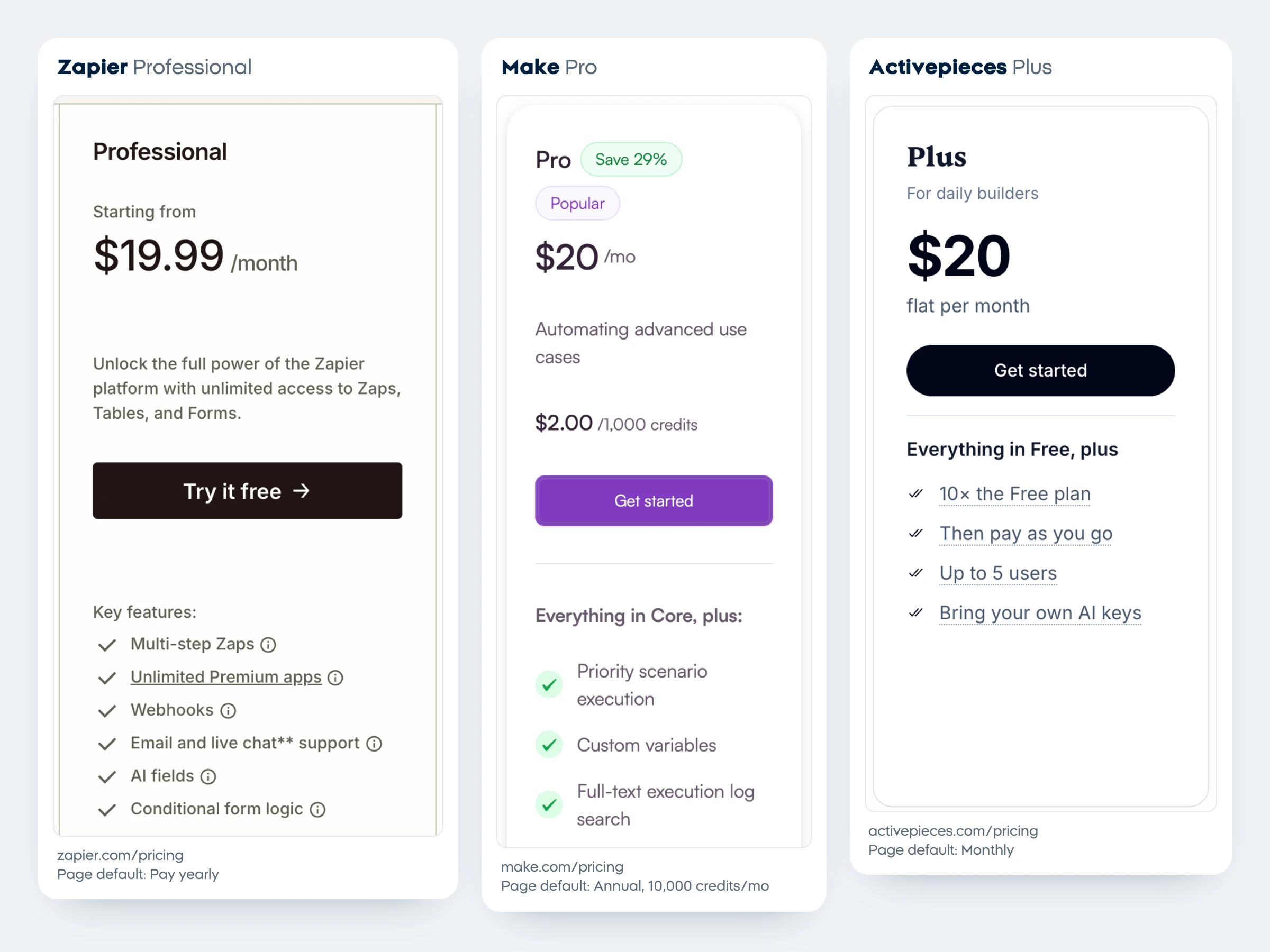
The right n8n alternatives depend on what pushed you away, and two of the usual reasons, the server and the bill, can often be fixed without leaving n8n. If you still switch, Make (Core from $12 a month in the US, billed yearly) and Zapier (Professional from $19.99, billed yearly) are the easiest hosted builders, Activepieces is the closest like-for-like swap because it bills per run, and Lindy or Gumloop fit if you want an AI agent more than a workflow. None of them imports n8n's workflow files that we could find, so budget time for a rebuild.
Why people look for an n8n alternative
People leave n8n for five reasons: running the server, the Cloud cap, the price of team features, the license and the learning curve. The first three often have a fix inside n8n, and the n8n pricing guide covers every plan, the execution rules and server costs in detail, so here they get one line each.
- Running the server. On the free Community Edition, the server and its upkeep are yours, and n8n's guide to choosing how to use n8n points anyone without technical expertise to n8n Cloud, which it calls fully managed.
- The Cloud cap. Starter includes 2,500 executions a month and Pro 10,000, and both "are capped and have no overages" (n8n pricing). A Schedule Trigger counts every time it fires, even when it finds nothing, so check your schedules first.
- Team features. Git version control, SSO, environments and sharing are among the 10 features the free Community Edition leaves out (edition comparison). They start with the self-hosted Business plan at €667 a month billed yearly for 40,000 executions, and companies under 20 employees that qualify get the Start-up Plan at 50% off Business.
- The license. n8n is fair-code under its Sustainable Use License and says it isn't open source by the OSI definition. Most businesses can live with it (see the license table below).
- The learning curve. n8n passes data between nodes as items you map with expressions; Zapier and Make hide more of that, but count every step.
Pick an n8n alternative by your reason for leaving
Start from the reason, not the tool. Seven of the eight reasons below have something to try inside n8n first.
| Why you're leaving | Try first, inside n8n | Switch to | Cheapest paid start |
|---|---|---|---|
| You don't want to run a server | n8n Cloud, Starter €20 billed yearly | Make or Zapier, hosted only | $12 (Make Core, US, billed yearly) |
| The Cloud cap or the bill | Trim schedule triggers; self-host the free Community Edition | Activepieces, 1 credit per run | $16 (Plus, billed yearly) |
| You need SSO without Business pricing | Start-up Plan, 50% off Business under 20 employees | Activepieces Team, or Windmill if you code | $166 (Activepieces Team, billed yearly); Windmill self-hosted $0, SSO for up to 10 users |
| The license blocks your product | Read n8n's License FAQ: client work is allowed | Activepieces or Node-RED | $0 self-hosted |
| The learning curve | A guided first build: n8n tutorial for beginners | Zapier or Make | $12 (Make Core, US) or $19.99 (Zapier Professional), billed yearly |
| You want an AI agent, not a workflow | n8n's AI Agent node | Lindy or Gumloop | $29.99 per user (Lindy Team) |
| You write code and want scripts | n8n's own code steps | Windmill | $10 per builder (Cloud Team) |
| Your company runs on Microsoft 365 | None | Power Automate | $15 per user, paid yearly |
USD a month unless marked; n8n in euros. Checked on each vendor's page on October 26, 2026. Make's prices are the US ones from the pricing data its own page loads, because Make sets prices by country.
Paying month to month, without a yearly commitment, the entry plans line up like this:
Month-to-month list prices from each vendor's pricing page on October 26, 2026. Yearly billing lowers Make, Activepieces, n8n, Zapier and Integrately (see the table above); Windmill costs the same either way, and Lindy and Gumloop show no yearly price. n8n's page shows euros, and its checkout bills US buyers the same numbers in dollars (see the n8n pricing guide). Power Automate is left out because Microsoft shows only a paid-yearly price.
The n8n alternatives in detail (checked October 26, 2026)
Each of these n8n competitors gets the same questions, ending with what happens to your n8n setup. The order follows the decision table, not a ranking; for a roundup of automation tools in general, see the best AI automation tools.
Make, for a visual builder without a server
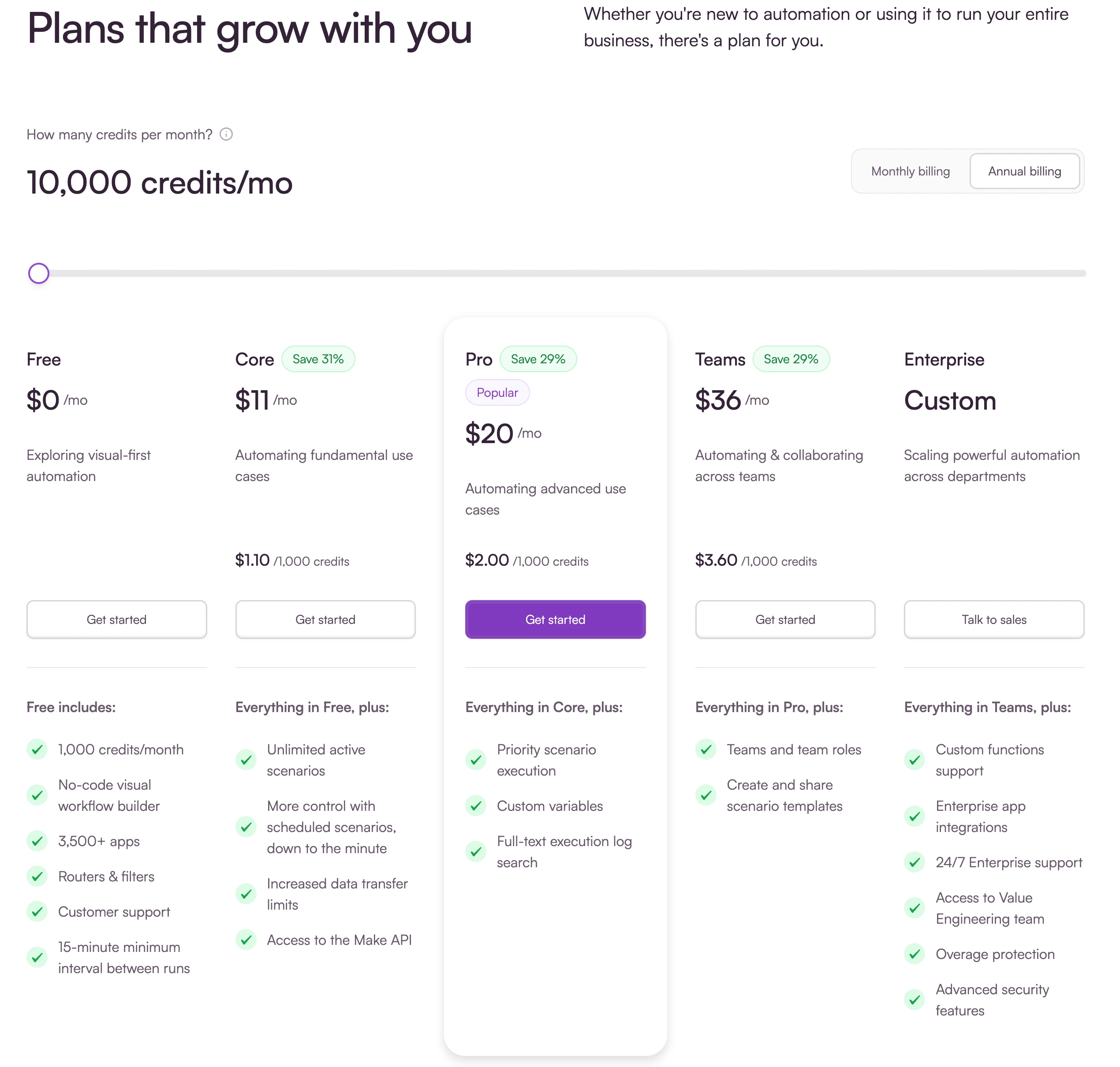
- Price: Core is $12 a month billed yearly or $16 monthly for 10,000 credits in the US; Pro is $21 or $28 and Teams $38 or $51 (Make pricing). Make prices by country: our browser in Israel saw Core at $11 billed yearly.
- Free tier: 1,000 credits a month, with scheduled runs at most every 15 minutes.
- How usage counts: every module action uses credits, most of them 1, while routers and error handlers are free. When credits run out, scenarios stop until you add more, and unused credits expire at the end of the term.
- Self-hosting and license: none; hosted by Make only.
- AI: Make AI Agents (beta), included on every plan with Make's AI Provider or your own model key, and Maia, which builds scenarios and agents from a chat.
- From your n8n setup: we found no official importer. A scenario with 10 modules uses about 10 credits per run where n8n counted 1 execution; n8n vs Zapier vs Make prices the same workflows on all three.
Zapier, for the gentlest start and the most apps
- Price: Professional from $19.99 a month billed yearly or $29.99 monthly for 750 tasks; Team from $69 or $103.50 for 2,000 tasks, in USD (Zapier pricing). The price follows your task tier, as the clip below shows.
- Free tier: 100 tasks a month, two-step Zaps only, one user.
- How usage counts: each successful action is a task, while triggers and built-in tools such as Filter, Paths, Formatter and Looping are free. When you reach your tier, Zapier switches you to pay-per-task billing unless you turn it off, up to 3 times the plan's limit, then holds runs.
- Self-hosting and license: none; proprietary and hosted by Zapier.
- AI: Zapier Agents with their own quota (400 activities a month free), and AI by Zapier steps at 1, 3 or 5 tasks by model tier, or 1 task with your own AI key on Advanced or Premium models.
- From your n8n setup: no importer found. Free has no webhooks (they start on Professional), and a run with a trigger and 9 actions uses 9 tasks where n8n counted 1 execution.
Screen recording of Zapier's pricing page on October 26, 2026 with yearly billing in US dollars: moving the task slider from the start to 100,000 tasks a month raises Professional from $19.99 to $489 a month and Team from $69 to $599 a month, while Free stays at $0.
Activepieces, the closest open source n8n alternative
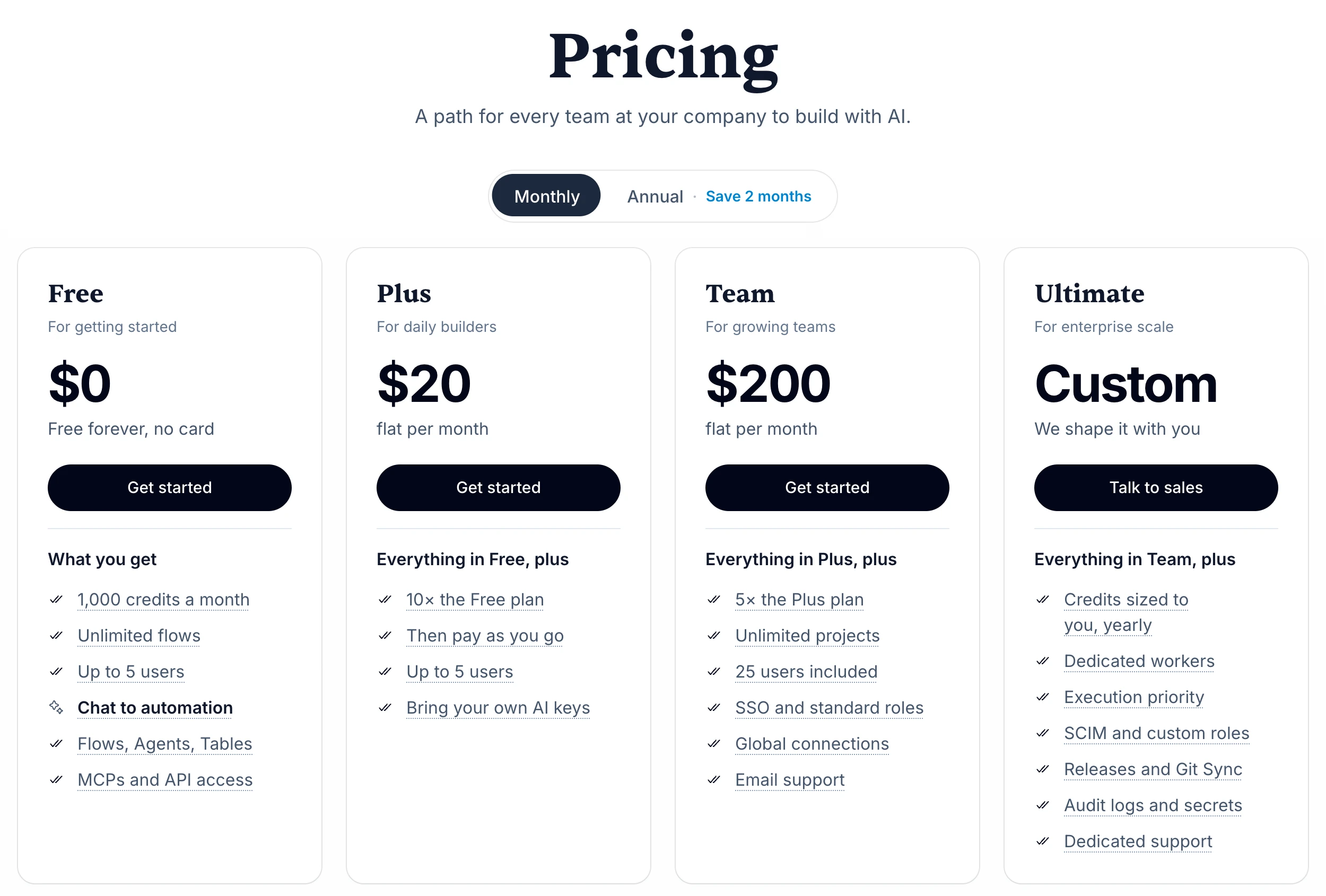
- Price: Plus is $20 flat a month, or $16 billed yearly, for 10,000 credits and up to 5 users; Team is $200, or $166 billed yearly, for 50,000 credits and 25 users with SSO, in USD (Activepieces pricing). Extra credits cost $0.007 each.
- Free tier: 1,000 credits, unlimited flows and up to 5 users. The page lists a daily reset in its table and a monthly one in its FAQ, so check which applies.
- How usage counts: one flow run is 1 credit however many steps it has, the closest match to an n8n execution. AI steps add 2, 10 or 20 credits by model, or 1 with your own keys on Plus and up.
- Self-hosting and license: the Community Edition is MIT, except the enterprise folders, which have their own license; the recommended setup is Docker Compose with PostgreSQL and Redis.
- AI: an Agents product and a Run Agent step inside flows, plus 772 pieces (integrations) with 6,524 actions.
- From your n8n setup: no importer, and its docs don't mention n8n, but your execution math carries over best here. The catch: Activepieces calls the free Community Edition the automation core on its own, so access control, change history, separate team spaces, safe releases, Agents and Chat need a paid plan, and its SOC 2 program is still in progress.
Microsoft Power Automate, if your company runs on Microsoft 365
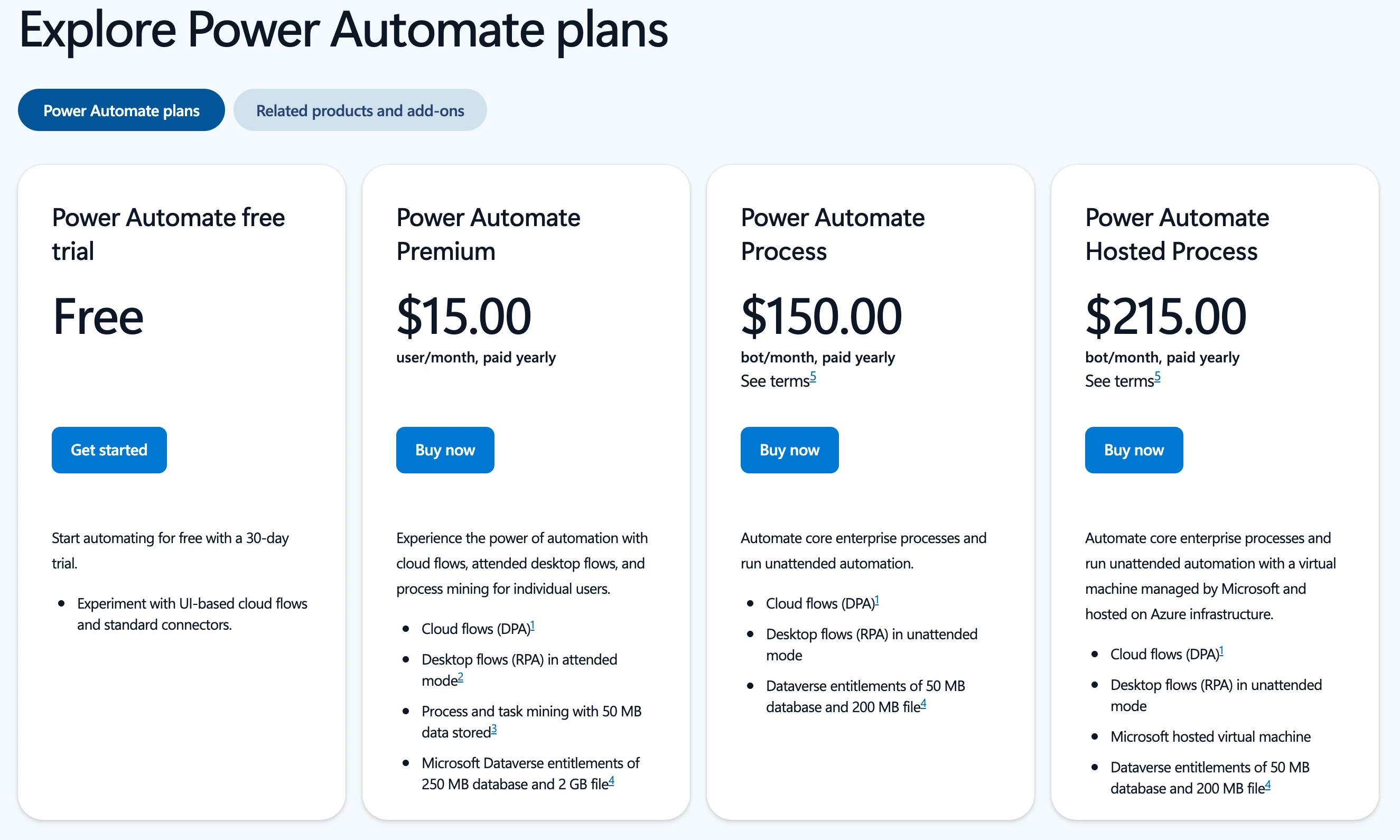
- Price: Premium is $15.00 per user a month, paid yearly; Process is $150.00 per bot and Hosted Process $215.00 (Power Automate pricing). These are US dollar prices, and Microsoft notes they vary by currency, country and region.
- Free tier: no lasting free plan, only a 30-day trial with standard connectors. Some Microsoft 365 licenses include Power Automate, with 6,000 requests per 24 hours.
- How usage counts: a license per user or per bot, with 40,000 requests per 24 hours per paid user; every connector call and built-in action counts, successful or failed.
- Self-hosting and license: proprietary, and a cloud service only, says Microsoft's FAQ. Desktop flows (software robots that click through apps like a person) run in the Power Automate for desktop app on Windows 10 and 11, or on a Microsoft-run virtual machine with Hosted Process.
- AI: Copilot builds and edits flows from plain language; agents come through Copilot Studio, priced separately.
- From your n8n setup: no importer. It has more than 1,400 prebuilt connectors, but premium ones need a paid license.
Windmill, if you or your team write code
- Price: Cloud Team is $10 a month per builder ($5 per non-builder), with 10,000 executions per seat and at most 10 seats; Cloud Enterprise starts at $840 a month, in USD (Windmill pricing).
- Free tier: Cloud Free gives 1,000 executions a month; the self-hosted Community Edition has unlimited executions, 3 workspaces, up to 50 users and SSO for up to 10.
- How usage counts: an execution is a job under 1 second, each extra second counts again, and a flow's executions are the sum of its steps.
- Self-hosting and license: AGPLv3 and Apache 2.0 code plus proprietary enterprise features. The Community Edition is free to use inside your company but can't be resold or run as a managed service without an agreement.
- AI: AI agent steps inside flows, with your own key for OpenAI, Anthropic, Mistral, Gemini, Groq, OpenRouter and others.
- From your n8n setup: no importer, though its README calls it a self-hostable alternative to n8n. You write steps as scripts in Python, TypeScript, Go, Bash and more, so it suits developers.
Node-RED and Huginn, free on your own server
- Price: free software with no paid plan from either project. Node-RED lists FlowFuse, AWS and Azure as cloud options (we didn't check their prices); Huginn's README says to expect a small monthly hosting bill.
- Free tier and usage: no metering at all; you pay for the machine.
- Self-hosting and license: Node-RED is Apache 2.0, part of the OpenJS Foundation, and runs on your own computer, a Raspberry Pi, Docker or a cloud server (nodered.org). Huginn is MIT, with Docker Compose as the recommended production setup.
- AI: for Node-RED, look in its library of 6,325 community nodes, which has an AI category. Huginn's agents watch for events and act on them, and it can summarize, classify or translate text through OpenAI-compatible APIs.
- From your n8n setup: no importer. Node-RED's editor isn't secured by default: anyone who can reach its address can change your flows, so secure it before it goes online.
Lindy and Gumloop, if you want an AI agent more than a workflow
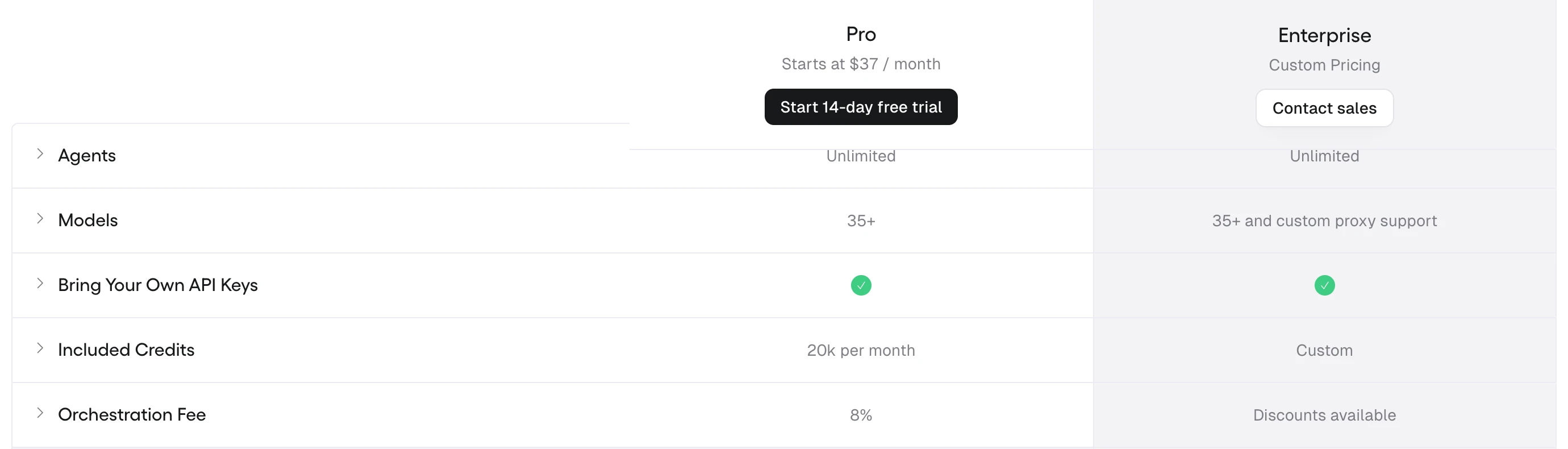
- Price: Lindy Team is $29.99 a month per active user for 3,000 credits each, with top-ups at $10 per 1,000 credits (Lindy pricing). Gumloop Pro starts at $37 a month for 20,000 credits, 12,600 of them bonus (Gumloop pricing). Both in USD.
- Free tier: Lindy gives $50 in credits with no card, valid for 7 days. Gumloop has no free plan: its 14-day Pro trial needs a card and rolls into Pro unless you cancel.
- How usage counts: Lindy draws 2 to 250 credits for an everyday ask and up to 2,500 for a big build from a team pool, and pauses when the pool runs out. Gumloop bills model tokens at list price, 5 credits per minute of agent work and at least 1 per tool call, plus an 8% orchestration fee (16% with your own model keys).
- Self-hosting and license: neither; both are proprietary, and Gumloop lists a Virtual Private Cloud option on Enterprise.
- AI: it's the whole product. Lindy works in Slack, email and meetings with 1,500+ integrations plus MCP; Gumloop offers 35+ models and 400+ connectors. The best AI agent platforms compares them with other agent builders.
- From your n8n setup: no importer. Gumloop now labels its workflow builder "Workflows (Legacy)", so expect to turn an n8n workflow into an agent's instructions.
Integrately, for simple app-to-app jobs
- Price: Starter is $19.99 a month billed yearly or $29.99 monthly for 2,000 tasks, in USD, taxes extra (Integrately pricing).
- Free tier: 100 tasks and up to 5 single-step automations, updated every 15 minutes.
- How usage counts: every successful action, condition, data edit and search is a task; triggers and failed actions are free.
- Self-hosting and license: none; proprietary.
- AI: OpenAI actions such as generating a response; we found no agent builder.
- From your n8n setup: no importer, and branching costs tasks, so a workflow full of IF nodes adds up.
Free and open source n8n alternatives, and their catch
Four tools here publish their code under open source licenses, and each one's catch is features, hosting or your own time. n8n's own Community Edition is free to self-host too, with no execution cap from a plan. The hosted free tiers (Make's 1,000 credits, Zapier's and Integrately's 100 tasks) are in each tool's section above.
| Open source option | License | What's free | The catch |
|---|---|---|---|
| Activepieces | MIT, except enterprise folders | The self-hosted Community Edition, or 1,000 Cloud credits | The Community Edition leaves out access control, Agents and Chat |
| Node-RED | Apache 2.0 | Everything, self-hosted | Editor not secured by default; you secure and update it yourself |
| Huginn | MIT | Everything, self-hosted | Agents you configure by hand; expect a small hosting bill |
| Windmill | AGPLv3 and Apache 2.0, plus proprietary parts | Self-hosted with unlimited executions, or 1,000 Cloud executions | Code-first; no reselling the Community Edition |
For an open source n8n alternative that a non-coder can run, Activepieces is the realistic pick: you can try its hosted free tier, which includes building from a chat, before you install anything. Node-RED and Huginn are fully open, but you run and secure them yourself.
Do you have to leave n8n over the license?
Probably not, if n8n runs your own business or your client work. The Sustainable Use License limits use to your own internal business purposes or non-commercial use, and n8n's License FAQ spells out what that covers. On client work, "The determining factor is client access", not the number of clients or the revenue.
| Under n8n's free license, can you... | Allowed? |
|---|---|
| Run your own business on n8n | Yes |
| Build workflows for paying clients on your instance, if they can't create or edit them | Yes |
| Charge for building, setup, maintenance, training and consulting | Yes |
| Run n8n behind your product, where users trigger workflows you built and connect their own accounts | Yes |
| Host n8n as a service where clients build their own workflows | No |
| Let your product's users build or configure workflows, through your own screens, the API, MCP or an AI agent | No |
| Fork n8n into your own automation product, or remove its branding | No |
Source: n8n's License FAQ, October 26, 2026. A No row is the one reason on this page with no fix inside free n8n.
What carries over from n8n
Your workflow logic carries over as a map, not as a file another tool can open, and your credentials and webhook URLs don't carry over at all. This comes from n8n's docs and each alternative's pages on October 26, 2026.
| Piece of your n8n setup | Carries over? | What to do |
|---|---|---|
| Workflow JSON | Partial | Download it from the workflow menu or export it from the command line, and use it as the spec for the rebuild |
| Credentials | No | Reconnect each app in the new tool with fresh API keys; on self-hosted n8n they sit encrypted under a key n8n creates on first launch |
| Webhook URLs | No | n8n builds them from your instance's protocol, host and port, so point every form, payment or app webhook at the new tool's URL |
| Sub-workflows | Partial | n8n counts only the parent run; in a per-step tool such as Zapier or Make, every step inside costs on each run |
Clean any export before you share it: n8n's export and import docs say the JSON includes credential names and IDs, and HTTP Request nodes imported from cURL can hold authentication headers.
On self-hosted n8n, these two commands from n8n's command line docs export every workflow and every credential (not a full backup of the instance); run them where n8n runs:
# every workflow, one JSON file each
n8n export:workflow --backup --output=backups/latest/
# every credential in plain text: treat this file like a password
n8n export:credentials --all --decrypted --output=backups/decrypted.json
An AI assistant can turn one export into a rebuild plan. Remove credential names and any authentication headers first:
Here is an n8n workflow exported as JSON: [PASTE THE CLEANED JSON].
I am rebuilding it in [NEW TOOL]. List every node in the order it runs, with its job in one line, the fields it takes from earlier nodes, and any expressions or code it uses.
Then suggest the matching [NEW TOOL] step for each node, mark any node with no clear match, and list every app connection and webhook URL I will need to recreate.
Check the suggested steps against the new tool's own docs before you build: the assistant sees your JSON, not the tool.
Where our AI automation course fits
ai school teaches AI automation, and I build automations for clients, so read this page with that in mind: that's why our course isn't in the decision table and nothing here is ranked. The AI automation course is in early access (pre-order) and covers automations for leads, email, social posting and connecting your tools without code. If a tool above fits your reason better, use that tool.
Quick check0 of 2 correct
You build and maintain n8n workflows for 12 paying clients on your own self-hosted n8n, and the clients can't edit them. Does the license force you to switch?
Not quite.
The License FAQ allows building automations for clients on your instance as long as they can't create or edit them, and says client access, not client count, is what matters.
You move a form workflow from n8n to Make. What happens to the webhook URL your form sends to?
Not quite.
n8n builds webhook URLs from your instance's own address, and we found no importer for n8n workflows, so every sender has to be pointed at the new tool.
What to do next
Find your reason in the decision table and, if it has a fix inside n8n, try that for a month before you move anything. If you still switch, export every workflow, rebuild your busiest one on the free tier or trial of your pick, and run both side by side for a week before you cancel n8n. If you're still weighing whether automation is worth the effort, what AI automation is explains the building blocks and their real costs, the ground our AI automation course builds on.
n8n switch checklist: export, map, rebuild, compare
A step-by-step checklist for leaving n8n safely: export every workflow, map each node, rebuild credentials and webhooks, run both tools for a week and compare cost on your real volume.
Enter your email and the full section opens right here. You also get a free lesson from the course.
Frequently asked questions
Is there a free n8n alternative?
Yes. Make's free plan gives 1,000 credits a month, Zapier's 100 tasks with two-step Zaps and Activepieces Cloud 1,000 credits. With no usage meter at all, Node-RED and Huginn are free to self-host, and Windmill's self-hosted Community Edition lists unlimited executions; you pay only for the server.
Can I import my n8n workflows into Make, Zapier or Activepieces?
Not with an official tool that we could find on October 26, 2026. n8n exports each workflow as a JSON file that n8n can import again, but none of the ten alternatives here lists an importer for it, so you rebuild each workflow by hand and reconnect every app account.
What is the open source alternative to n8n?
Activepieces is the closest: its Community Edition is MIT-licensed outside its enterprise folders, and its Cloud bills one credit per run like an n8n execution. Node-RED (Apache 2.0) and Huginn (MIT) are open source too, but you host them yourself. n8n uses the fair-code Sustainable Use License and doesn't call itself open source.
Is Zapier easier than n8n?
For most beginners, yes: you build a Zap one step at a time, Zapier runs the servers and it connects 9,000+ apps. The trade-off is the bill, because every successful action is a task: a run with 9 actions uses 9 tasks, where n8n counts 1 execution.
Is Pipedream still an n8n alternative?
Not for new users. Pipedream's docs say Workflows is in maintenance mode with no new signups or subscriptions, shuts down on March 31, 2027, and all Workflows data will be deleted by April 30, 2027. Pipedream Connect is not affected.
Keep reading
n8n vs Zapier vs Make 2026: Real Costs for the Same Workflow
n8n vs Zapier vs Make: the same 8,000 orders a month cost $489 on Zapier, $72 on Make, $50 on n8n, billed yearly. We also compare free plans and AI agents.
Automation and agents · 11 min readn8n Pricing 2026: Cloud Plans, Self-Hosted Cost, Is It Free?
n8n pricing in October 2026: Cloud Starter from €20 a month billed yearly, Pro from €50, and the free self-hosted Community Edition. See how executions count.
Automation and agents · 14 min readBest AI Automation Tools in 2026: 10 Picks With Real Prices
The best AI automation tools for 2026: Zapier, Make, n8n, Claude Code and 6 more, with verified prices, free and open-source options and a pick-by-need table.
Automation and agents · 15 min read