AI prompt generator for ChatGPT, Claude and Gemini
This free AI prompt generator turns your answers (the task, the reader, your facts, the format, length and tone, your rules, an example) into a prompt laid out the way OpenAI, Anthropic and Google recommend for their own models. It runs in your browser with no account and calls no AI, so nothing you type leaves the page. In our test on October 28, 2026, its prompts got the format right in 12 of 12 answers with no made-up facts; the same jobs typed as one line got 3 of 12 and 36 made-up details.
Updated
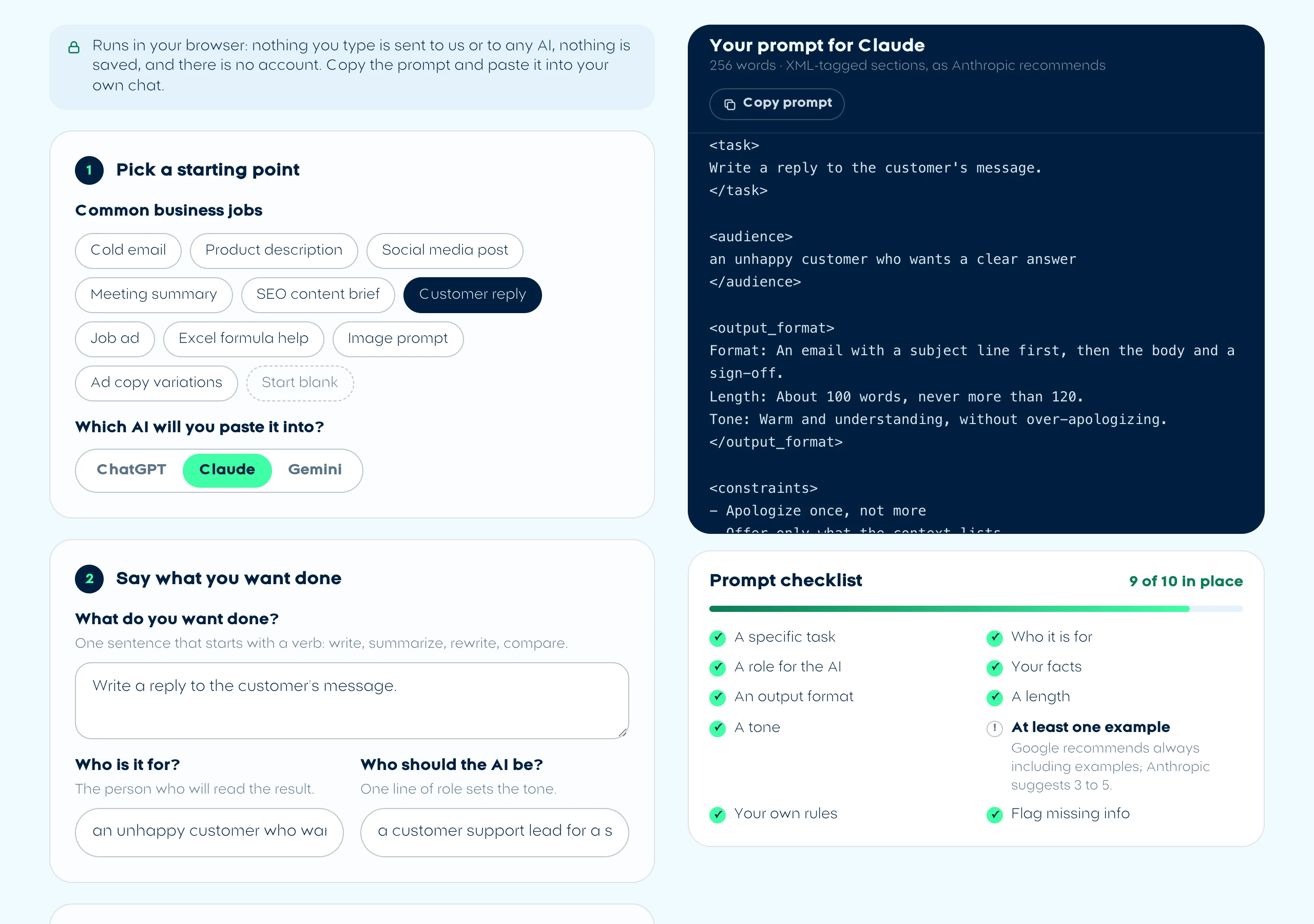
Your prompt for Claude
180 words · XML-tagged sections, as Anthropic recommends
You are an experienced B2B sales writer whose short, plain emails get replies.

<context>
Our company: [COMPANY NAME], we [WHAT YOU DO].
Who we help: [WHO YOU HELP].
One result we can prove: [A REAL RESULT].
Why this prospect: [WHAT YOU NOTICED ABOUT THEM].
</context>

<task>
Write a first cold email that asks the reader for a 15-minute call about our service.
</task>

<audience>
[JOB TITLE] at [TYPE OF COMPANY], who has never heard of us
</audience>

<output_format>
Format: An email with a subject line first, then the body and a sign-off.
Length: About 100 words, never more than 120.
Tone: Direct: the point in the first sentence, no filler.
</output_format>

<constraints>
- No flattery in the first line
- One question only, at the end
- No links or attachments
- If something you need is not in this prompt, do not guess: ask me, or write [MISSING: what you need] in its place. Never invent names, numbers, prices, dates or quotes.
</constraints>

Now complete the task in <task>. Use only the facts in <context> and follow everything above.
7 [placeholders] left: replace them with your own details before you paste.
Prompt checklist
9 of 10 in place
- A specific task
- Who it is for
- A role for the AI
- Your facts
- An output format
- A length
- A tone
- At least one exampleGoogle recommends always including examples; Anthropic suggests 3 to 5.
- Your own rules
- Flag missing info
How does this AI prompt generator build a prompt?
It fills in the six parts that Anthropic, OpenAI and Google all name in their own prompting guides (a role, the goal, your context, constraints, the output format and examples) and lays them out the way each company recommends for its own model. You pick the model in step 1: the words stay the same, only the layout changes. Unlike most AI prompts generators online, it does not send your idea to an AI to rewrite. It is a fixed template, so the same answers always give the same prompt, and it never adds a fact you did not type.
| Part | What you give it | What the model makers' guides say |
|---|---|---|
| Role | One line: who the AI should be | Anthropic: even one sentence of role focuses tone. Google: put the persona at the start |
| Goal | The task, with a verb, and who it is for | OpenAI names the Goal first; Google calls it the Task |
| Context | The facts: notes, specs, the message you answer | OpenAI lists Context as one of four parts; Anthropic says to explain the why |
| Constraints | What to avoid or never change | OpenAI calls them Boundaries; Google says to state any constraints |
| Output format | The format, the length and the tone | All three say to state the format you want |
| Examples | A past result you liked | Google recommends always including them; Anthropic suggests 3 to 5 |
Claude
A role line, then each part in its own XML tag (<context>, <task>, <output_format>, <constraints>, <examples>), long material first and the request last, as Anthropic's prompting best practices recommend. Pick Claude and it works as a Claude prompt generator.
ChatGPT
A role line, then Markdown sections named after the four parts in Prompting in ChatGPT (Goal, Output, Boundaries, Context), with the context near the end as OpenAI's prompt engineering guide suggests and a final check to close. That makes it a ChatGPT prompt generator too.
Gemini
Persona, Format and Constraints first, then Context, Examples and the Task at the very end, following Google's prompt design strategies for the Gemini API and its tips for Gems.
Every prompt also gets one rule you can switch off in step 5: if something is missing, the AI must ask you or write [MISSING] instead of guessing. That comes straight from OpenAI's guide, which suggests: "Flag missing information instead of guessing." The checklist next to the preview counts the parts you filled in and says what each missing one is for.
Does a structured prompt get a better answer? Our test
Yes, mostly because it carries your facts. On October 28, 2026 we built 4 prompts with this generator for a candle shop we made up (a customer reply, a meeting summary, a product description and a cold email), ran each 3 times in Claude Haiku 5.5 through Claude Code, and ran the same 4 jobs typed as one line 3 times each. Each job left out one fact on purpose, such as the hotel manager's name, to see whether the answer would make it up.
| What we checked | Generator prompt (12 answers) | One-line prompt (12 answers) |
|---|---|---|
| Format the job needed | 12 of 12 | 3 of 12 |
| 120 words or fewer | 12 of 12 | 5 of 12 |
| Details made up about the business | 0 | 36, in 9 answers |
| The fact we left out on purpose | Flagged 7, left out 5, made up 0 | Flagged 6, partly 3, made up 3 |
| Blanks left for you to fill in | 0 | 61 |
| Average time and cost per answer | 10.3 seconds, $0.00084 | 6.9 seconds, $0.00041 |
Before and after, the product description. Typed as one line, all 3 answers gave the candle a 50-hour burn time, an amber note and a lead-free wick, and one put it in "a matte charcoal glass jar with a bamboo lid". The real jar, in our notes, is amber glass with a black metal lid. The generator's prompt carried the specs, and all 3 answers used only those, ending with the 3 spec bullets it asked for.
Before and after, the cold email. The one-line answers ran 165 to 217 words with 11 to 15 blanks such as [Brand Name], and offered free samples and custom scents the shop never mentioned. The generator's answers ran 95 to 106 words, signed by the owner, and opened with "Hi [MISSING: GM first name]," instead of inventing a name.
When should you write the prompt yourself instead?
Write it yourself when the job is quick, when you are already in the middle of a chat, or when the same instructions repeat every day. A form is worth it for a first draft that has to be right; it is overkill for a question.
- Quick questions: "What does VLOOKUP do?" needs no role, format or rules. Just ask.
- Follow-ups: once the first answer is close, say what to change ("shorter, drop the second paragraph") in the same chat. OpenAI's guide treats follow-up messages as part of prompting, not a failure.
- Instructions you repeat: put the role, tone and rules into saved instructions once (custom instructions in ChatGPT, a Project in Claude, a Gem in Gemini), then each prompt only needs the task and the facts. In Claude Code, standing rules belong in a CLAUDE.md file.
- Work an AI agent does on your files: for jobs you repeat in Claude Code or similar tools, a saved skill beats a pasted prompt. Our skills directory lists tested ones.
- Facts you may not share: the generator keeps what you type in your browser, but the AI you paste the prompt into receives all of it. Leave out customer data you are not allowed to send.
Frequently asked questions
Is this AI prompt generator really free?
Yes. It is a free AI prompt generator with no account, no sign-up and no limit, because it runs in your browser and calls no AI. You paste the finished prompt into your own ChatGPT, Claude or Gemini, on whatever plan you already use.
Does the generator send what I type anywhere?
No. The prompt is put together by code in the page itself, so nothing you type goes to our server or to an AI, and nothing is kept after you close the tab. The site's visitor analytics, Microsoft Clarity, is set to mask the tool. The AI you paste the prompt into does receive it, so leave out anything you may not share.
Why does the prompt look different for ChatGPT, Claude and Gemini?
Each company recommends its own layout: Anthropic suggests XML tags for Claude, OpenAI names a Goal, Context, Output and Boundaries, and Google puts the task at the end, after the context. The parts are the same, so any version works in any of the three; the layout just follows each model's own guide.
How is this different from AI prompt generators that write the prompt for you?
Most of those tools send your idea to an AI, which rewrites it into a longer prompt. This one is a fixed template: it never adds facts, so it cannot invent any, and it asks you for the details instead. The trade-off is that it will not suggest a better task than the one you type.
Can I use the prompt as custom instructions or a system prompt?
Yes. Put the role, tone, format and rules into custom instructions, a Claude Project, a Gem or an API system prompt, and keep the task and the facts for each message. Anthropic and Google both suggest putting the role in the system instructions.