Best AI Image Generators (2026): 6 Models, Same Prompts
There is no single best AI image generator: in our test on October 27, 2026, all six models spelled a mug's shop name right, five of six got a social post's text right, and FLUX.2 Pro was fastest at 13 seconds. Pick Ideogram or ChatGPT for graphics with words, Gemini's free Nano Banana 2 for everyday images, Canva for posts you will edit, Adobe Firefly for commercial safety and Midjourney for an artistic look.
By Yotam DahanUpdated 19 min readAI content creation
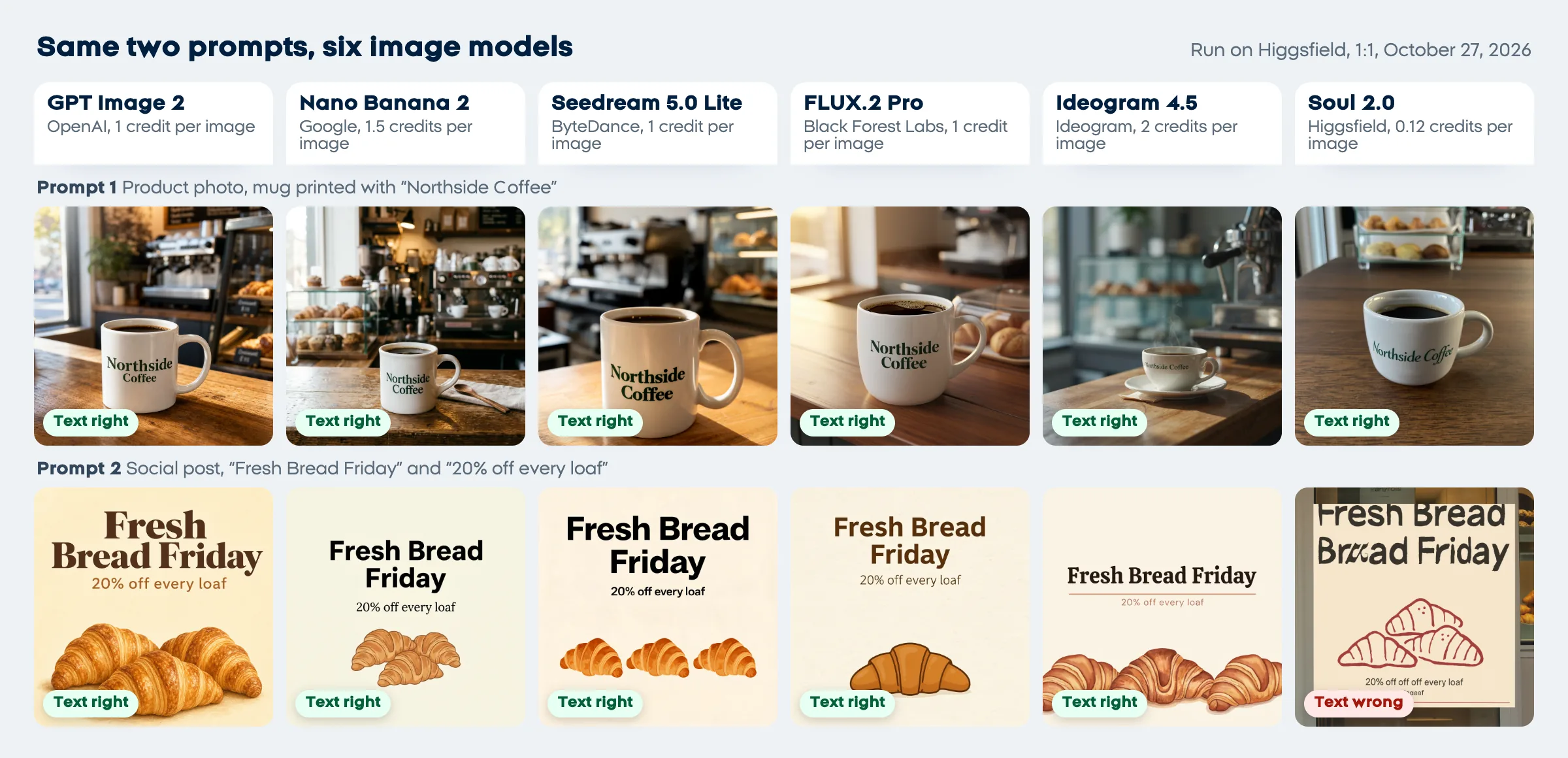
The best AI image generator depends on what you make. For graphics with words, such as an offer post or a poster, Ideogram and ChatGPT are the safest picks; for everyday images and quick edits, Gemini's free Nano Banana 2 is hard to beat; Canva suits posts you'll keep editing, and Adobe Firefly suits work where commercial safety matters most. We ran the same two business prompts on six models to check this: all six printed a shop name on a mug correctly, and five of six got a social post's headline right.
Which AI image generator is best? Our same-prompt test
On our two business prompts, GPT Image 2 followed the layout most closely, Nano Banana 2 drew the richest scene in 19 seconds, FLUX.2 Pro was fastest, and Ideogram 4.5 set the neatest type. All six models wrote "Northside Coffee" on the mug correctly; only Higgsfield's Soul 2.0 got the social post's words wrong.
Method. We ran each prompt once on six models through the Higgsfield command line tool on a free account, all at a square 1:1 ratio. Time to result is from submitting the job to the finished image, so it includes Higgsfield's queue that morning. We read every image at full size, letter by letter. GPT Image 2.5 and Seedream 5.0 Pro refused to run on the free plan ("minimum basic plan required"), so we used GPT Image 2 and Seedream 5.0 Lite instead. "Northside Coffee" and the bakery are made up.
Product photo for a small coffee shop's website. A white ceramic coffee mug filled with black coffee sits on a wooden cafe counter in soft morning light from a window on the left. The words "Northside Coffee" are printed on the side of the mug in dark green serif letters. Blurred espresso machine and pastry case in the background. Realistic photograph, shallow depth of field, no people.Square Instagram post graphic for a neighborhood bakery's weekend offer. Warm cream background with a simple illustration of three croissants at the bottom. Large bold headline at the top: "Fresh Bread Friday". Smaller line under it: "20% off every loaf". Clean modern layout with plenty of empty space, no logos, no other text.| Model (maker) | Credits per image | Seconds, mug / post | Mug text | Post text | What went wrong |
|---|---|---|---|---|---|
| GPT Image 2 (OpenAI) | 1 | 43.0 / 36.9 | Yes | Yes | Added blurred price tags we didn't ask for |
| Nano Banana 2 (Google) | 1.5 | 18.8 / 18.9 | Yes | Yes | Added a spoon, a napkin and a menu board |
| Seedream 5.0 Lite (ByteDance) | 1 | 65.2 / 44.8 | Yes | Yes | Slowest; three identical copies of one croissant |
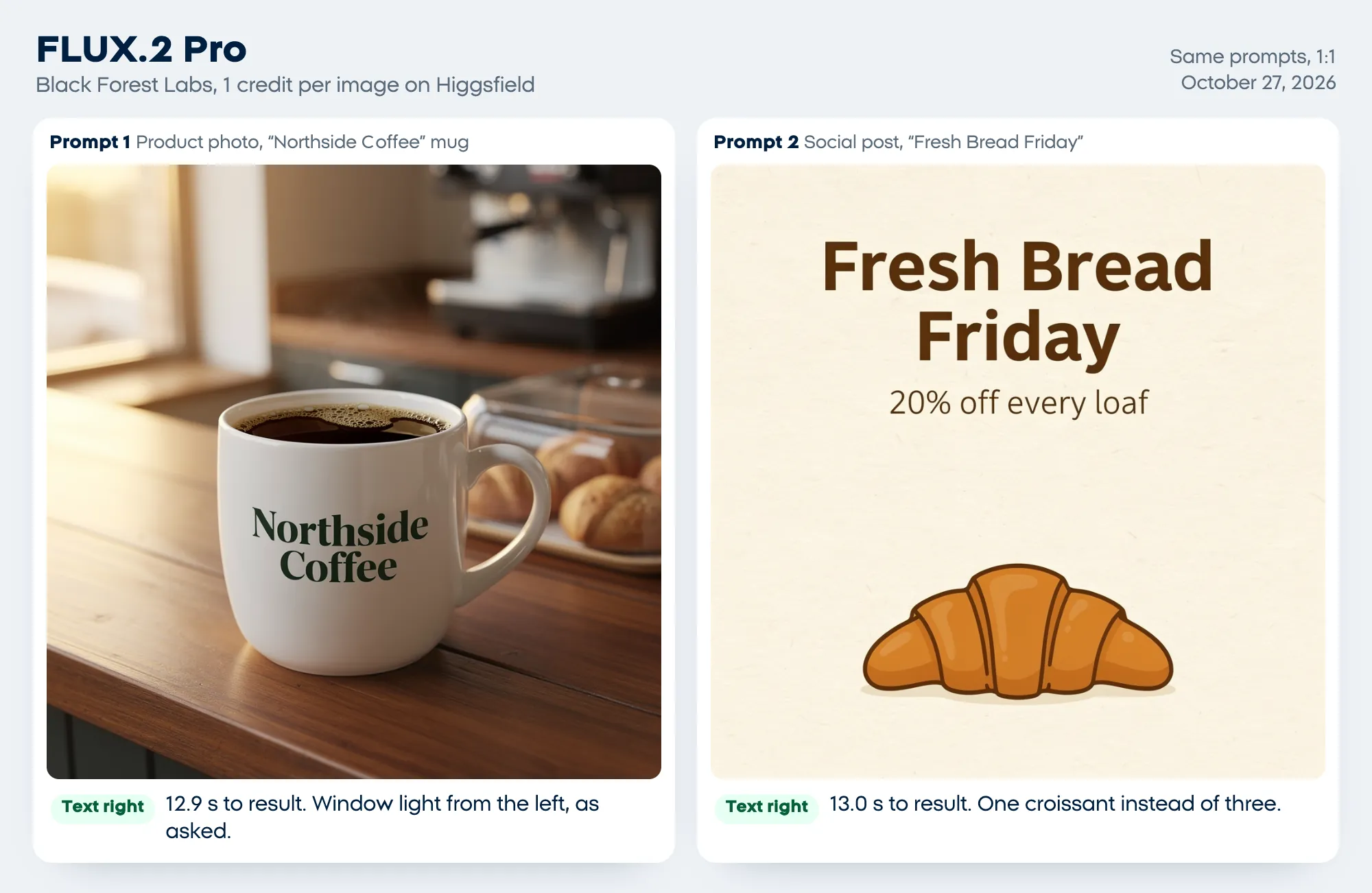
| FLUX.2 Pro (Black Forest Labs) | 1 | 12.9 / 13.0 | Yes | Yes | One croissant instead of three |
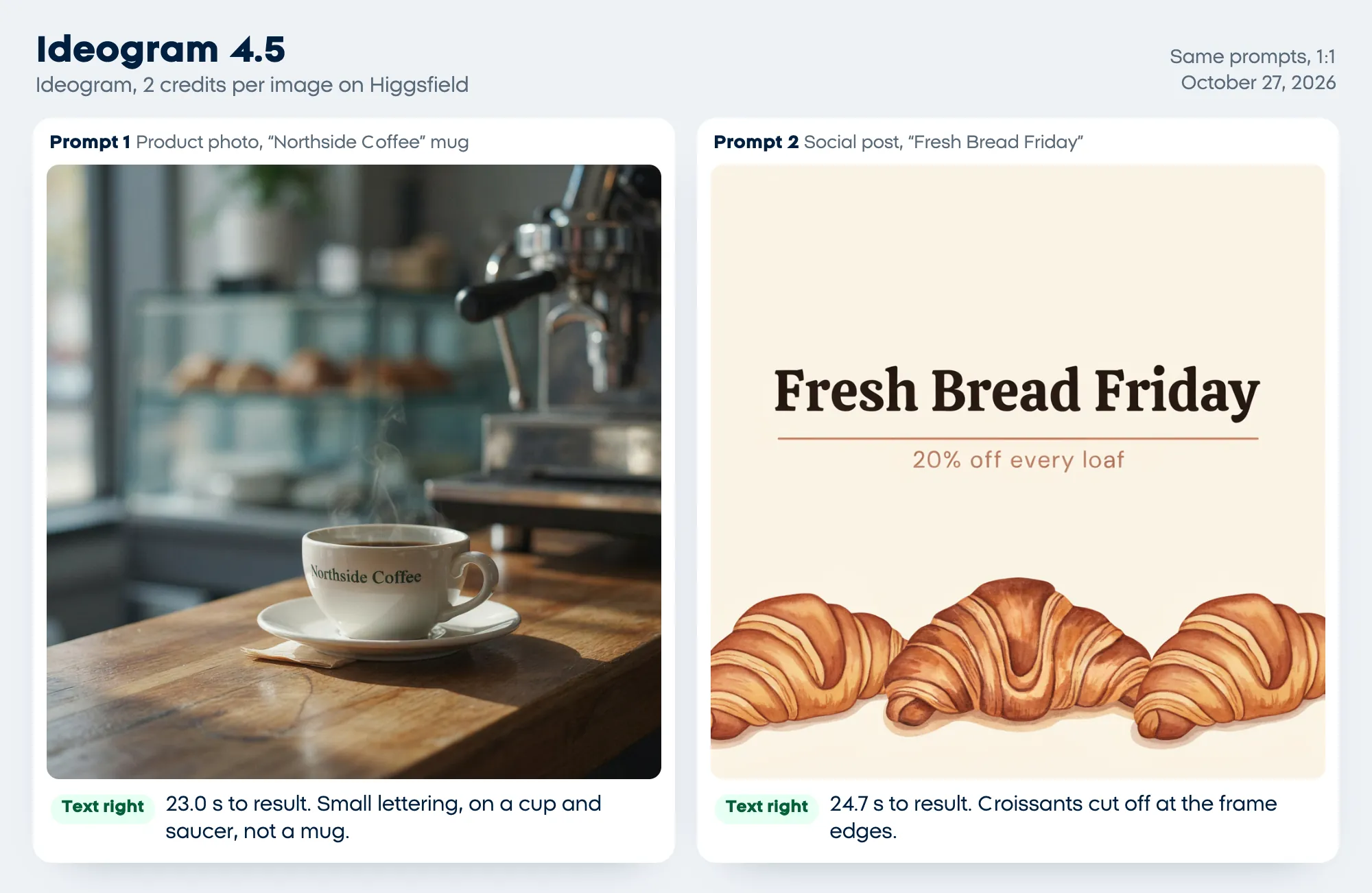
| Ideogram 4.5 (Ideogram) | 2 | 23.0 / 24.7 | Yes | Yes | Small lettering on a cup and saucer, not a mug |
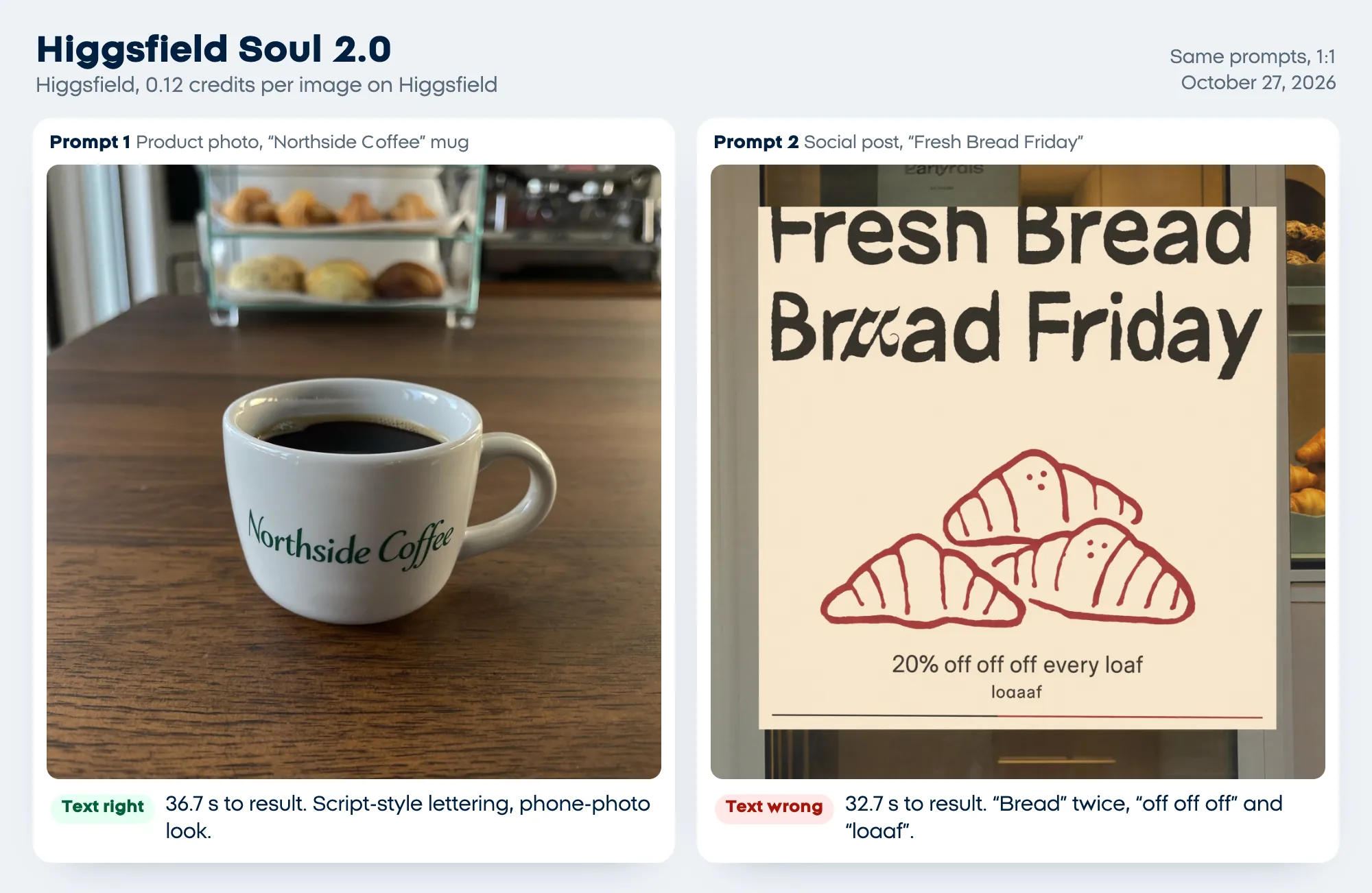
| Soul 2.0 (Higgsfield) | 0.12 | 36.7 / 32.7 | Yes | No | "Bread" twice, "off off off" and a stray "loaaf" |
We used 13.24 credits in total. At Higgsfield's Starter price of $19 a month for 270 credits, about 7 cents a credit, each image cost this much by our arithmetic:
Credits per image from our run, times $19 / 270 credits from higgsfield.ai/pricing. Bought elsewhere, prices differ: Ideogram 4.5 at medium costs 6 credits on ideogram.ai, $0.06 at its pay-as-you-go rate of 1 cent a credit.
The clip below puts each model's own time to result on one clock. The runs happened one after another, not at once:
The Fresh Bread Friday social post prompt on six models, each image appearing at its own time to result on a clock sped up 4 times: FLUX.2 Pro at 13.0 seconds, Nano Banana 2 at 18.9, Ideogram 4.5 at 24.7, Soul 2.0 at 32.7 with the text wrong, GPT Image 2 at 36.9 and Seedream 5.0 Lite at 44.8, all five others with the text right.
What each model got right and wrong
GPT Image 2 matched the layout most closely: the headline at the top and three distinct croissants at the bottom, as asked. In the mug photo it added blurred price tags to the pastry case, a reminder to check the background too.
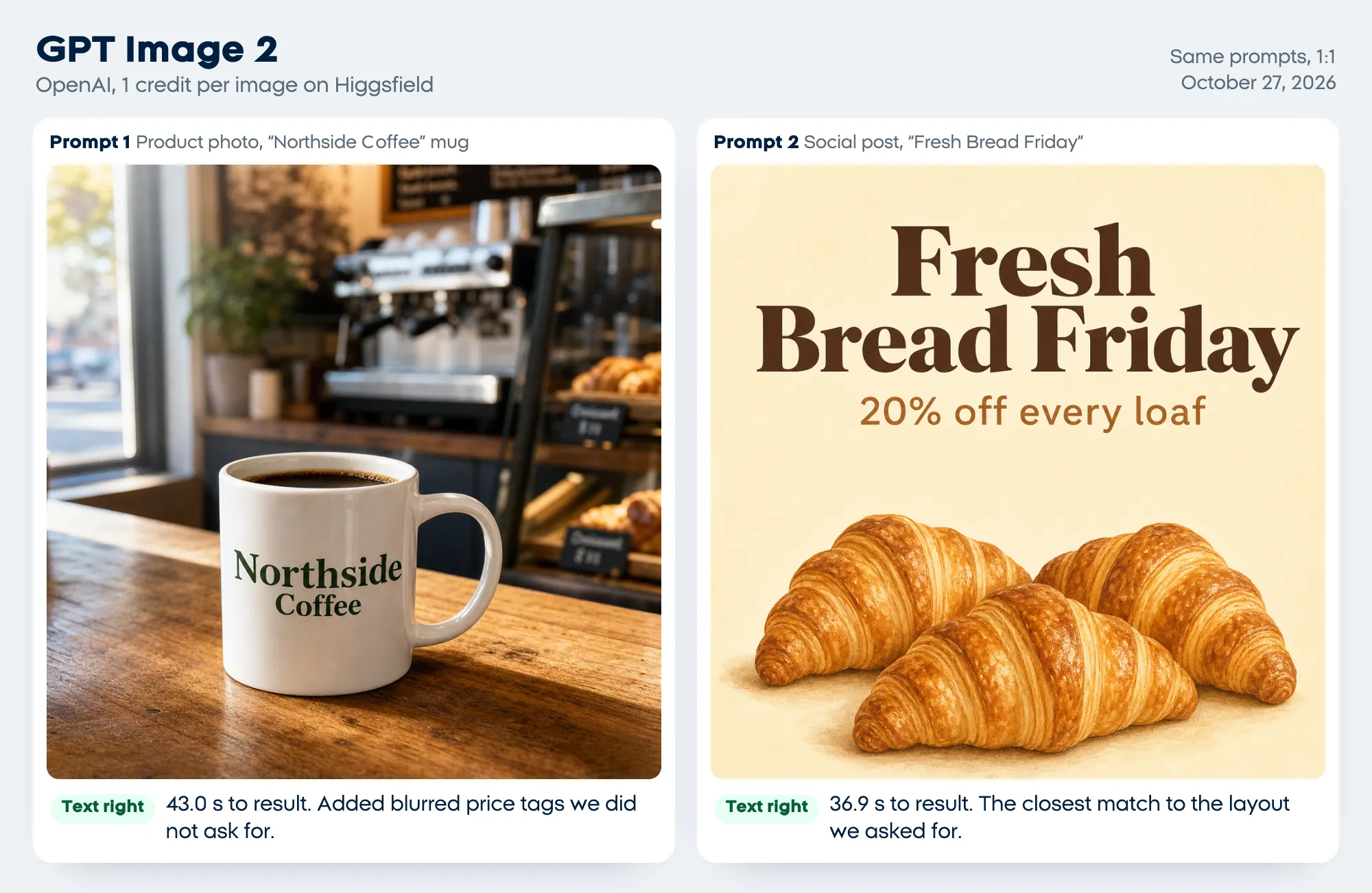
Nano Banana 2, the model behind Gemini's free image generation, was the second fastest and drew the busiest cafe, with a spoon, a napkin and a menu board we didn't ask for. Its post is the plainest of the six: black sans-serif type on cream.
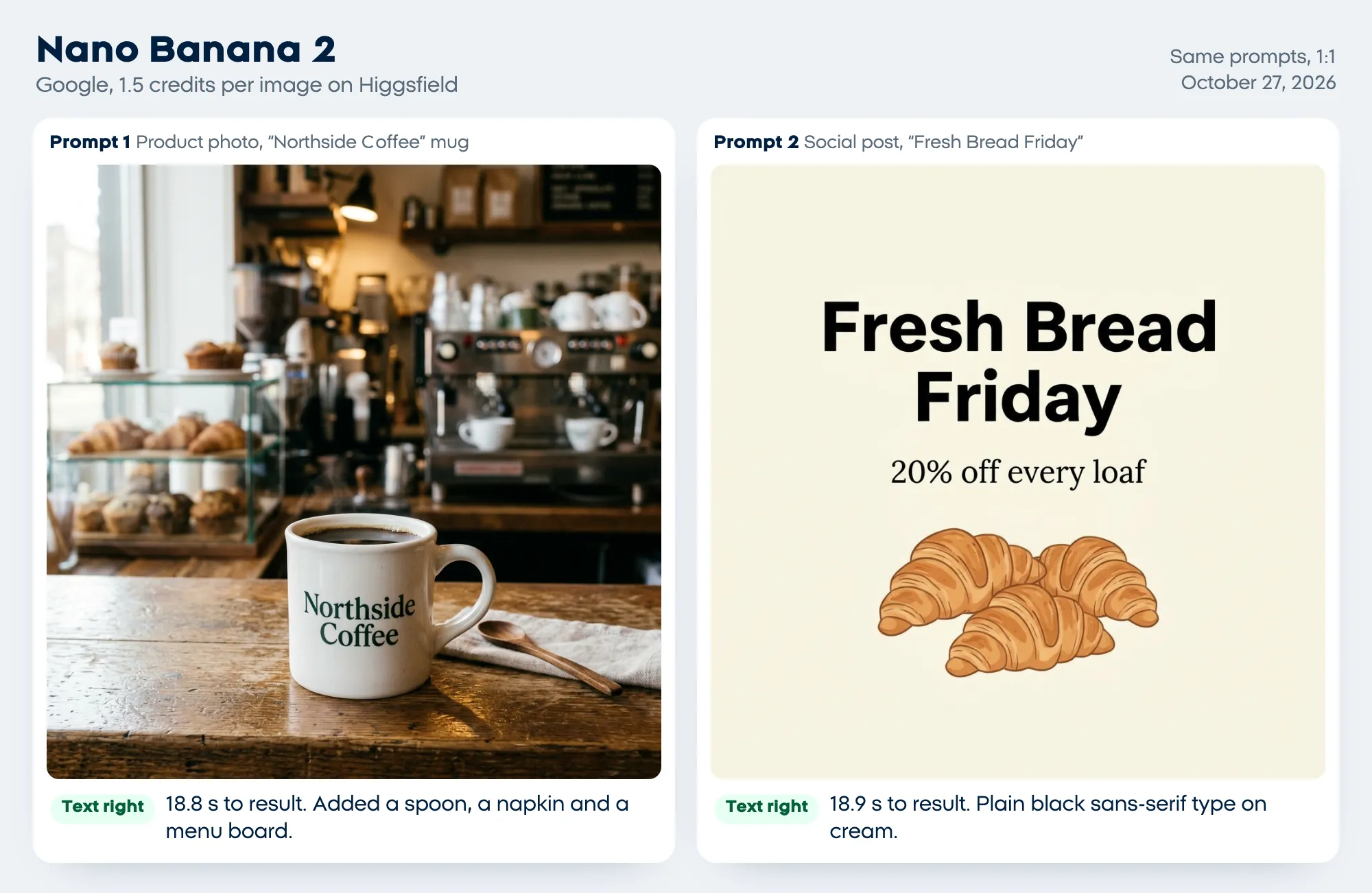
Seedream 5.0 Lite printed the biggest, boldest lettering of the six and returned 2048 x 2048 pixels, but it was the slowest, and its three croissants are copies of one drawing.
FLUX.2 Pro finished both images in about 13 seconds and kept the window light on the left, as the prompt said. It drew one croissant where we asked for three.
Ideogram 4.5 set the cleanest type on the post, with a thin rule under the headline. On the product photo it chose a cup and saucer and kept the lettering small.
Soul 2.0, Higgsfield's own model, made the most natural-looking photo, like a phone snapshot, for about a cent. On the post it failed: it drew a poster in a shop window and garbled the words.
One run per prompt is a snapshot: image models give a different picture every time, so run your own prompt two or three times before you decide.
The best AI image generator for each job
Pick by the job you do most. Prices are the cheapest paid start on each vendor's page on October 27, 2026.
| Your job | Pick | Why | Cheapest paid start |
|---|---|---|---|
| Posters, flyers and offers with exact words | Ideogram | Built around text; edit letters as layers | $15 a month billed yearly, or $20 monthly |
| Editing an image by describing changes | ChatGPT | Select an area and say what to change | $8 a month (Go, US) |
| Everyday images for free | Google Gemini | Nano Banana 2 on the free plan | $4.99 a month (Google AI Plus) |
| Social posts you'll keep editing | Canva | AI image inside an editable design | US$15 a month, or US$120 a year |
| Client work where commercial safety matters | Adobe Firefly | Adobe calls its own models' outputs safe for commercial use | 2,000 credits a month, priced by country |
| An artistic, stylized brand look | Midjourney | Built for aesthetics, with an edit model | $10 a month, or $8 billed yearly |
| You already pay for Microsoft 365 | Microsoft Copilot | Images inside Word and PowerPoint | $9.99 a month (Microsoft 365 Personal) |
| Trying many models with a daily allowance | Leonardo.Ai | 150 free tokens a day | $12 a month, or $10 billed yearly |
| Comparing top models in one account | Higgsfield | Runs all six models we tested | $19 a month |
| Paying per image from your own app | FLUX (Black Forest Labs) | Pay as you go, no subscription | From $0.03 per image |
| Logos, icons and vector graphics | Recraft | Vector output and brand styles | $10 a month billed yearly, or $12 monthly |
The 11 best AI image generators in detail (checked October 27, 2026)
Every tool answers the same questions: the free plan, the cheapest paid plan, how it handles text and edits, and whether you can use the images for business. The numbers are for reference, not a ranking.
1. ChatGPT Images, for editing by conversation
- Free plan: "limited image creation"; ChatGPT Images works on every plan (ChatGPT pricing).
- Cheapest paid plan: Go at $8 a month in the US with more image creation; Plus at $20 adds more complex images and images with thinking. Both bill monthly only.
- Text and editing: ChatGPT has used ChatGPT Images 2.5 since September 8, 2026. It follows instructions to add text, and its editor lets you select an area and describe the change, switch the aspect ratio or start from a template (Images in ChatGPT).
- Business use: OpenAI's terms assign the output to you (terms of use).
- Our test: we ran the earlier GPT Image 2, because GPT Image 2.5 needed a paid Higgsfield plan. It got both texts right and followed the layout best.
2. Google Gemini with Nano Banana, the best free start
- Free plan: image generation and editing with Nano Banana 2; downloads are 1K without a plan and 2K with one (Gemini Apps Help).
- Cheapest paid plan: Google AI Plus at $4.99 a month in the US, with twice the free usage and Nano Banana 2.1, Google's most advanced image model (Google AI plans).
- Text and editing: Google says Nano Banana 2 adds text with more accurate spelling in all supported languages; you can edit part of an image, combine several photos or upload one and ask for changes.
- Business use: Google's terms say it won't claim ownership of content you generate.
- Our test: Nano Banana 2 got both texts right in under 19 seconds.
3. Ideogram, the best AI image generator for text
- Free plan: 30 credits a week if you sign in with Google, Apple or Microsoft. At 3 credits per Ideogram 4.5 image on low quality, that's about 10 images.
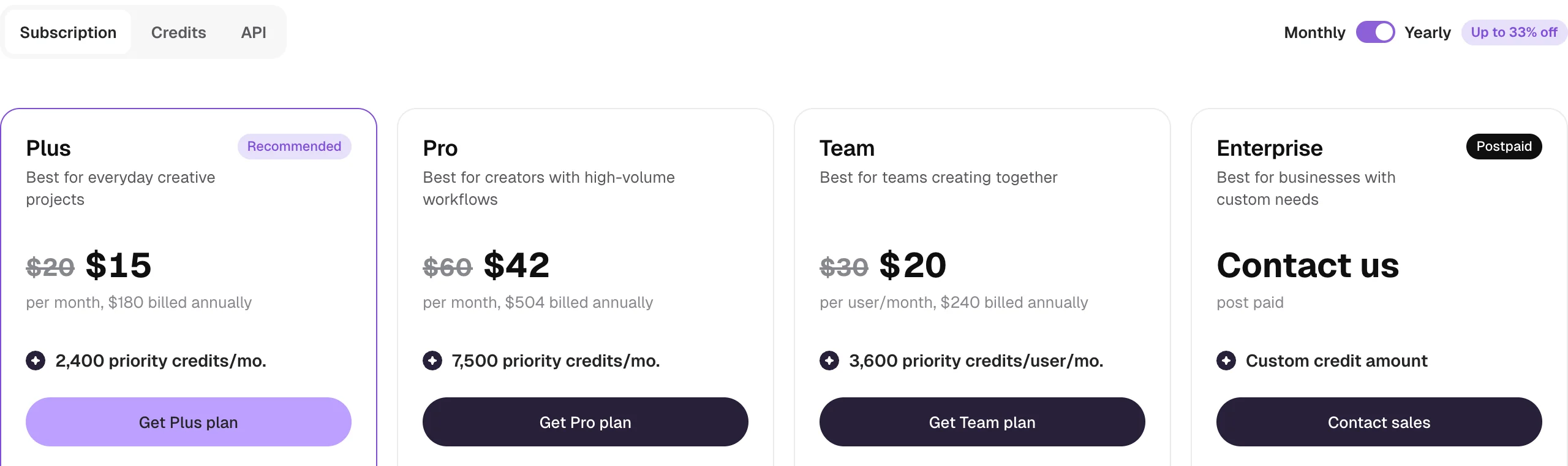
- Cheapest paid plan: Plus at $20 a month, or $15 a month billed yearly ($180), with 2,400 priority credits and unlimited slower generations after that (Ideogram plans).
- Text and editing: you put the exact words in quotation marks, and its Studio's Layerize text tool turns lettering in an image into an editable text layer, so you can fix a typo without starting over.
- Business use: Ideogram's terms don't claim ownership of your output or restrict commercial use.
- Our test: Ideogram 4.5 got both texts right with the neatest type.
4. Canva, for social posts you'll edit
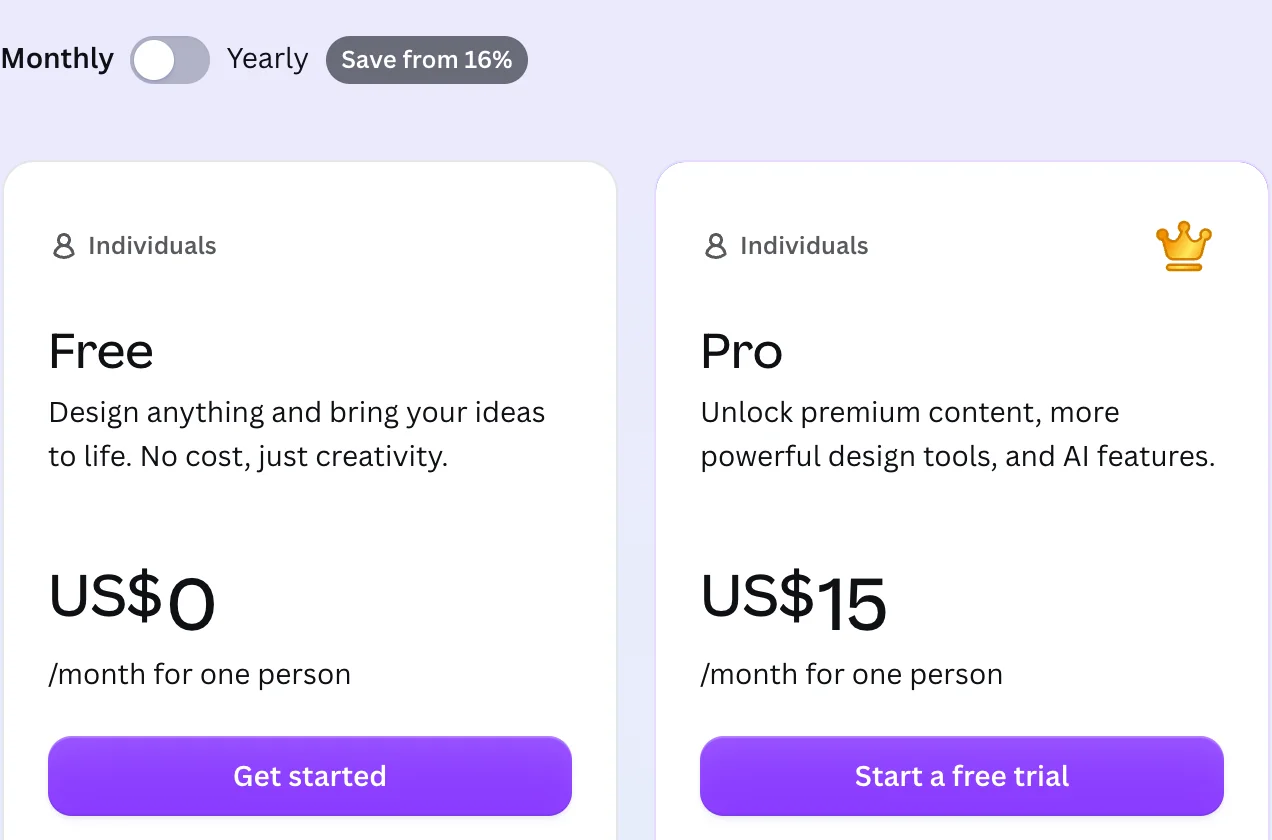
- Free plan: up to 20 uses of Standard or Premium AI tools a month (Canva pricing).
- Cheapest paid plan: Pro at US$15 a month or US$120 a year, with up to 200 uses of Premium AI tools a month (Canva AI usage).
- Text and editing: Dream Lab, which runs on Leonardo.ai's technology, gives four images per prompt; you then add the words with Canva's text tool, so they're exactly what you typed, on a design with your brand kit.
- Business use: Canva's AI product terms say you own your output, except where it modifies Canva's own library content (AI product terms).
- Our test: not included, because Canva needs an account.
5. Adobe Firefly, for commercial safety
- Free plan: free daily generations without a plan, including partner models such as Nano Banana (Firefly plans).
- Cheapest paid plan: Firefly Standard, 2,000 generative credits a month and unlimited standard image generations. Adobe showed us local prices from Israel (NIS 35 a month), so check the page for your country; Adobe's October 2025 announcement listed Standard at US$9.99 a month.
- Text and editing: Generative Fill and Generative Expand on paid plans, and Text to Vector Graphics.
- Business use: Adobe says outputs from its own Firefly models are safe for commercial use because they're trained on licensed and public domain content; with partner models, the call is yours.
- Our test: not included.
6. Midjourney, for an artistic look
- Free plan: none on the website or Discord; there's a limited trial in the niji·journey phone app.
- Cheapest paid plan: Basic at $10 a month or $96 a year ($8 a month), with 200 minutes of fast generation; Standard ($30) adds unlimited relaxed images (Midjourney plans).
- Text and editing: put the words in double quotation marks; Midjourney says short phrases in Latin letters work best. Version 8.2, the default since July 24, 2026, brought an Edit model for changes by instruction, inpainting and outpainting.
- Business use: you own your images, but a company grossing over $1,000,000 a year needs the Pro ($60) or Mega plan.
- Our test: not included; Midjourney has no free web access.
7. Microsoft Designer and Copilot, if you already pay for Microsoft 365
- Free plan: Designer is free with a Microsoft account, and Microsoft says frequent creators may need a subscription (Designer FAQ).
- Cheapest paid plan: Microsoft 365 Personal at $9.99 a month or $99.99 a year, with higher image creation limits in Copilot than free.
- Text and editing: Microsoft warns that text in generated images may be misspelled. Designer can erase objects, remove backgrounds and upscale to 4K.
- Business use: Designer is "licensed for personal, non-commercial use", according to its FAQ.
- Our test: not included.
8. Leonardo.Ai, for many models and a daily allowance
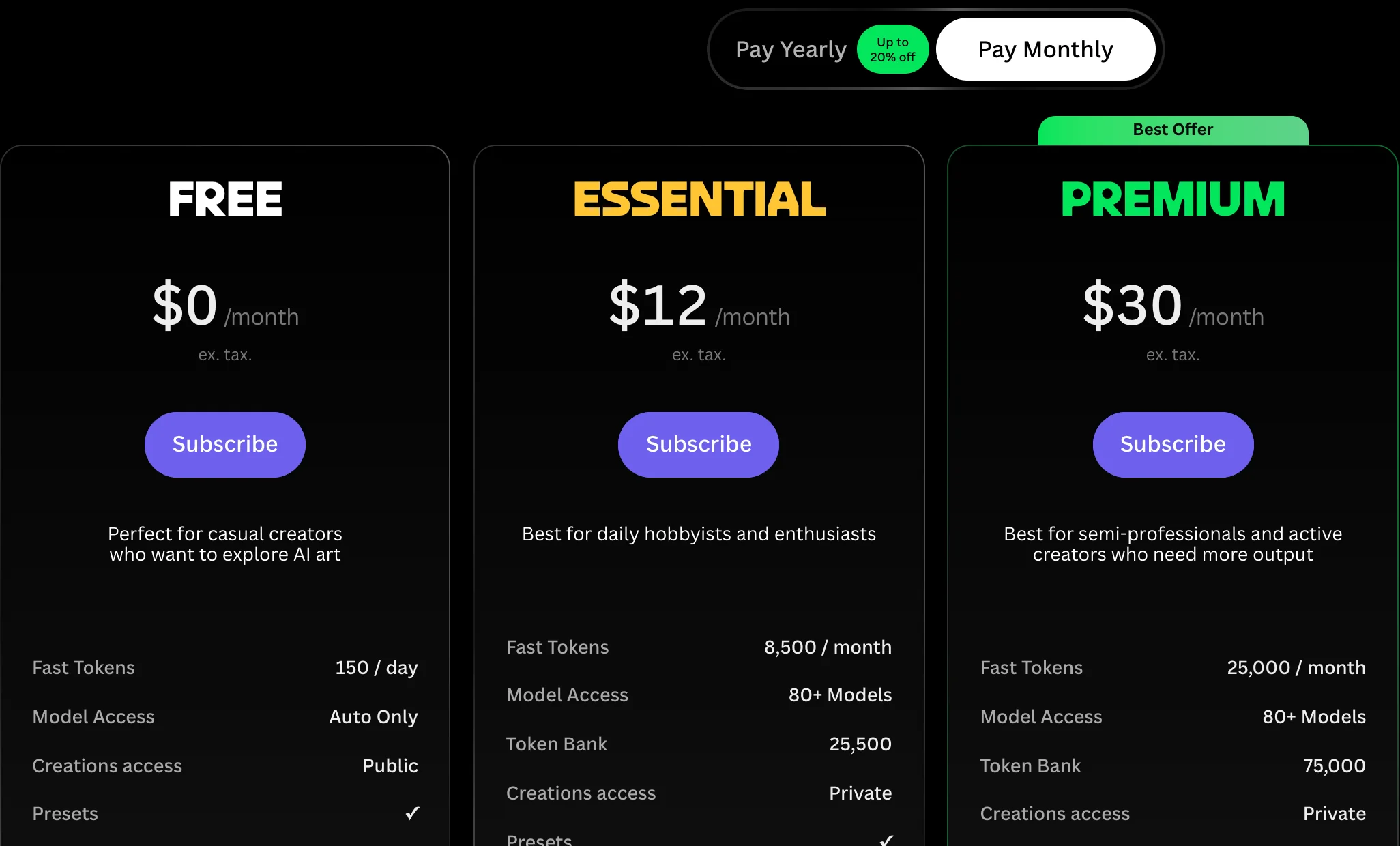
- Free plan: 150 fast tokens a day, automatic model choice only, and every creation is public.
- Cheapest paid plan: Essential at $12 a month before tax, or $10 a month billed yearly, with 8,500 fast tokens, 80+ models and private creations (Leonardo pricing).
- Text and editing: you can train your own style models (10 on Essential), and it runs other companies' models such as Nano Banana, GPT Image and Seedream next to its own.
- Business use: on paid plans you own your images; on the free plan Leonardo owns them and gives you a royalty-free license to use them commercially.
- Our test: not included.
9. Higgsfield, to compare top models in one account
- Free plan: "limited use". On our free account, GPT Image 2.5 and Seedream 5.0 Pro needed a paid plan.
- Cheapest paid plan: Starter at $19 a month, monthly or yearly, with 270 credits (Higgsfield pricing).
- Text and editing: it runs GPT Image, Nano Banana, Seedream, FLUX, Ideogram and its own Soul models side by side, so you can test one prompt on several. Our Higgsfield tutorial walks through the app.
- Business use: its help center says the terms don't tie commercial use to a plan and Higgsfield doesn't claim ownership of outputs.
- Our test: the whole test ran here, for 13.24 credits.
10. FLUX by Black Forest Labs, to pay per image
- Free plan: none listed, and the FLUX Playground asks you to sign in.
- Cheapest paid plan: no subscription; you pay per image at 1 credit = $0.01, from $0.03 for FLUX.2 [pro] and $0.048 for FLUX 3 Image at 1K (BFL pricing).
- How you use it: through an API, from your own app or automation, so it suits developers more than casual users.
- Business use: read the API terms, which also let Black Forest Labs use your inputs and outputs to improve its models.
- Our test: FLUX.2 Pro was the fastest, with both texts right.
11. Recraft, for logos and vector graphics
- Free plan: limited free credits, personal use only, all images public and no commercial use (Recraft pricing).
- Cheapest paid plan: Basic at $12 billed monthly, or $10 a month billed yearly ($120), with 1,000 credits a month, commercial rights and private images.
- Text and editing: made for vector images and consistent brand styles; Basic adds Nano Banana, Seedream, GPT Image and FLUX.
- Business use: only images made on a paid plan; free-plan images stay public and can't be used commercially.
- Our test: not included.
Free AI image generators you can use for business
The best free AI image generator for a business is one whose free plan lets you use the images commercially. Three of the nine free plans below keep ownership or rule out business use: Leonardo.Ai, Microsoft Designer and Recraft.
| Free plan | What you get | Business use? | The catch |
|---|---|---|---|
| Google Gemini | Nano Banana 2, 1K downloads | Yes | A visible AI watermark |
| ChatGPT Free | Limited image creation | Yes | Limits not published |
| Ideogram | 30 credits a week | Yes | Google, Apple or Microsoft sign-in |
| Adobe Firefly | Free daily generations | Yes, with Firefly models | Daily limits |
| Canva Free | 20 AI uses a month | Yes | Small allowance |
| Higgsfield Free | Limited use | Yes | Top models need a paid plan |
| Leonardo.Ai Free | 150 tokens a day | Licensed, but Leonardo owns them | Every image is public |
| Microsoft Designer | Free with a Microsoft account | No | Personal, non-commercial use |
| Recraft Free | Limited free credits | No | Public images, no commercial use |
How to get readable text in AI images
Readable text comes from short, quoted words with a stated position, then a letter-by-letter check at full size. These steps come from our test and from Ideogram's and Midjourney's own prompting guides:
- Quote the exact words. Put them in double quotation marks; Midjourney says single quotes don't work.
- Keep it short. Our three-word headline and four-word offer line came out right on five of six models.
- Say where and how big. "Large bold headline at the top" beats "add a headline".
- Read it at 100%. In a small thumbnail, Soul 2.0's "20% off off off every loaf" is easy to miss.
- Fix, don't regenerate. Use ChatGPT's selection tool, Ideogram's Layerize text or Midjourney's Editor on the one wrong word.
- Type facts yourself. Prices, dates and phone numbers belong in a design tool's text layer, never in the generated pixels.
Square [PLATFORM] post for [BUSINESS TYPE], [OFFER IN 5 WORDS]. [BACKGROUND COLOR] background with a simple illustration of [OBJECT] at the bottom. Large bold headline at the top: "[HEADLINE, 2 TO 4 WORDS]". Smaller line under it: "[ONE SHORT LINE]". Plenty of empty space, no logos, no other text.For photos of a product you already sell, don't generate it from text: start from a real photo and change only the scene, as our AI product photography guide shows. To turn a finished image into motion, see how to make AI videos, and for full ad creatives with a presenter, AI UGC ads.
Where our course fits
ai school's AI content creation course (Creators) teaches AI images, video ads and editing, and it's in early access (pre-order). We ran this test on Higgsfield, which the course also teaches, so read this page with that in mind. That's why the page isn't ranked and why Higgsfield's own model, Soul 2.0, is the one that failed our text test in plain view. For several jobs above, a tool we don't teach is the better pick.
Quick check0 of 3 correct
Which model got the social post's text wrong in our October 27, 2026 test?
Not quite.
Soul 2.0 wrote "Bread" twice, "20% off off off every loaf" and a stray "loaaf". The other five models got every word right.
You need free images for your shop's ads. Which free plan rules that out?
Not quite.
Microsoft's Designer FAQ says Designer is licensed for personal, non-commercial use. Gemini and Ideogram don't claim ownership of what you generate.
Your AI post shows the wrong price. What's the safest fix?
Not quite.
Generated letters can change on every run. Facts such as prices and dates are safest as real text you typed.
What to do next
Pick the job you do most from the table, then run our two prompts, or one of your own, on two free plans from the list on the same day and compare them at full size. The bonus sheet gives you fill-in templates and a scorecard for that test. If images are part of a wider content routine, AI tools for content creators shows where they fit next to scripts, captions and editing.
AI image prompt pack and side-by-side test sheet
Fill-in prompt templates for product photos, social posts and offer graphics, plus a one-page sheet to test two or three generators on your own prompts before you pay.
Enter your email and the full section opens right here. You also get a free lesson from the course.
Frequently asked questions
Can I copyright images made with an AI image generator?
In the US, not the purely AI-generated parts. The Copyright Office concluded on January 29, 2025 that AI output is protected only where a human determined enough of the expressive elements, for example by arranging or modifying it, and that prompts alone are not enough. Your own photos, edits and layout around the image can still be protected.
How can people tell an image was made with AI?
Several tools mark it. Gemini adds a visible watermark plus an invisible SynthID mark that the Gemini app can check, Adobe attaches Content Credentials to Firefly outputs, and Microsoft adds C2PA provenance data to images made in Copilot. Some editing apps strip that metadata when they export.
Will the generator train on the photos I upload?
It depends on the tool. Adobe says it doesn't train Firefly on your personal or generated content, and Leonardo doesn't use private content for training. Higgsfield may train on your content unless you have an Enterprise agreement, so read the terms before you upload client photos.
Can two people get the same AI image?
Yes. OpenAI, Canva, Ideogram and Higgsfield all say in their terms or help pages that other users may receive similar or identical output, and your ownership doesn't cover theirs. Use your own product photos, colors and text so the final image is clearly yours.
Should I make my logo with an AI image generator?
Use it for ideas, then have the final mark drawn or cleaned up by a person. A vector tool such as Recraft gives you editable shapes, and the human work on the final version is what copyright can protect. Before you use any logo, search your country's trademark register for similar marks.
Keep reading
AI Product Photography: Free Tools, Real Product, No Studio
AI product photography from one phone photo, with free tools like Google Product Studio and Shopify's editor. Let AI change the scene, never your product.
AI content creation · 15 min readHiggsfield AI Tutorial (2026): Pricing, Video and Soul ID
Higgsfield AI tutorial for beginners: make your first image and video, train a Soul ID for an AI influencer, and see pricing, credits and what's free.
AI content creation · 16 min readAI Tools for Content Creators (2026): One Tool per Job
AI tools for content creators that cover your week: Claude for scripts, Descript for edits and captions, Opus Clip for social clips, all with free plans.
AI content creation · 14 min read