Cursor Alternatives (2026): 12 Tools by Why You're Leaving
The best Cursor alternative depends on why you're leaving. For a cheaper plan in your editor, GitHub Copilot Pro and Zed Pro cost $10 a month; for a Cursor-style editor that imports your settings, Devin Desktop (formerly Windsurf) costs $20 on Pro; for a terminal agent, Claude Code or Codex; for open source, Cline, Kilo Code, OpenCode or Aider; for $0, Google Antigravity.
By Yotam DahanUpdated 16 min readClaude Code
The best Cursor alternative depends on why you're leaving. Cursor's own pricing changed this year: since The X Subscription launched on October 12, 2026, the $8 Plus plan runs only Grok and Composer models, and Claude, GPT and Gemini cost API list price on top from Premium ($30). OpenAI also plans to cut its models off in Cursor on November 12, 2026. If that's your reason, GitHub Copilot and Zed cost $10 a month, Devin Desktop (formerly Windsurf) is the closest editor at $20, Claude Code and Codex move the work to a terminal agent, and Cline, Kilo Code, OpenCode and Aider are free and open source.
Why people leave Cursor in 2026
Three things changed at Cursor this year, and each sends people looking for Cursor alternatives. SpaceX completed its purchase of Cursor on August 14, 2026 (Cursor's announcement). On October 12, The X Subscription replaced Cursor's plans for new customers with one bundle for Grok, Cursor and X. And OpenAI told SpaceX it would wind down its model contract, with a proposed shutoff date of November 12, 2026.
a month for Cursor Plus, which runs only Grok and Composer models
a month for Cursor Premium, the cheapest plan that opens Claude, GPT and Gemini, billed per token on top
weekly usage pool, shared between Cursor and the Grok apps
From Cursor's models and pricing docs, read October 27, 2026.
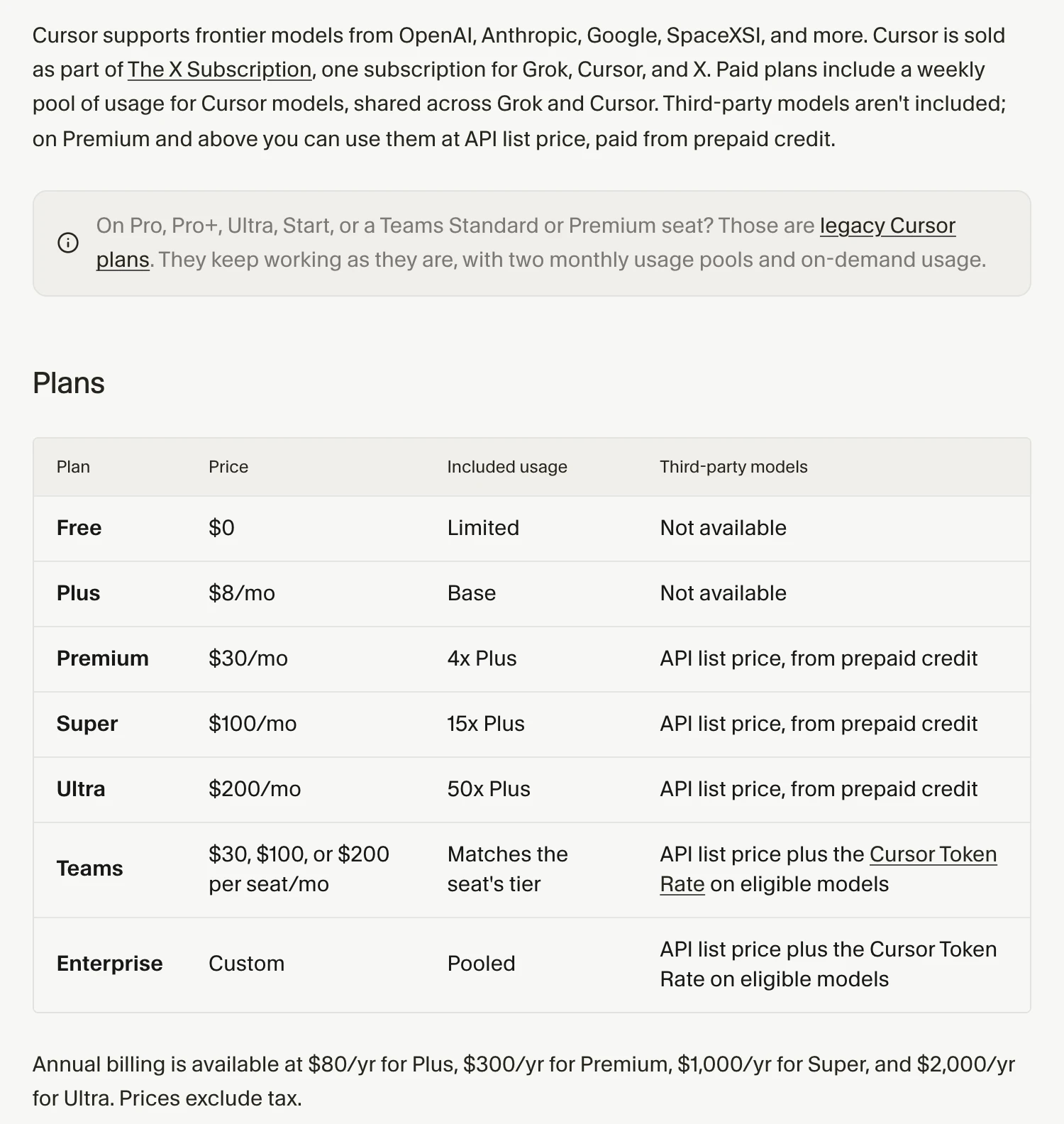
Before you leave, check which plan you're on. Cursor's legacy plans page says Pro ($20), Pro+ ($60) and the old Ultra keep working with two monthly pools, one of them for outside models like Claude, and that switching to The X Subscription is optional and permanent. If Claude is why you use Cursor, staying on Pro may beat moving. Our Claude Code vs Cursor guide works through what Claude costs inside Cursor now.
The other reasons are older: staying in VS Code or JetBrains, preferring a terminal agent, wanting open source or local models, or paying nothing.
Cursor alternatives at a glance, by reason
The best Cursor alternatives for you sit in your reason's row; the rows aren't a ranking, and the tools inside a row are in no order.
| Your reason | Alternatives | Free plan | Cheapest paid plan |
|---|---|---|---|
| Same kind of AI editor, different price | Devin Desktop, Kiro | Devin Free (light quota); Kiro Free (50 credits) | $20 (Devin Pro, Kiro Pro) |
| Stay in VS Code | GitHub Copilot | 2,000 completions a month | $10 (Copilot Pro) |
| Work in JetBrains IDEs | JetBrains AI with Junie | AI Free (3 credits a month) and Junie Lite | $10 a month or $100 a year (AI Pro) |
| A different, non-VS Code editor | Zed | $0 with your own keys or agents | $10 (Zed Pro, $5 of tokens included) |
| A terminal agent | Claude Code, OpenAI Codex | Codex on ChatGPT Free (desktop app, subject to rollout) | $8 (ChatGPT Go, Codex desktop app only); $20 (Claude Pro) |
| Open source or local models | Cline, Kilo Code, OpenCode, Aider | Yes: the tools are free | Optional model plans: $9.99 (ClinePass), $10 (OpenCode Go), $19 (Kilo Pass) |
| Pay nothing | Google Antigravity | $0 with a weekly quota | $19.99 (Google AI Pro, US) |
USD a month unless stated, from each vendor's pricing page on October 27, 2026.
List prices from each vendor's pricing page, read October 27, 2026.
If you want a Cursor-style editor for less
Devin Desktop and Kiro are the closest swaps: desktop AI editors on a VS Code base, like Cursor, with agents that can also run in the cloud.
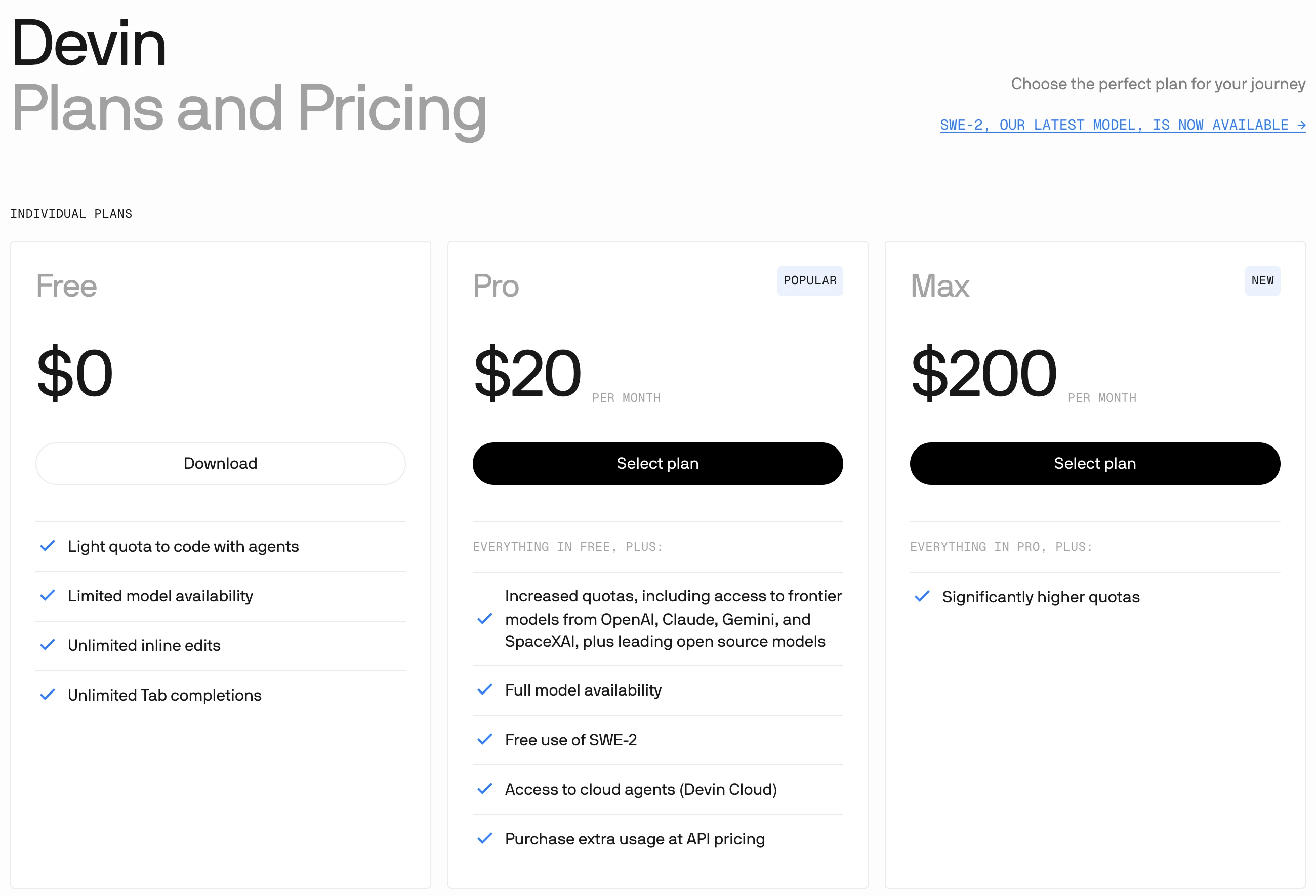
Devin Desktop (formerly Windsurf). Cognition calls it the next generation of Windsurf, launched June 2, 2026. Free gives a light agent quota with limited models; Pro ($20) adds frontier models from OpenAI, Claude, Gemini and SpaceXAI, free use of its SWE-2 model, Devin Cloud agents and extra usage at API pricing; Max is $200 (Devin pricing). Quotas refresh daily and weekly. It's the only tool here whose docs import Cursor's editor settings, and the Devin CLI reads .cursor/rules and .cursor/mcp.json on its own (configuration import).
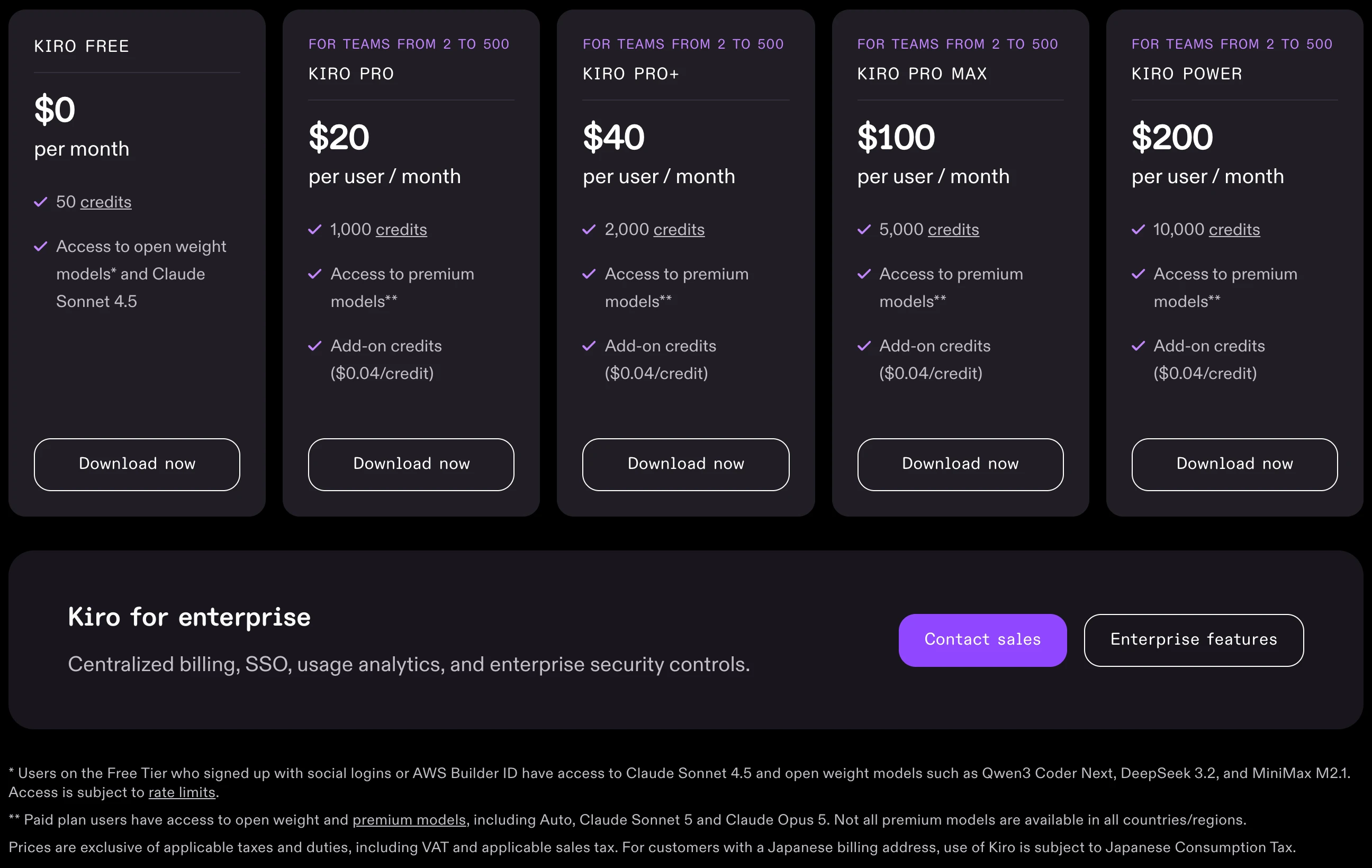
Kiro. An IDE, CLI and web agent built around specs: requirements, a technical design and an implementation plan before any code. Free gives 50 credits a month with Claude Sonnet 4.5 and open-weight models; Pro is $20 for 1,000 credits, Pro+ $40, Pro Max $100 and Power $200, with extra credits at $0.04 each (Kiro pricing). Paid plans add premium models, including Claude Sonnet 5 and Claude Opus 5. Its onboarding imports settings and extensions from VS Code, not Cursor.
If you'd rather work in VS Code, JetBrains or Zed
All three keep you in an editor you may already know, and each has a $10 plan, $20 less than Cursor Premium.
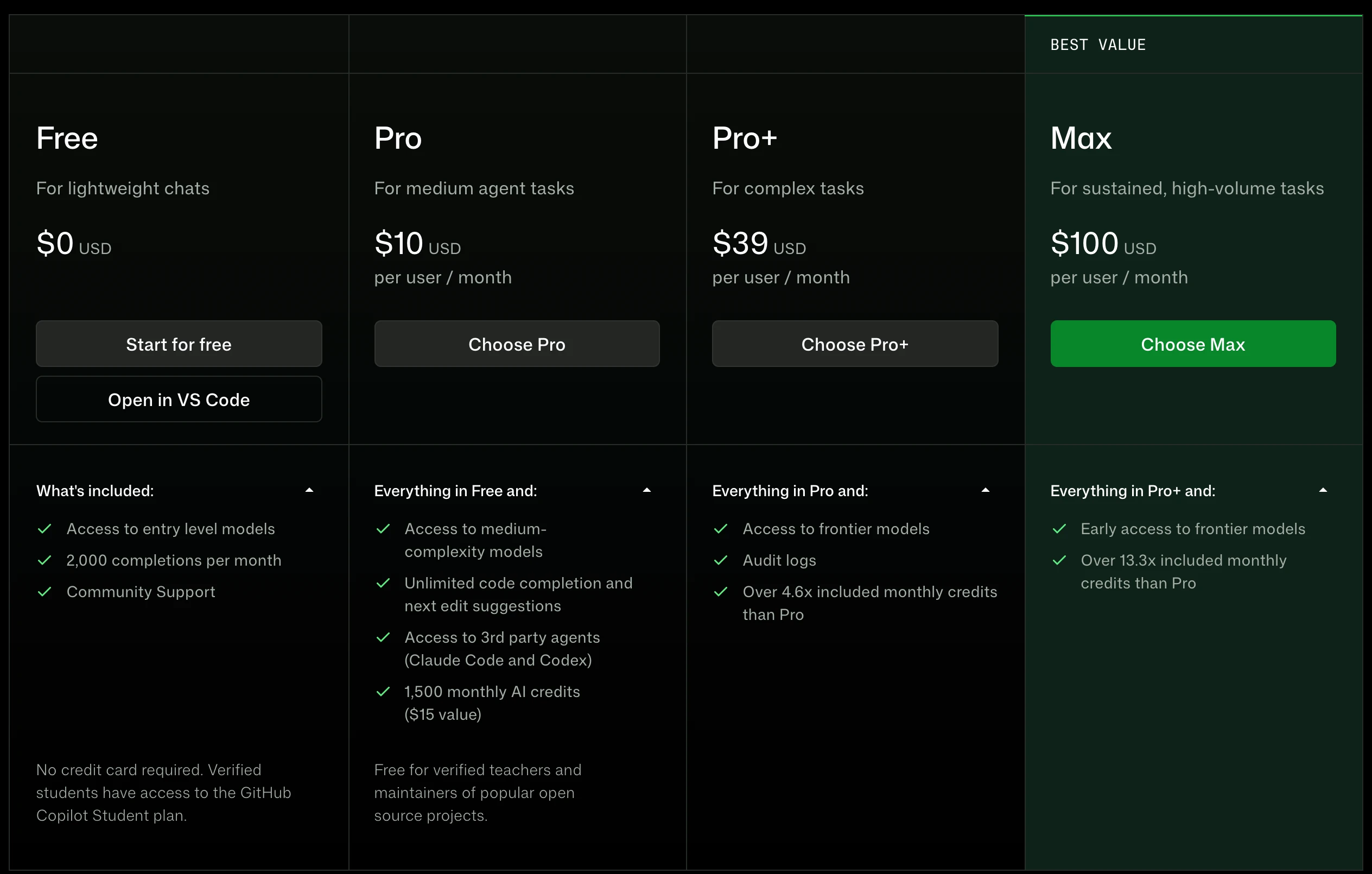
GitHub Copilot in VS Code. Free gives 2,000 completions a month; Pro costs $10 with $15 of monthly AI credits; Pro+ is $39 and Max $100 (Copilot plans). It also runs in JetBrains, Visual Studio, Xcode, Neovim, Eclipse and Zed, and as Copilot CLI. VS Code reads AGENTS.md and CLAUDE.md but not Cursor rules, and it can reuse Cursor's MCP config once you turn on chat.mcp.discovery.enabled (MCP reference).
JetBrains AI and Junie. AI Free gives unlimited completion in JetBrains IDEs and 3 AI credits a month, and every JetBrains account gets Junie Lite, a free tier that runs Qwen 3.6 27B today. AI Pro costs US$10 a month or US$100 a year for 10 credits, with Junie, Claude Agent, Codex and Gemini; AI Ultimate is US$30 a month or US$300 a year for 35 credits (JetBrains AI plans). JetBrains says the final price shows at checkout. Junie CLI offers to import other agents' instruction files and detects .cursor/skills folders.
JetBrains AI pricing page switched from Yearly billing to Monthly billing: AI Free stays free, AI Pro goes from US$100.00 per user per year to US$10.00 per user per month, and AI Ultimate from US$300.00 per year to US$30.00 per month, with 10 and 35 monthly AI credits.
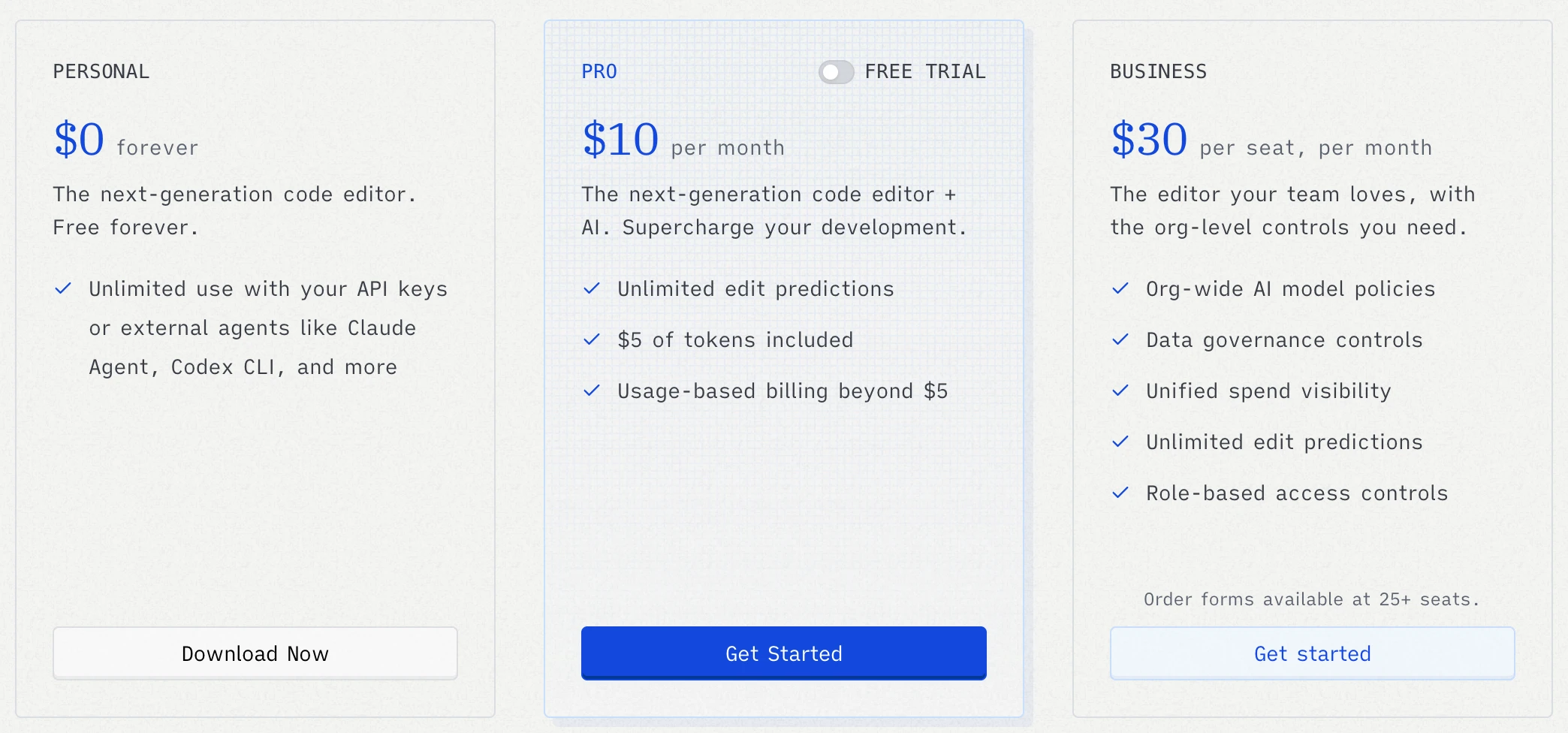
Zed. An open source editor of its own, with a smaller extension catalog than VS Code. Personal is $0 with your own API keys or external agents such as Claude Agent and Codex; Pro is $10 a month with $5 of tokens and usage beyond that at API list price plus 10%; Business is $30 a seat (Zed pricing). Its importer copies key VS Code settings but no extensions or keybindings.
If you want a terminal agent instead of an editor
A terminal agent edits files, runs commands and checks its own work while you describe the result, and you can keep any editor next to it, Cursor included.
- Claude Code. Comes with any paid Claude plan: Pro is $20 a month, or $17 billed yearly, and Max starts at $100 (Claude pricing). It runs in the terminal, in VS Code and JetBrains, in a desktop app and on the web, and its VS Code extension has an install link for Cursor. Its /init command reads .cursor/rules and .cursorrules into the CLAUDE.md it writes. Every Claude plan is compared in our Claude Code pricing guide.
- OpenAI Codex. Included in ChatGPT: Free and Go ($8) get the Codex desktop app with GPT-6 Luna, subject to rollout; Plus ($20) adds the CLI, IDE extension, web, iOS and GPT-6.1 Sol; Pro costs $100, $200 or $500 (Codex pricing). If you used OpenAI's models in Cursor, this is OpenAI's own agent for them, and it also runs local models through Ollama or LM Studio.
Codex has the most complete Cursor import of the 12. In the ChatGPT desktop app (Settings > Import) or the CLI (/import), it brings over Cursor's instruction files as AGENTS.md, plus settings, skills, plugins, MCP servers and recent chats; the CLI takes up to 50 chats from the last 30 days (Import from another agent).
# in your project folder
codex
# then type /import, choose Cursor and pick what to bring over
Open source Cursor alternatives
Four free tools put the code in your hands and let you pick any model, local ones included; you pay the model provider per token, or use free models.
Cline
Free VS Code extension, CLI and desktop app. Reads your old .cursorrules file on its own. ClinePass ($9.99 a month) gives 2 to 5 times the usage of standard API rates on open coding models.
Kilo Code
Free extensions for VS Code and JetBrains, plus a CLI. Lists 500+ models from 60+ providers and has a Cursor migration guide. Kilo Pass starts at $19.
OpenCode
Free agent for the terminal, desktop and IDEs, with free models and 75+ providers, including ChatGPT and Copilot sign-ins. Go costs $10, Go Plus $40.
Aider
Free terminal pair programmer under the Apache license, for almost any model. It commits each change to Git. Its last release on PyPI, 0.86.2, came out February 12, 2026.
Sources: Cline pricing, ClinePass, Kilo pricing, OpenCode Go and Aider, all read October 27, 2026. For local models, Kilo Code names Ollama and LM Studio, and OpenCode lists local models among its providers.
Free Cursor alternatives and their limits
Every $0 option caps the amount, the models or the editor, so pick the limit you can live with.
| Free option | What you get | The catch |
|---|---|---|
| Google Antigravity | Gemini 3.8 Flash, plus Claude Sonnet 4.6, Claude Opus 4.6 and GPT-OSS-120b | A weekly quota; those three models leave on November 2, 2026 |
| GitHub Copilot Free | 2,000 completions a month | Entry-level models, such as Haiku 4.5 and GPT-5 mini |
| Kiro Free | 50 credits a month with Claude Sonnet 4.5 and open-weight models | Rate limits |
| Devin Free | A light agent quota, unlimited Tab completions | Limited model availability |
| Junie Lite and JetBrains AI Free | Junie Lite plus 3 AI credits a month in JetBrains IDEs | JetBrains publishes no quota for Junie Lite |
| Zed Personal | The editor, with your own keys or external agents | Hosted models need Pro |
| Codex on ChatGPT Free | GPT-6 Luna in the desktop app | Subject to rollout |
Read on each vendor's pages on October 27, 2026 (Antigravity models, Antigravity plans). Google AI Pro ($19.99 a month in the US) adds Claude Sonnet 5.5 and Opus 5.5 to Antigravity, on paid plans only, not trials.
What carries over from Cursor, tool by tool
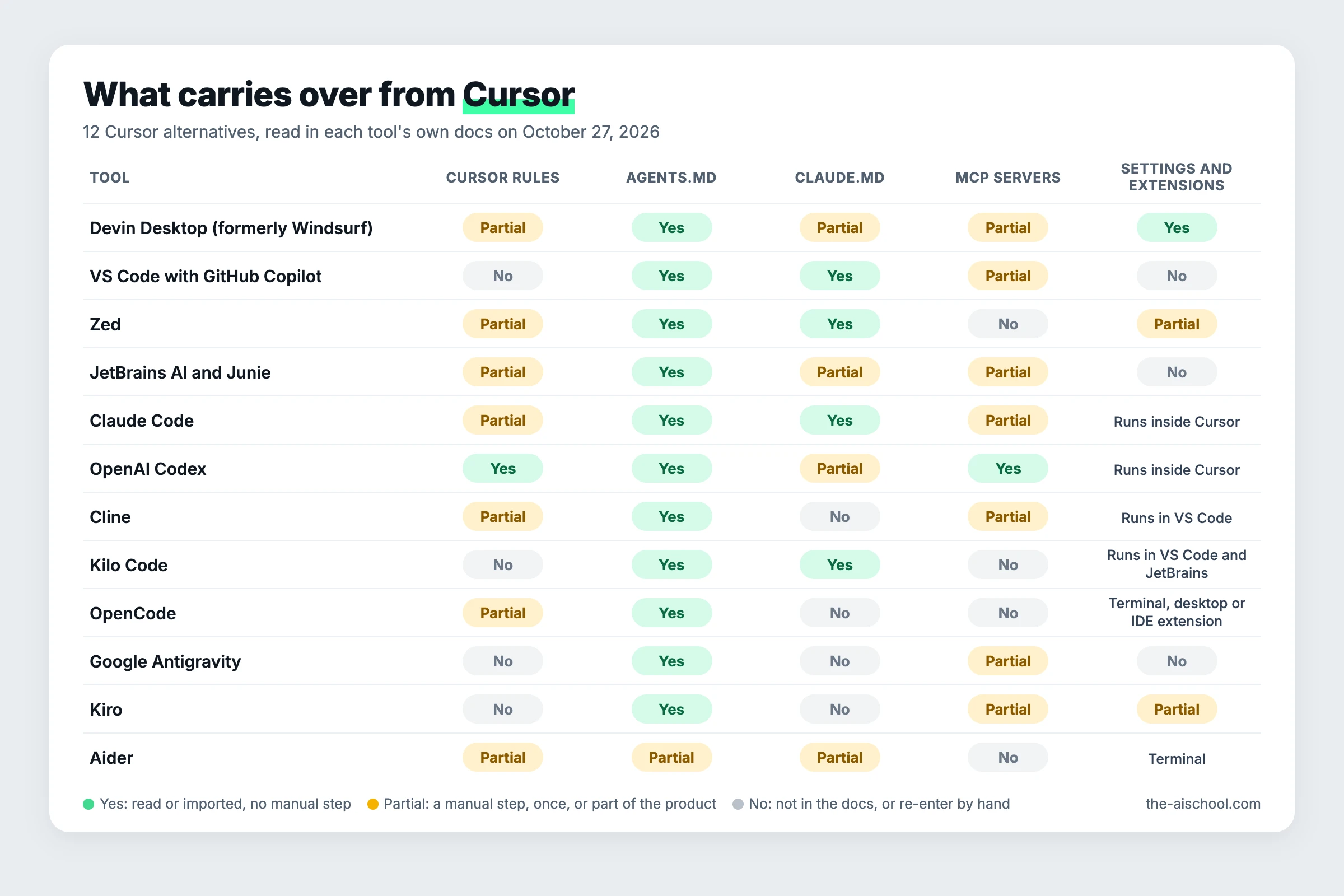
Your rules carry over best as an AGENTS.md file; your MCP servers and editor settings depend on the tool. This is what each tool's own docs said on October 27, 2026.
| Tool | Cursor rules | AGENTS.md | CLAUDE.md | Cursor's MCP servers | Settings and extensions |
|---|---|---|---|---|---|
| Devin Desktop (formerly Windsurf) | Partial | Yes | Partial | Partial | Yes |
| VS Code with GitHub Copilot | No | Yes | Yes | Partial | No |
| Zed | Partial | Yes | Yes | No | Partial |
| JetBrains AI and Junie | Partial | Yes | Partial | Partial | No |
| Claude Code | Partial | Yes | Yes | Partial | Runs inside Cursor |
| OpenAI Codex | Yes | Yes | Partial | Yes | Runs inside Cursor |
| Cline | Partial | Yes | No | Partial | Runs in VS Code |
| Kilo Code | No | Yes | Yes | No | Runs in VS Code and JetBrains |
| OpenCode | Partial | Yes | No | No | Terminal, desktop or IDE extension |
| Google Antigravity | No | Yes | No | Partial | No |
| Kiro | No | Yes | No | Partial | Partial |
| Aider | Partial | Partial | Partial | No | Terminal |
Yes: read or imported with no manual step. Partial: a manual step, a one-time import, or only part of the product (the Devin CLI reads Cursor rules, Devin Desktop's rules docs don't list them; Zed and Cline list the old .cursorrules file, not the .cursor/rules folder; Claude Code converts them once with /init). No: not in the docs, or a different format you re-enter by hand.
Move your rules into AGENTS.md first
Cursor's rules docs call AGENTS.md a "simple alternative to .cursor/rules", and every tool above except Aider loads it automatically; Aider loads it with --read. Cursor's .mdc rule files start with frontmatter (alwaysApply, globs, description) that other tools don't use, so strip it while you merge. On Mac or Linux, in your project folder:
# merge every Cursor rule into one AGENTS.md, without the --- frontmatter
find .cursor/rules -name '*.mdc' | sort | while read -r f; do echo "## From $f"; awk 'NR==1 && /^---$/ {fm=1; next} fm && /^---$/ {fm=0; next} !fm' "$f"; echo; done >> AGENTS.md
# add the old single-file rules too, if you still have one
[ -f .cursorrules ] && cat .cursorrules >> AGENTS.md
On Windows, in PowerShell:
Get-ChildItem .cursor\rules -Recurse -Filter *.mdc | Sort-Object FullName | ForEach-Object { "## From $($_.Name)"; (Get-Content $_.FullName -Raw) -replace '(?s)\A---.*?\r?\n---\r?\n', '' } | Add-Content AGENTS.md
A rule that only applied to some files (a globs line) now applies everywhere, so add a sentence naming the folder it's for. Our CLAUDE.md file guide shows what a good instructions file looks like, and the same advice fits AGENTS.md.
Bring your MCP servers
Cursor keeps MCP servers (Model Context Protocol, the standard way to plug tools such as a database or your email into an agent) in ~/.cursor/mcp.json and in each project's .cursor/mcp.json.
- Imported for you: Codex's import, the Devin CLI, and VS Code once discovery is on.
- Paste the entries: Antigravity, Devin Desktop, Kiro, Junie and Cline use the same mcpServers map, and Antigravity and Devin also accept Cursor's url key for remote servers; Claude Code takes one entry at a time through claude mcp add-json.
- Re-enter by hand: Zed (context_servers in its settings), Kilo Code (the mcp key in kilo.jsonc) and OpenCode V2 (mcp.servers in opencode.jsonc). Aider's docs and release notes don't mention MCP.
Keep Cursor's editor, change the agent
You don't have to leave the editor to leave Cursor's plans. Claude Code's VS Code extension installs in Cursor, Codex's IDE extension lists Cursor next to VS Code and Windsurf (Codex IDE docs), and both bill your own Claude or ChatGPT plan. Extensions are the one thing to check by name if you move to VS Code: Cursor's help page says it installs from Open VSX and swaps some Microsoft Marketplace extensions for its own builds.
Our interest: we teach Claude Code
ai school teaches Claude Code, and I build client projects with it, so weigh this page with that in mind. Claude Code is one of the 12, it isn't ranked, and our Claude Code course is in early access (pre-order). If you want to stay in an editor, Copilot, Zed or Devin Desktop fits better; if you want $0, Antigravity or an open source tool does. People leaving Claude Code rather than Cursor have their own guide, Claude Code alternatives, and the benchmark roundup is best AI coding agents.
Quick check0 of 2 correct
You pay for legacy Cursor Pro and mostly use Claude models. What should you check before you switch?
Not quite.
Cursor's docs say legacy Pro keeps a monthly pool for third-party models like Claude, and switching to the new tiers is optional and permanent. Plus runs only Grok and Composer.
Which file do the most Cursor alternatives read without any setup?
Not quite.
Eleven of the 12 tools load AGENTS.md automatically, and Aider loads it with --read. Zed and Cline pick up the old .cursorrules file on their own, but neither lists the .cursor/rules folder.
What to do next
Find your reason in the at-a-glance table and pick one tool from that row, not three. Merge your rules into AGENTS.md with the command above, bring your MCP servers across, and give the new tool one small real task on a copy of your project before you cancel Cursor. If a terminal agent is the row you picked, our Claude Code course covers setting Claude Code up with a CLAUDE.md file, skills and MCP, the same setup this page moves between tools.
Move-off-Cursor checklist and one-week trial plan
Turn your Cursor rules into one AGENTS.md, carry your MCP servers and extensions across, and test the new tool for a week before you cancel anything.
Enter your email and the full section opens right here. You also get a free lesson from the course.
Frequently asked questions
Is Windsurf still available?
Under a new name. Cognition announced Devin Desktop as the next generation of Windsurf on June 2, 2026, and says it stays fully backwards-compatible with Windsurf. Windsurf's old docs address now redirects to the Devin Desktop docs, and the plans are sold on devin.ai/pricing.
Can I use my Cursor subscription in another editor?
In some. JetBrains' AI pricing page lists Cursor among the agents you can sign in to through the Agent Client Protocol (ACP), and Zed's docs say a Cursor subscription works through a Cursor external agent where available. Zed adds that a Cursor plan can't be used as a model provider in Zed itself.
Which Cursor alternative works with a ChatGPT or Claude subscription I already pay for?
For ChatGPT, Codex comes with every plan from Free up, and Zed and OpenCode both accept a ChatGPT Plus or Pro sign-in. For Claude Pro or Max, use Claude Code, or Zed's Claude Agent, which Zed's docs list for a Claude plan; a Claude plan has no direct model provider path in Zed itself.
What happened to Roo Code and Continue?
Both left the field this year. Roo Code's docs say its extension shut down on May 15, 2026, and point users to ZooCode, a community fork, and Cline. Continue's site says it was acquired by Cursor, and its open source code stays available.
Which Cursor alternative is easiest if I don't code?
Pick one that runs as a desktop app, so you never open a terminal: Codex in the ChatGPT desktop app (from $0, subject to rollout) or the Google Antigravity app ($0 with a weekly quota). Both read an AGENTS.md file, so your instructions carry over.
Keep reading
Claude Code Alternatives (2026): What to Switch To and Why
Claude Code alternatives by reason: limits, price, other models or an editor. Codex, Copilot, Cursor and OpenCode prices checked, plus what carries over.
Claude Code · 17 min readClaude Code vs Cursor (2026): New Pricing and Which to Pick
Claude Code vs Cursor in 2026: Cursor's paid plans start at $8, but Claude models need Premium ($30) plus per-token fees. See real costs and which to pick.
Claude Code · 14 min readAI Coding Agents in 2026: The 12 Best Compared and Priced
The best AI coding agents in October 2026: Claude Code, Codex, Devin, Antigravity, Cursor, Copilot and 6 more, with benchmark scores, prices and free picks.
Claude Code · 18 min read