AI Training for Employees: A 30-Day Plan for Small Teams
A practical program for a small business or team: what each role practices every week, the rules that keep customer data safe, how to prove it worked on day 30, and which paid AI training courses are worth the seats.
By Yotam DahanUpdated 13 min readLearn AI
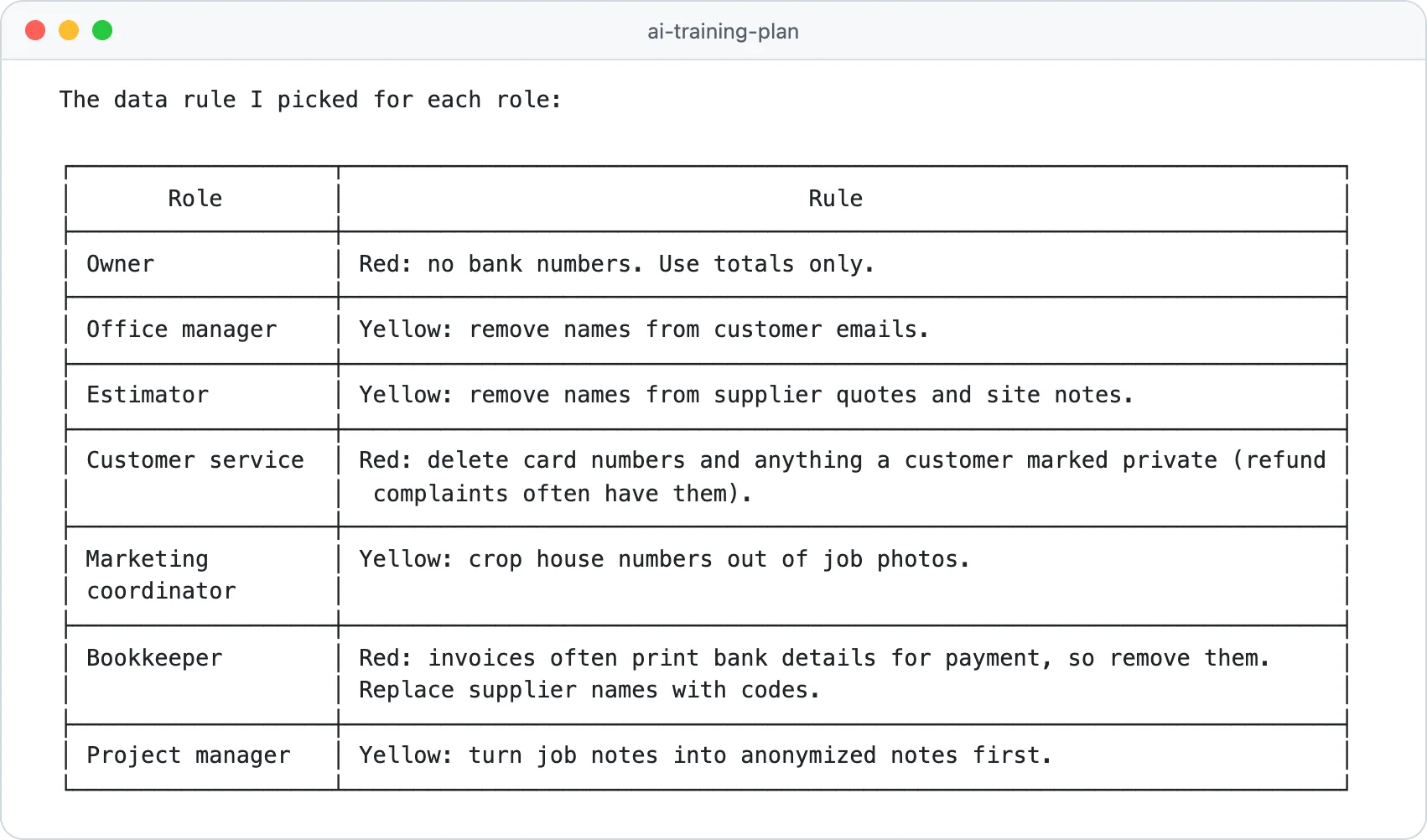
AI training for employees works best as a 30-day program built on each person's real work: one approved tool, a one-page data rule, a weekly practice task per role and a before-and-after time check on day 30. Courses help, but they are the smaller part. In this guide, AI training means teaching your people to use AI tools safely and well, not training AI models.
Search "AI training" and many results are about training AI models, or about jobs labeling data for AI companies. This page is about the other meaning: how a small business or team gets its people using AI safely and productively.
What AI training for employees should cover
Most failed rollouts skip the boring parts. A team that watched ten hours of video but never agreed which tool to use, or what may be pasted into it, ends up with ten private habits and one data leak waiting to happen. Cover these four areas, in this order:
Approved tools
Which AI tools staff may use for work, on which company account, and what is off limits.
Data and privacy rules
What may be pasted in freely, what must be cleaned first and what never goes in.
Prompting
How to brief the AI clearly, give it context and check what comes back.
Real tasks per department
One repeat task per person, practiced every week until it is routine. The plan below gives each role its first task.
Approved tools: pick one per job
Choose one general assistant for everyone and set it up on company accounts, so an admin controls the settings and can remove access when someone leaves. Personal accounts, free browser extensions and meeting bots that join calls on their own are the usual ways company data ends up somewhere you can't see. If you haven't picked the assistant yet, our Claude vs ChatGPT comparison covers the business plans and their privacy settings.
Data and privacy rules: the traffic light
Staff remember three colors better than a ten-page policy. Write your own version and teach it in the first session:
| Color | Rule | Examples |
|---|---|---|
| Green | Paste freely | Your public website text, product sheets, your own drafts |
| Yellow | Remove names and details first | Customer emails, supplier quotes, job photos showing house numbers |
| Red | Never paste | Card or bank numbers, passwords, employee files, signed contracts, anything marked private |
Prompting: one brief everyone uses
Teach one reusable brief instead of a list of tricks. People get better results from the same four parts every time: the task, the context, the format and what to check. Our prompt engineering course guide goes deeper if someone wants more.
Task: [WHAT YOU NEED, IN ONE SENTENCE]
Context: I work as [YOUR ROLE] at [TYPE OF BUSINESS]. The reader is [WHO WILL READ IT]. Here is the material: [PASTE GREEN OR CLEANED YELLOW DATA ONLY]
Format: [LENGTH, TONE, BULLETS OR EMAIL, LANGUAGE]
Before you answer, list anything you had to guess, and mark every price, date or promise so I can check it.
The 30-day AI training plan by role
Training sticks when each person practices on the job they already do every week. Each week has one group session of about 45 minutes and practice on real work in between:
Week 1
Accounts, the traffic light and a timed baseline of each person's task
Week 2
Draft the task with AI, check everything by hand
Week 3
Save the prompts that worked in one shared library
Week 4
Use them for every case that week, then time the task again
Day 30
Review the numbers: keep, fix or drop each use
| Week | Group session | Practice on real work | Done when |
|---|---|---|---|
| 1 | Company accounts and the traffic light, with examples from your business | Time your repeat task three times the normal way | Everyone has a baseline in minutes |
| 2 | The team brief, used live on one person's task | Draft the task with AI and check every line by hand | Each person has one draft they would send after edits |
| 3 | Show and tell: what worked and what the AI got wrong | Save two or three working prompts, each with what to check | The shared prompt library has something from everyone |
| 4 | Edge cases and when to skip AI | Use the saved prompts on every case, then time the task three times | The day 30 numbers are in |
Expect week 2 drafts to need heavy edits; the point of that week is learning what the AI gets wrong in your business. Pick each person's task from this table. The best ones repeat every week, are mostly reading or writing, and are easy to check:
| Role | Task to train on | Week 2 practice | Week 4 target | Always checked by a human |
|---|---|---|---|---|
| Owner or manager | Weekly numbers summary | Draft it from totals you type in, never from bank exports | Two versions, for the bank and the team, from one prompt | Every figure against the books |
| Admin | Scheduling emails | Drafts for confirm, move and delay emails | Three saved replies used all week | Dates and times against the calendar |
| Sales | Site or call notes turned into a quote | A scope of work from cleaned notes | One shared quote prompt with price lines left blank | Prices, measurements and terms |
| Customer support | Replies to common questions | Drafts for the five most common questions | Saved prompts plus a list of fixes | Promises about refunds, warranties or delivery |
| Marketing | Project posts and review replies | Drafts from your own job notes | A week of posts written in one sitting | Claims, names and photo permissions |
| Finance | Invoice and receipt summaries | Summaries with bank details removed first | Keep it only if cleaning the data doesn't eat the gain | Totals and account details |
| Operations | Daily job updates | One version for the customer, one for the crew | Saved prompts for both versions | Dates, safety notes and who does what |
We ran this plan through Claude Code on a made-up remodeling company with nine staff in seven roles. We gave it the company's one-page AI policy and a task list with hours per week, and this was the whole request:
Read AI-POLICY.md and team.csv. Write training-plan.md: a 30 day AI training plan for each role in team.csv. For every role give four weekly checklist items (week 1 to week 4) built on that role's real repeat task, the one data rule from the policy that matters most for that role, and how we measure it on day 30 (minutes per task before and after). Use markdown checkboxes and plain words.It wrote a 138-line plan in about a minute, with a checklist per role. The image at the top of this page is its summary of the data rules: it gave the bookkeeper a red rule because invoices often print bank details, and customer service a red rule because refund complaints often contain card numbers. Those are the judgment calls worth reviewing before you hand the plan out. Our Claude Code course teaches this kind of work on your own files.
Before day 1, tick these off:
0 of 6 done
How to measure the results of AI training
Hours watched and courses completed tell you nothing about the business. Measure the work itself, for each trained task:
- Minutes per task, timed three times before training and three times on day 30, including the human check.
- Errors caught by the human check in week 4, written down with what went wrong.
- Use: how many days in week 4 the person actually used AI on the task.
Here is the day 30 table Claude Code built for the same demo company, from a CSV of made-up timings and the hours in its task list:
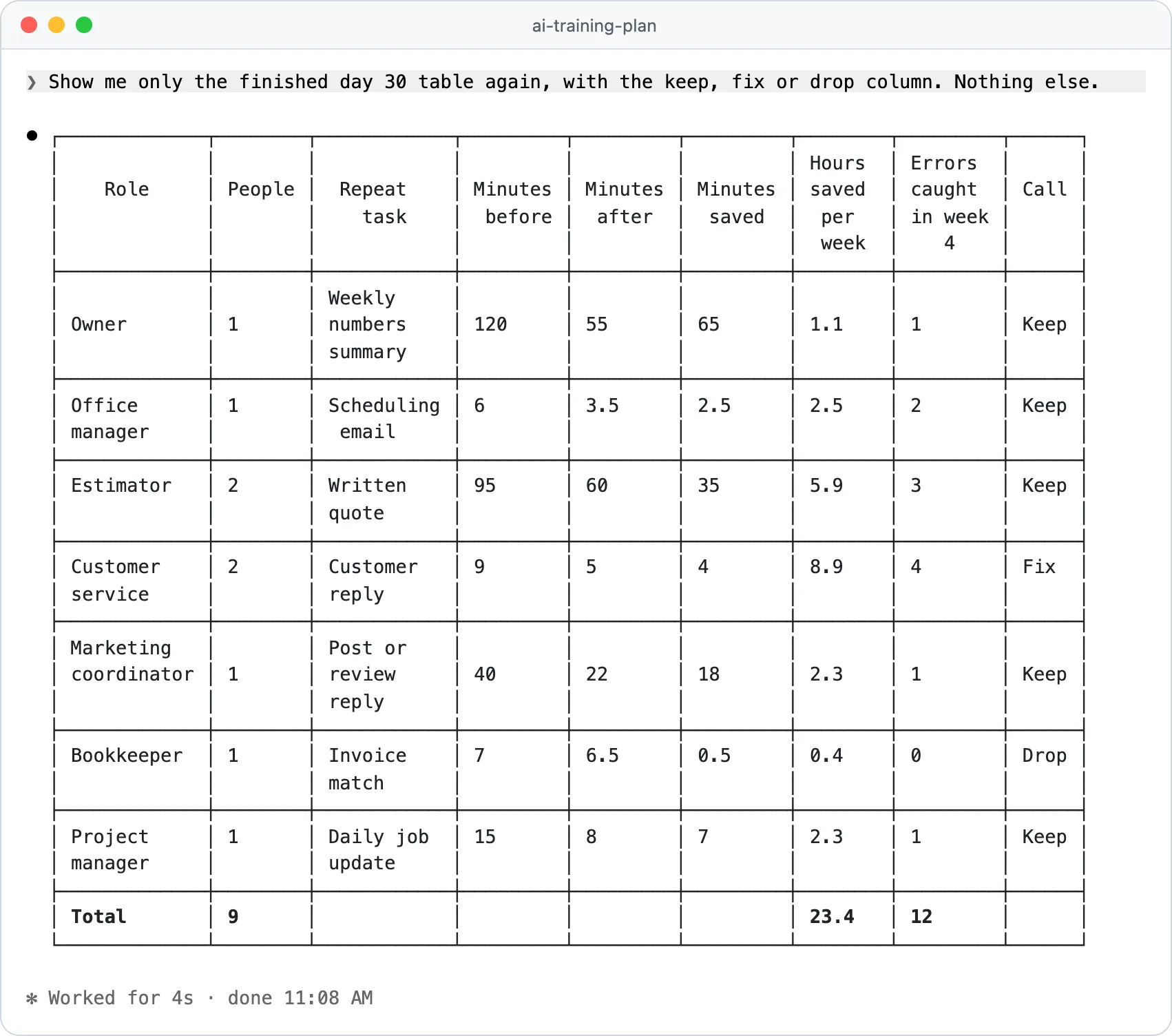
Read the table by role, not by its total. Claude worked out hours saved as hours per week, times the number of people, times the share of minutes saved, which assumes the same number of tasks each week. Then turn each row into a decision:
Keep
Minutes went down clearly and errors stayed low. Move this person on to a second task next month.
Fix
Time went down but the human check is catching a lot. Tighten the prompt and the checks before anyone stops reviewing.
Drop
Barely any time saved, often because cleaning the data eats the gain. Go back to the old way or pick a different task.
The best AI training courses for teams, compared
Courses earn their place for the basics, for people who learn better from a structured lesson, and for anyone who needs a credential. I checked every option below on its official page on October 25, 2026.
| Option | Price, October 2026 | Team size | Good for | Watch out for |
|---|---|---|---|---|
| OpenAI Academy | Free | Anyone with a ChatGPT account | Short, task-based courses: AI Foundations takes 60 to 75 minutes | Badges are not certifications; courses can't be loaded into your own learning system yet |
| Microsoft Learn | Free | Anyone | Teams that run on Microsoft 365 and Copilot | Built around Microsoft's own products |
| Google AI Professional Certificate | Free for US businesses with 500 employees or fewer and a valid EIN; otherwise $49 a month on Coursera in the US and Canada | Per learner | A known credential with hands-on practice | The bundled Workspace and AI Pro trials need enrollment by December 15, 2026 |
| DataCamp Teams | $14 per user a month billed annually, shown as a special price (list $28) | 2 and up | Clear explanations of AI and data concepts | Leans toward data skills more than everyday office tasks |
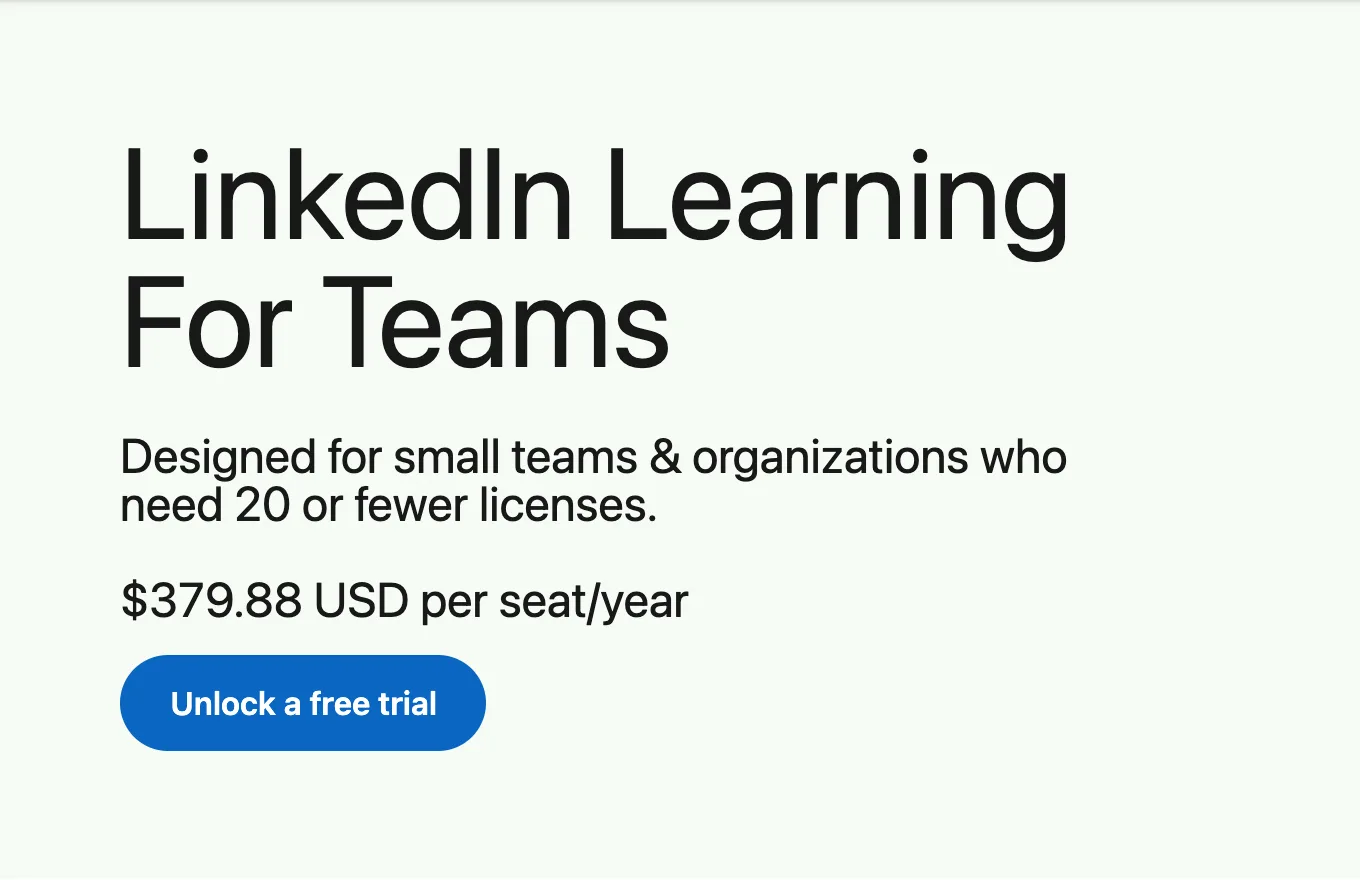
| LinkedIn Learning for Teams | $379.88 per seat a year | 20 seats or fewer; larger groups go to sales | A broad library of 18,000+ courses | You pick and assign the AI courses yourself |
| Udemy Business Team Plan | Per user per year, priced by region (€336 on the page we checked) | 2 to 50 people | 28,000+ courses, including curated AI courses | Its AI-only plans start at 21 or 100 seats |
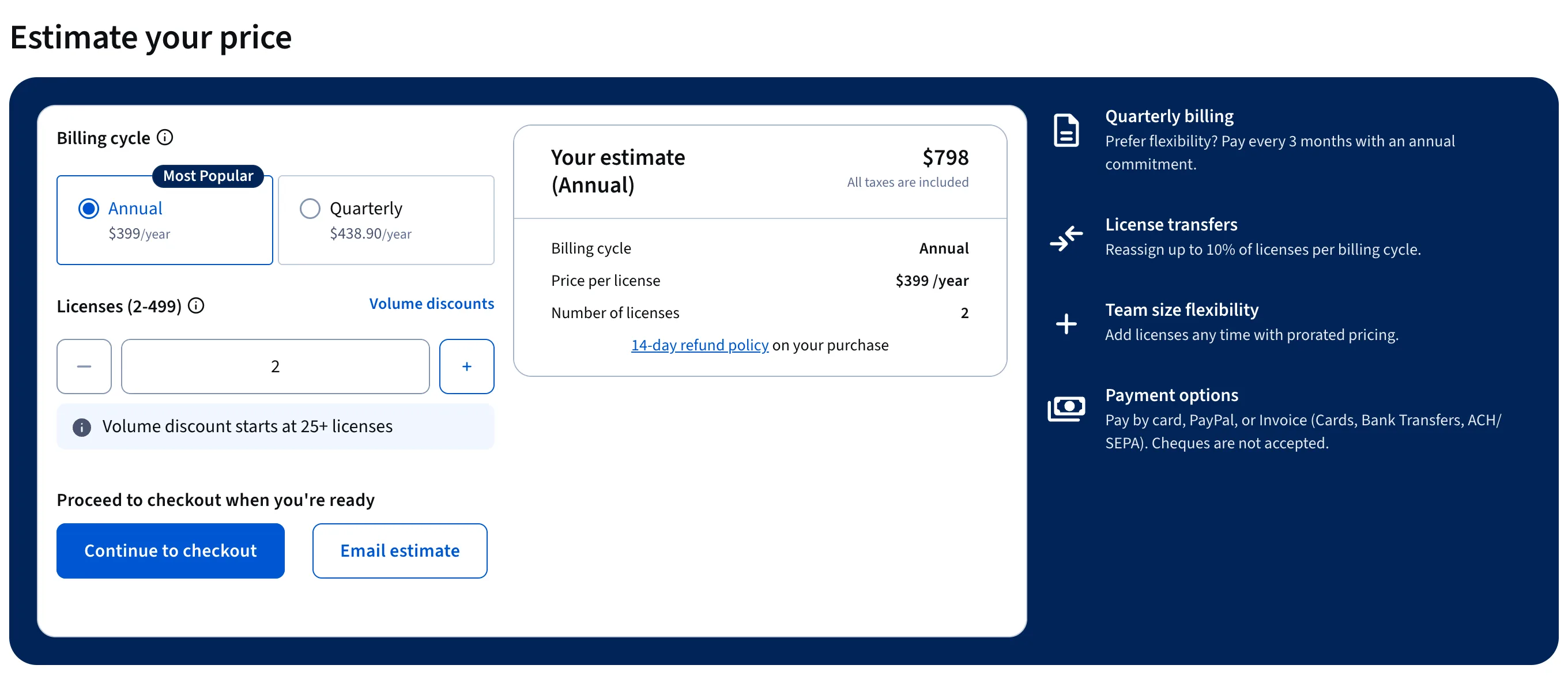
| Coursera for Teams | $399 per user a year, or $438.90 billed quarterly | 2 to 499 licenses | University and Google content | An annual commitment; refunds only within 14 days |
| This 30-day program, in-house | Your time plus the AI tool seats | Any | Training on your own tasks and rules | Needs one person who keeps it going |
| ai school | Early access (pre-order) | Per person | Building websites, AI content and automations yourself | Not a team learning platform; no accredited certificate |
DataCamp's figure is its $14 a month annual special price times 12. Udemy is left out because its Team Plan price changes by region. Checked on each official pricing page on October 25, 2026.
Coursera shows its team price as a live estimate, so you can see the full bill for your headcount before you commit:
LinkedIn Learning publishes one flat seat price for small teams, and its help center says the plan starts with a one-month free trial (LinkedIn Help):
Which option fits your team
There is no single best artificial intelligence training course for every team, so start from the situation. Before you buy any seats, run the five-question test in are AI courses worth it; for individual picks, see the best AI courses for business owners.
- Fewer than 10 people and a tight budget: OpenAI Academy or Microsoft Learn for the basics, plus this 30-day program.
- A US business that wants a credential: Google's free small business offer for the AI Professional Certificate.
- A team that also needs non-AI skills: a library plan such as LinkedIn Learning, Udemy Business or Coursera for Teams.
- Staff who will analyze data: DataCamp Teams.
Where ai school's courses fit
Every team that adopts AI well ends up with one or two people who go further: they build the landing page, set up the automation that files invoices, or make the product video. Our courses are for those people, not a compliance library for the whole staff. The bundle at /ai-course covers Claude Code, websites, AI content and automation; all four courses are in early access, open for pre-order, with no accredited certificate. If you need a credential or seat management for twenty people, one of the platforms above is the better buy.
Quick check0 of 2 correct
Customer service now answers in 5 minutes instead of 9, but the human check caught the most errors of any role, in replies that go straight to customers. What is the right call?
Not quite.
A clear time saving with frequent errors means the use is worth keeping, but only with stronger prompts and the human check still in place.
Which of these belongs in the red category of a staff data rule?
Not quite.
Card and bank numbers, passwords, employee files and anything marked private never go into an AI tool, cleaned or not.
What to do next
Pick the one repeat task per person this week and time it three times the normal way; that baseline is the step most teams skip. Then write your traffic light on one page and book four 45-minute sessions in the calendar. If you want to learn the hands-on side first, our guide to how to learn AI has a 30-day path for you as the person leading the program.
Staff AI training kit: policy, session scripts and scorecard
A fill-in one-page staff AI policy, four 45-minute session agendas for weeks 1 to 4, practice cards for seven roles and a day 30 scorecard with keep, fix or drop rules.
Enter your email and the full section opens right here. You also get a free lesson from the course.
Frequently asked questions
Is AI training mandatory for employees?
In the EU, Article 4 of the AI Act requires companies that use AI systems to take measures that support the AI literacy of their staff; a July 2026 amendment softened the wording but kept the duty. Elsewhere it depends on your industry, your clients' contracts and your insurer, so ask your advisor.
Who should run AI training in a small company?
One person who uses AI every day and knows the business well, often the owner or the office manager, with an hour a week set aside for it. They don't need to be technical. They need to check outputs carefully and keep the shared prompt library tidy.
Do AI training certificates matter for employees?
Mostly for people whose clients or future employers ask for proof. Google's AI Professional Certificate carries a name clients and employers recognize, while OpenAI says its free Academy badges are not certifications. For your own business, a before and after time on a real task proves more.
Should employees use free AI accounts for training?
Free accounts are fine for public practice material, such as OpenAI Academy's exercises. As soon as staff work with customer emails or company files, move them to a business plan where your admin controls the settings and training on your content is off.
How often should we repeat AI training?
Run a short refresher every quarter, and whenever you add a tool or a new kind of task. AI tools change their features several times a year, so a session from last spring can already be out of date.
Keep reading
AI for Small Business (2026): 90-Day Plan and What It Costs
AI for small business, tested on a sample plumbing company: where it saves hours first, a 90-day plan, costs from $0, Google AI and free training for owners.
AI by role · 14 min readBest AI Courses in 2026: 8 Honest Picks for Business Owners
Best AI courses for business owners, with real prices: Google's AI certificate (free if your US small business qualifies), Wharton, DeepLearning.AI and Maven.
Choosing an AI course · 11 min readHow to Learn AI in 2026: A Free 30-Day Plan for Beginners
How to learn AI for free as a beginner, no coding needed: the AI skills to learn first, prompt and context engineering basics and a step-by-step 30-day plan.
Learn AI · 16 min read