Claude Code Plugins: 12 Best Picks and How to Install Them
Twelve plugins picked by job, with each one's install name and what it needs, plus the tokens seven of them add to every session on Claude Code 2.1.303.
By Yotam DahanUpdated 17 min readClaude Code
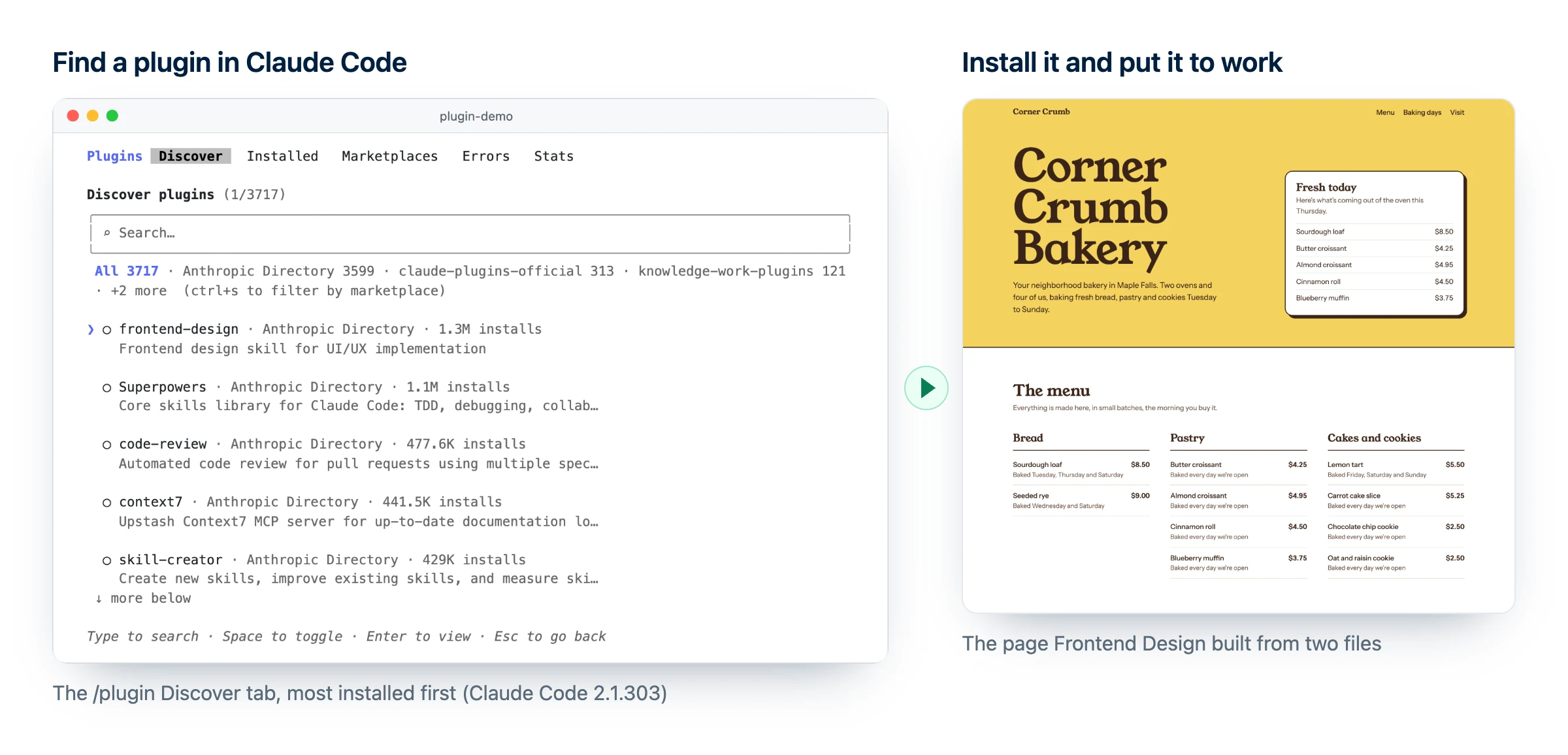
Claude Code plugins are add-on packages that give Claude Code several new abilities in one install: skills, helper agents, automatic hooks and connections to apps such as Canva or HubSpot. For people who don't code, the best place to start is Frontend Design for websites, Marketing and Brand Voice for content, and Small Business for running the company. You install one with /plugin inside a session, pick who gets it, and check its token cost first, because every plugin you leave switched on adds text to every session.
What are Claude Code plugins?
A Claude Code plugin is a folder of skills, agents, hooks, MCP servers or other parts that Claude Code installs and loads as one unit. Most come from a marketplace, a catalog that lists plugins and where to download each one.
Plugins opened in public beta to every Claude Code user on October 9, 2025. Besides skills, agents (helpers Claude can hand a job to), hooks (commands that run on their own at set moments, such as after every edit) and MCP servers, a plugin can now carry newer parts such as themes and output styles. Its skills run with the plugin's name in front, as /plugin-name:skill-name, for example /marketing:email-sequence.
Claude Code plugins vs skills vs MCP servers
Skill
A folder of instructions (SKILL.md) Claude loads when your request matches, such as a brand voice checklist.
MCP server
A connection that gives Claude actions in another app, such as creating a Canva design.
Plugin
The installable package: skills, agents, hooks and MCP servers that install and update together.
So you never choose between them: the plugin is the box, and skills and MCP servers are what's inside. To write your own skill, see how to create a Claude skill; for the connection side, read what an MCP server is.
The Claude Code plugin marketplace: official, community and demo
Every install name has two parts: the plugin, then @ and its marketplace, as in frontend-design@claude-plugins-official. That marketplace is where official Claude Code plugins live, Anthropic's own plus many from partners such as Canva, Vercel and HubSpot, and Claude Code adds it the first time you start an interactive terminal session.
Anthropic also publishes topic marketplaces you add yourself, like knowledge-work-plugins, home of Marketing, Brand Voice and Small Business. Third-party marketplaces get no review from Anthropic.
| Marketplace | Name after @ | How you get it | Auto-updates by default |
|---|---|---|---|
| Official | claude-plugins-official | Added the first time you start Claude Code in a terminal | Yes |
| Knowledge work (Anthropic) | knowledge-work-plugins | /plugin marketplace add anthropics/knowledge-work-plugins | No |
| Community | claude-community | /plugin marketplace add anthropics/claude-plugins-community | No |
| Third-party | The name in its marketplace.json | /plugin marketplace add owner/repo | No |
To browse the Claude Code marketplace on the web instead, Claude Marketplace on claude.com lists plugins with their install counts and marks some Anthropic verified, though a missing badge doesn't mean a plugin is unsafe. In Claude Code 2.1.303, the /plugin Discover tab also lists Anthropic's directory next to your marketplaces.
plugins listed on Claude Marketplace (claude.com)
plugins in Anthropic's official marketplace
installs of Frontend Design, the most installed
Counts from claude.com/marketplace/plugins and Claude Code's /plugin Discover tab, checked October 21, 2026.
The 12 best Claude Code plugins, picked by job
I picked these for people who don't code: each works without writing code, comes from a known publisher, and does one concrete job you can try today. Tokens is what a plugin adds to every session, from claude plugin details on Claude Code 2.1.303, not counting MCP tools.
For everyone
- Skill Creator (
skill-creator@claude-plugins-official, by Anthropic): creates, improves and tests skills, and tunes their descriptions so Claude picks them at the right moment. Try: turn your weekly client report into a skill. Needs: nothing. Tokens: about 114. - CLAUDE.md Management (
claude-md-management@claude-plugins-official, by Anthropic): a skill that audits your CLAUDE.md, the file of standing rules Claude reads every session, and a/claude-md-management:revise-claude-mdcommand that saves what you learned once you approve. Try: run the command at the end of each session on your site project. Needs: nothing. Tokens: about 177.
For website builders
- Frontend Design (
frontend-design@claude-plugins-official, by Anthropic): the most installed plugin, with more than a million installs. This frontend design Claude Code plugin is one skill that loads when you ask for a page, and it pushes a clear visual direction, typography and colors instead of the generic AI look. Try: the bakery test below. Needs: nothing. Tokens: about 80, plus about 2,700 each time it runs. - Playwright (
playwright@claude-plugins-official, by Microsoft): an MCP server that drives a real, visible browser to open pages, click, fill in forms and take screenshots. Try: submit your contact form and screenshot the result at phone width. Needs: Node.js 20 or newer. Tokens: about 0 in the estimate, because MCP tools are counted separately. - Vercel (
vercel@claude-plugins-official, by Vercel): 33 skills, 3 agents and 4 commands, deploy among them, according to Vercel's plugin docs. Try: type/verceland pick the deploy command to put a finished page live. Needs: a Vercel account, Node.js 18 or later, and Bun. Tokens: not measured.
Here is Frontend Design on a real job: we gave it the menu and price files of a demo bakery and one prompt.
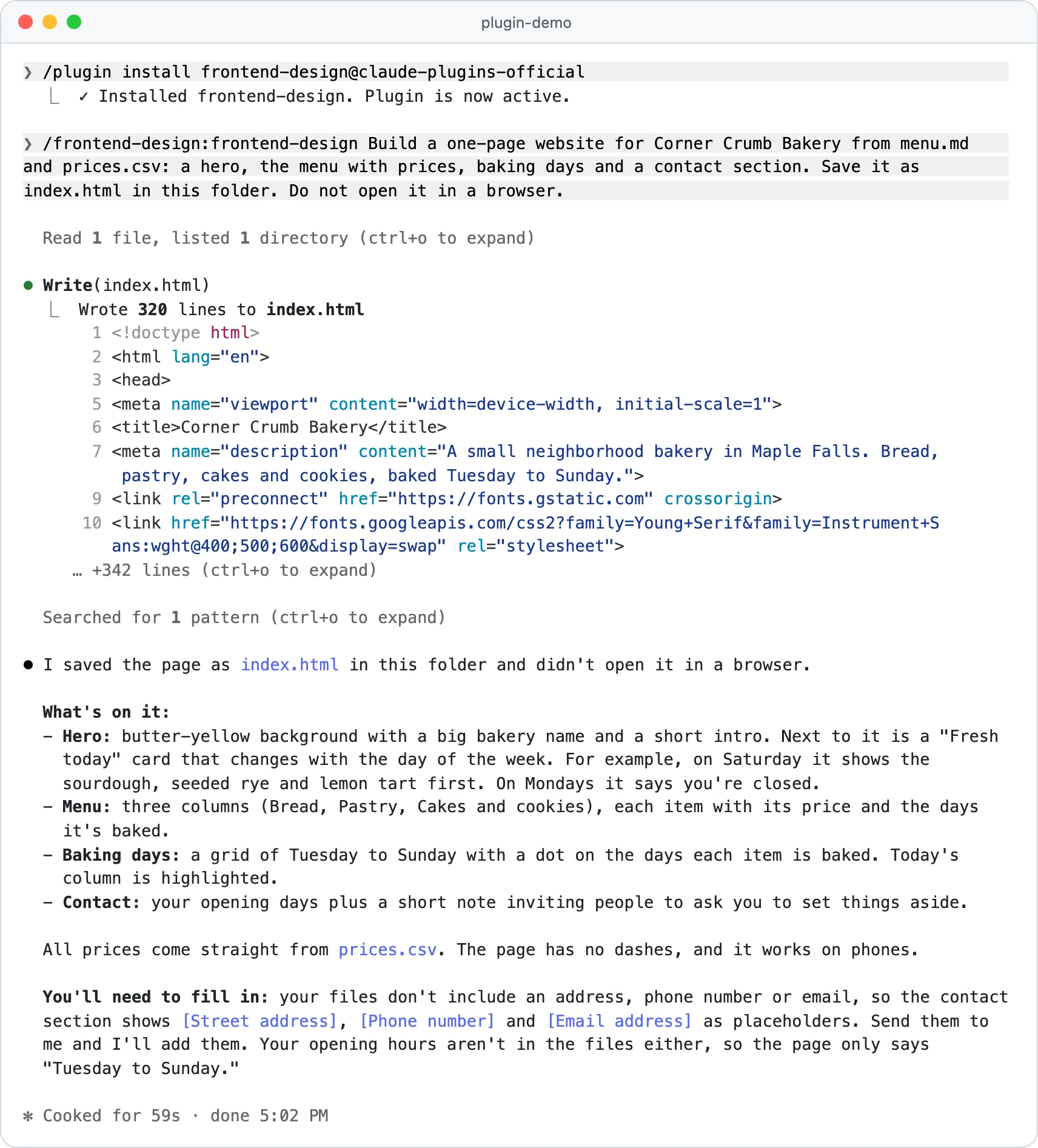
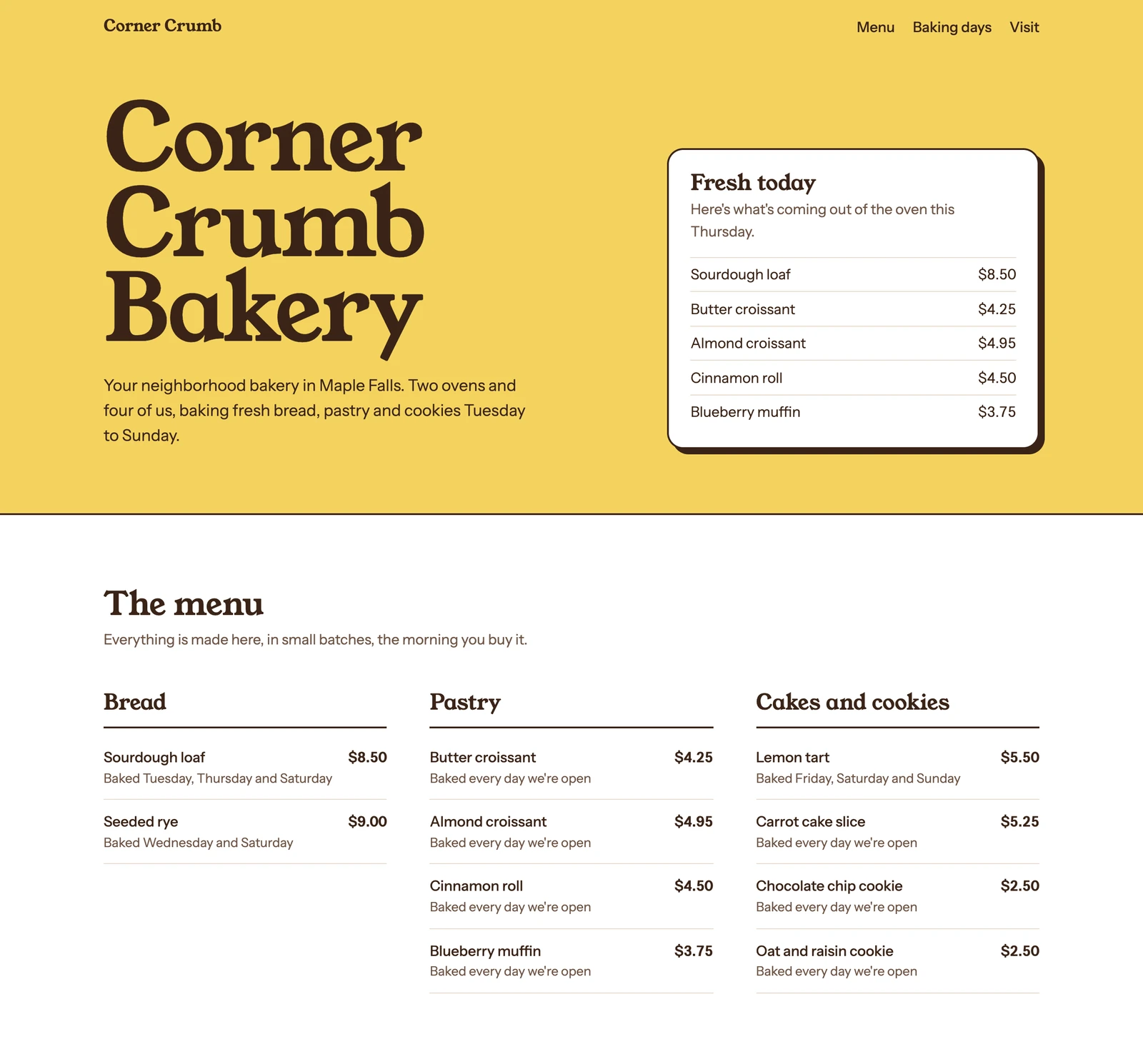
To try it on your own business, put your menu or service list and prices in a folder, open Claude Code there, and paste this:
Use the frontend-design skill to build a one-page site for [YOUR BUSINESS] from [YOUR FILES, e.g. menu.md and prices.csv]. Include a hero, [YOUR MAIN OFFER] with prices, opening hours and a contact section. Save it as index.html in this folder and tell me which design direction you chose and why.For marketers
- Marketing (
marketing@knowledge-work-plugins, by Anthropic): 8 skills, from campaign plans and competitive briefs to SEO audits and email sequences, plus 13 optional connectors such as HubSpot, Canva and Klaviyo. Try:/marketing:email-sequencefor a five-email welcome flow. Needs: nothing to start. Tokens: about 874. Our guide to Claude Code for marketers goes deeper. - Brand Voice (
brand-voice@knowledge-work-plugins, built by Tribe AI):/brand-voice:discover-brand,/brand-voice:generate-guidelinesand/brand-voice:enforce-voice, backed by 5 agents. Try: feed it your 10 best emails and your homepage copy, get written voice guidelines, then check new drafts against them. Needs: nothing to start. Tokens: about 2,599, mostly from the agents. - Canva (
canva@claude-plugins-official, by Canva): 6 skills on Canva's MCP server for editing existing designs, resizing for social platforms, bulk creating from a spreadsheet, brand kit checks, design feedback and applying comments. Try: resize one promo for Instagram, LinkedIn and Facebook. Needs: a Canva account; bulk create needs Canva Enterprise. Tokens: not measured. - Firecrawl (
firecrawl@claude-plugins-official, by Firecrawl): scrapes, crawls, searches and maps websites into clean text. Try: pull five competitors' pricing pages into one table. Needs: an API key; the free plan has 1,000 credits a month and a basic page costs 1 (Firecrawl pricing). Tokens: not measured.
These four speed up writing, design changes and research. Creating the images and videos, and automating the follow-up, is what our AI marketing course covers, now in early access.
For business owners
- Small Business (
small-business@knowledge-work-plugins, by Anthropic): 44 skills in version 1.35.1, such as a Monday brief, invoice chasing and a cash-flow snapshot, plus more than 30 connectors. Every workflow starts in approval mode, so nothing is sent or paid until you say so. Try: ask "who owes me money?" and approve the reminder drafts. Needs: nothing to start; it works from CSV and PDF files. Tokens: about 11,679, the heaviest here, so keep it at local scope. Setup is in Claude Code for small business. - HubSpot Sales (
hubspot-sales@claude-plugins-official, by HubSpot): daily brief, call prep, follow-up drafts, contact import, call logging and pipeline review, writing back to HubSpot. Try: a morning brief of deals that went quiet. Needs: a HubSpot account; HubSpot says its Claude connector is free. Tokens: not measured. - Zapier (
zapier@claude-plugins-official, by Zapier): runs Zapier actions across 9,000+ apps without building a Zap. Try: add a new lead to a Google Sheet and post it in Slack. Needs: a Zapier account; each tool call uses two tasks from your plan (Zapier MCP). Tokens: not measured.
Also worth a look: Build with WordPress (by WordPress.com), Wix, Notion, Figma, and Anthropic's Design plugin for UX copy and accessibility reviews.
Here is the full Claude Code plugins list from this page, side by side:
| Plugin | Install name | Best for | Needs | Always-on tokens |
|---|---|---|---|---|
| Skill Creator | skill-creator@claude-plugins-official | Everyone | Nothing | ~114 |
| CLAUDE.md Management | claude-md-management@claude-plugins-official | Everyone | Nothing | ~177 |
| Frontend Design | frontend-design@claude-plugins-official | Websites | Nothing | ~80 |
| Playwright | playwright@claude-plugins-official | Websites | Node.js 20+ | ~0 + MCP tools |
| Vercel | vercel@claude-plugins-official | Websites | Vercel account, Node.js 18+, Bun | Not measured |
| Marketing | marketing@knowledge-work-plugins | Marketing | Nothing to start | ~874 |
| Brand Voice | brand-voice@knowledge-work-plugins | Marketing | Nothing to start | ~2,599 |
| Canva | canva@claude-plugins-official | Marketing | Canva account | Not measured |
| Firecrawl | firecrawl@claude-plugins-official | Research | Firecrawl API key | Not measured |
| Small Business | small-business@knowledge-work-plugins | Owners | Nothing to start | ~11,679 |
| HubSpot Sales | hubspot-sales@claude-plugins-official | Sales | HubSpot account | Not measured |
| Zapier | zapier@claude-plugins-official | Automation | Zapier account | Not measured |
How to install Claude Code plugins
The safest way is inside a Claude Code session, because you see what a plugin contains before anything installs.
Marketplace
Claude Code looks the plugin up in a catalog you added once
Details pane
You see what it will install, its token cost and a trust warning
Scope
You choose who gets it: you, the whole project, or you in this folder
Active
It works right away, or after /reload-plugins
- Open Claude Code. In your project folder, type
claude. - Name the plugin and its marketplace. Type
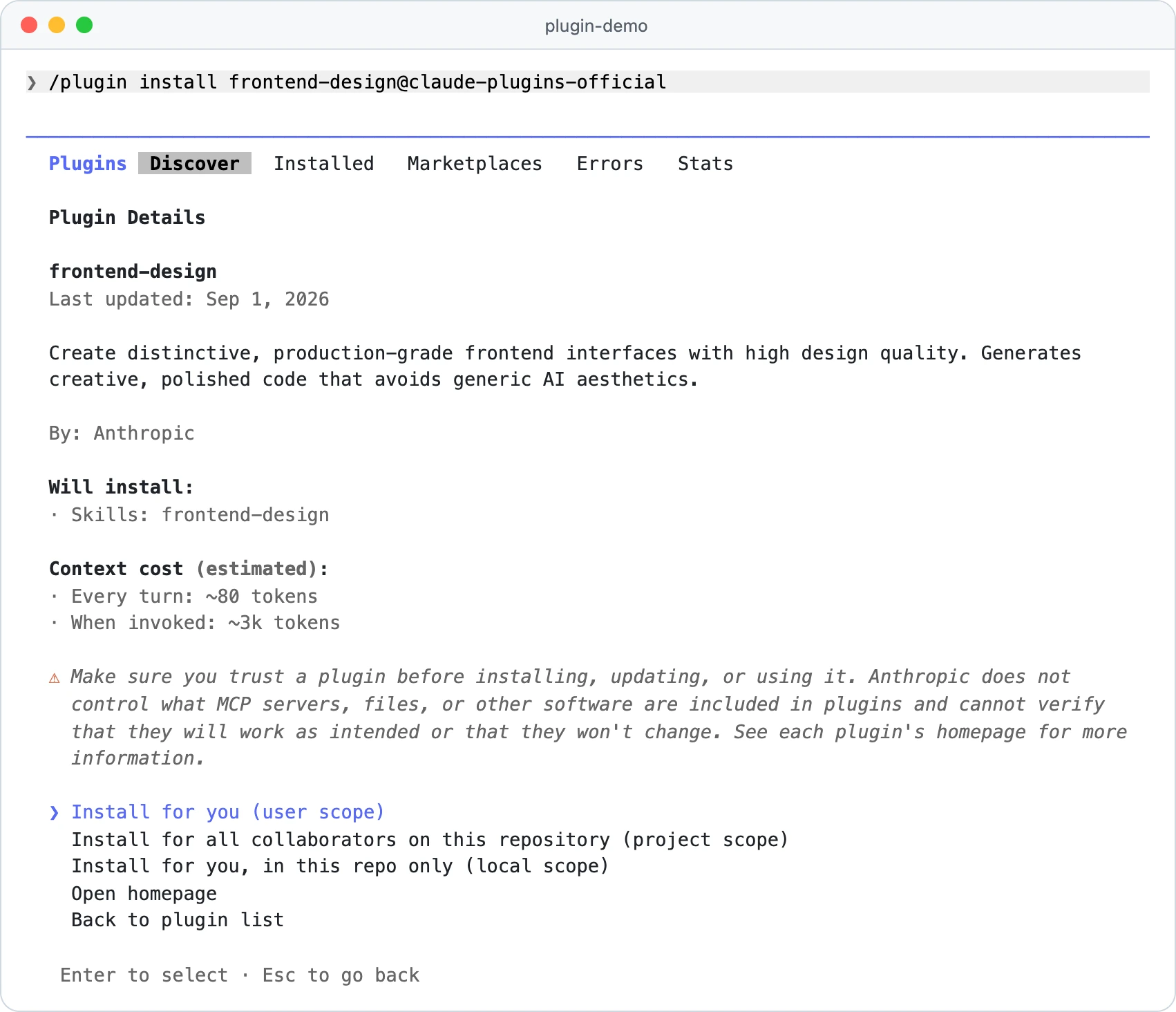
/plugin install frontend-design@claude-plugins-official, which opens the plugin's details and installs nothing yet./pluginalone opens the Discover tab for browsing, but for official plugins the Context cost only shows when you name the marketplace like this, or come from the Marketplaces tab. - Read the details. Check Will install and Context cost, which gives two numbers: Every turn and When invoked.
- Choose a scope. Pick who gets the plugin, using the scope table further down.
- Check it worked. Type
/and look for/frontend-design:frontend-design, or open the Installed tab.
Prefer the terminal? The same claude plugin commands work in Terminal on Mac and Linux and in PowerShell on Windows. Run the first one from your project folder:
claude plugin install frontend-design@claude-plugins-official --scope local
claude plugin marketplace add anthropics/knowledge-work-plugins
claude plugin install marketing@knowledge-work-plugins
Shell installs skip the details pane, default to user scope unless you add --scope, and load in your next session or after /reload-plugins. Since Claude Code 2.1.292, one command can add a marketplace and install from it: claude plugin install brand-voice --marketplace anthropics/knowledge-work-plugins. On a new computer where you have never opened an interactive session, run claude plugin marketplace add anthropics/claude-plugins-official first.
Pick an install scope
| Scope | Who gets it | Saved in | Use it for |
|---|---|---|---|
| User (shell default) | You, in every project on this computer | ~/.claude/settings.json | Light plugins you use everywhere, like Skill Creator |
| Project | Everyone working in this repository | .claude/settings.json (commit it) | A shared site project; each teammate still installs once |
| Local | You, in this folder only | .claude/settings.local.json | Heavy plugins like Small Business, kept to one folder |
If one plugin is set at several scopes, local beats project and project beats user.
Install plugins in the desktop app and VS Code
- Desktop app: in a local or SSH session on the Code tab, click + next to the prompt box, then Add plugins (or Plugins, then Browse plugins), and pick a plugin and scope.
- VS Code: type
/pluginsto open Manage plugins. If the Plugins tab is empty, addanthropics/claude-plugins-officialon the Marketplaces tab. - One set of settings: the terminal, the desktop app's local sessions and VS Code share settings files, so a user-scope install shows up in all three.
How many tokens each plugin adds to every session
Every enabled plugin puts the names and descriptions of its skills, agents and commands into Claude's context (the text Claude reads before it answers) in every session, used or not. That always-on text adds to your token usage all the time; a skill's full instructions load only when it runs. MCP tool definitions aren't in the estimate (run /context and read "MCP tools"), and your only levers are disabling or uninstalling, as Anthropic's plugin cost docs explain.
Claude Code's own estimate from claude plugin details, Claude Code 2.1.303, measured October 21, 2026 (Small Business 1.35.1, Marketing 1.2.0, Brand Voice 1.1.0). MCP tool definitions are not included.
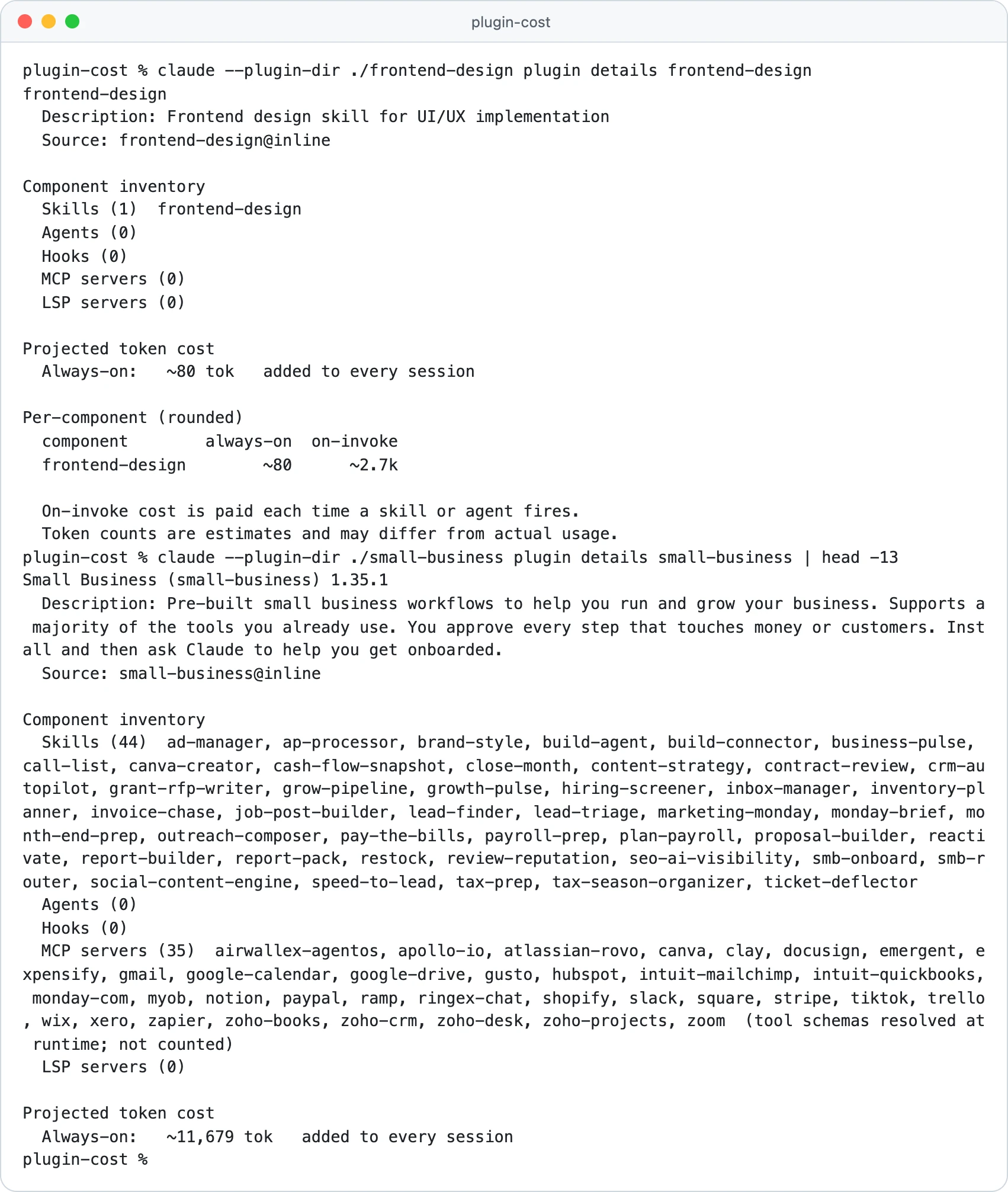
Check any installed plugin the same way:
claude plugin details frontend-design
Projected token cost
Always-on: ~80 tok added to every session
Per-component (rounded)
component always-on on-invoke
frontend-design ~80 ~2.7k
- Find idle plugins: the Installed tab groups plugins unused for at least 14 days and 10 sessions under "Not used recently".
- Ask for a checkup:
/doctorrecommends disabling plugins you don't use, and/usage(Pro, Max, Team and Enterprise) shows each plugin's share of recent usage. - Keep heavy ones local: install Small Business or Brand Voice at local scope in the one folder that needs them.
Are Claude Code plugins safe? Check these 6 things first
Anthropic's plugin security docs warn that a plugin "can execute arbitrary code on your machine with your user privileges." Hooks, background monitors and the local servers a plugin starts run outside Claude Code's sandbox; your permission rules only cover the actions Claude itself takes. Every marketplace, Anthropic's included, gets the same trust warning.
Anthropic reviews the plugins in its directory: each version gets automated validation and a security scan, and a person checks every new listing. Third-party marketplaces and plugins you upload yourself skip that review, so run through this list first:
0 of 6 done
Update, disable or uninstall a plugin
To uninstall Claude Code plugins, or just pause one, open the Installed tab of /plugin: press Space to disable a plugin without removing it, or open it for Update now and Uninstall. There's no update-all command, but the Marketplaces tab has Update marketplace. Knowledge-work plugins don't auto-update, so update those by hand.
claude plugin update marketing@knowledge-work-plugins
claude plugin disable small-business@knowledge-work-plugins
claude plugin uninstall small-business@knowledge-work-plugins --scope local
- Name the scope: the shell's
uninstallacts on user scope unless you add--scope, whiledisablefinds the scope on its own. - Updates apply later: an update made from the shell loads in your next session, or after
/reload-plugins. - Shared projects: when a project turned the plugin on, Uninstall asks whether to disable it just for you (y) or uninstall it for everyone (u).
- Leftovers: old files stay 14 days before Claude Code cleans them up, and removing a marketplace uninstalls every plugin from it.
Claude Cowork plugins and the Claude app
In claude.ai and the Claude desktop app, plugins live under Customize > Plugins: browse on Discover, or use Add to add a marketplace or upload a plugin. Directory plugins appear on Pro, Max, Team and Enterprise.
A plugin added there is saved to your account and reaches Claude Code as <name>@synced the next time you start a session signed in with that account (Claude Code 2.1.273 or later). Plugins installed from the Claude Code command line stay on that computer. Adding a plugin doesn't connect its connectors either, and each service may need its own paid plan.
Since September 16, 2026, Cowork has been folding into the main Claude chat in stages, Pro and Max first, so some accounts still show separate Chat and Cowork options; Anthropic's plugin docs still call the task side Cowork. The table shows which parts of Claude Code plugins also work in Chat and Cowork, per Anthropic's platform support page, and our Claude Cowork vs Claude Code comparison helps you pick between them.
| Part of a plugin | Chat | Cowork | Claude Code | Note |
|---|---|---|---|---|
| Skills | Yes | Yes | Yes | |
| Commands | Partial | Yes | Yes | Chat loads them as skills |
| Agents and hooks | No | Yes | Yes | |
| Remote connectors | Yes | Yes | Yes | In Chat and Cowork, connect each from the plugin's Connectors tab |
| Local MCP servers | No | Partial | Yes | Cowork only when the session runs on your computer |
bin/ programs | No | No | Yes | Chat and Cowork refuse the whole plugin |
| LSP servers, themes, output styles | No | No | Yes |
Quick check0 of 3 correct
You only need the Small Business plugin in your bookkeeping folder. Which scope fits?
Not quite.
Local scope turns it on for you in that folder only, so its 11,000-plus tokens don't ride along in every other project.
A tutorial tells you to run /plugin marketplace add anthropics/claude-code. What do you get?
Not quite.
The official marketplace is claude-plugins-official, and Claude Code adds it for you.
Which command shows how many tokens a plugin adds to every session?
Not quite.
Its Always-on line is the estimate for every session where the plugin is enabled.
What to do next
Make a test folder, install Frontend Design at local scope, and ask it for a one-page site for your business. Run claude plugin details frontend-design so you know what it costs, then add one plugin for your main job rather than five at once. If you want a guided path from your first install to client-ready work, the Claude Code course is open for early access.
Claude Code plugin starter kit: 4 stacks and a monthly audit
Install commands for four plugin stacks by job, a 10-point check before any install, and a 15-minute monthly audit that keeps your token cost down.
Enter your email and the full section opens right here. You also get a free lesson from the course.
Frequently asked questions
Where are Claude Code plugins installed?
In your home folder, under ~/.claude/plugins/cache/ with one folder per marketplace, plugin and version, and a record of each install in ~/.claude/plugins/installed_plugins.json. Whether a plugin is switched on is saved separately, in the settings file of the scope you chose.
Does Claude Code use plugins automatically?
Mostly. Claude loads a plugin's skills on its own when your request matches their descriptions, hooks fire on their events, and MCP tools are there whenever a task needs them. You can also run any of its skills or commands yourself by typing /plugin-name:skill-name.
Are Claude Code plugins free?
The plugins in Anthropic's marketplaces cost nothing to install, but the work they do counts toward your Claude plan or API usage like any other request. Some connect to services that need their own account or paid plan, such as Firecrawl credits or Zapier tasks.
How do I install a Claude Code plugin from GitHub?
Add the repository as a marketplace with /plugin marketplace add owner/repo, then install with /plugin install plugin-name@marketplace-name. The part after the @ is the name in the repository's marketplace.json, which Claude Code prints when it adds it, and it can differ from the repository name.
Why does Claude Code say /plugin isn't available in this environment?
You are in a non-interactive run such as claude -p, where the plugin panel can't open. Plugins you already installed still load there; install and manage them with claude plugin commands in your terminal instead.
Is a Claude Code plugin the same as the VS Code extension?
No. The VS Code extension and the JetBrains plugin let you run Claude Code inside your code editor, while a Claude Code plugin adds skills, agents, hooks or connections to Claude Code wherever it runs.
Keep reading
How to Create Claude Skills: 6 Steps and a SKILL.md Example
How to create a Claude skill: write SKILL.md, test it (we ran 18 trigger tests), upload it to the Claude app or let Claude write it, and fix what breaks.
Claude Code · 15 min readWhat Is an MCP Server? Model Context Protocol + 10 Examples
What is an MCP server? The Model Context Protocol in plain English, MCP vs API, 10 servers worth connecting, and safe setup in Claude Code and Claude Desktop.
Claude Code · 16 min readClaude Code Usage Limits 2026: The 5-Hour and Weekly Caps
Claude Code usage limits: how the 5-hour and weekly caps work on Pro, Max and Team, when they reset, how to check your usage and 8 ways to save tokens.
Claude Code · 15 min read