ChatGPT Alternatives (2026): 14 Free and Paid Picks
The best ChatGPT alternative depends on why you're leaving, and for ads or training the fix may be a setting inside ChatGPT. If you still switch, pick Claude for writing (Pro $20 a month), Gemini for Google apps (from $4.99), Microsoft Copilot for Office (Microsoft 365 from $9.99 a month), Perplexity for answers with sources (Pro $20), and Duck.ai, Proton Lumo or a local model for privacy.
By Yotam DahanUpdated 25 min readClaude Code
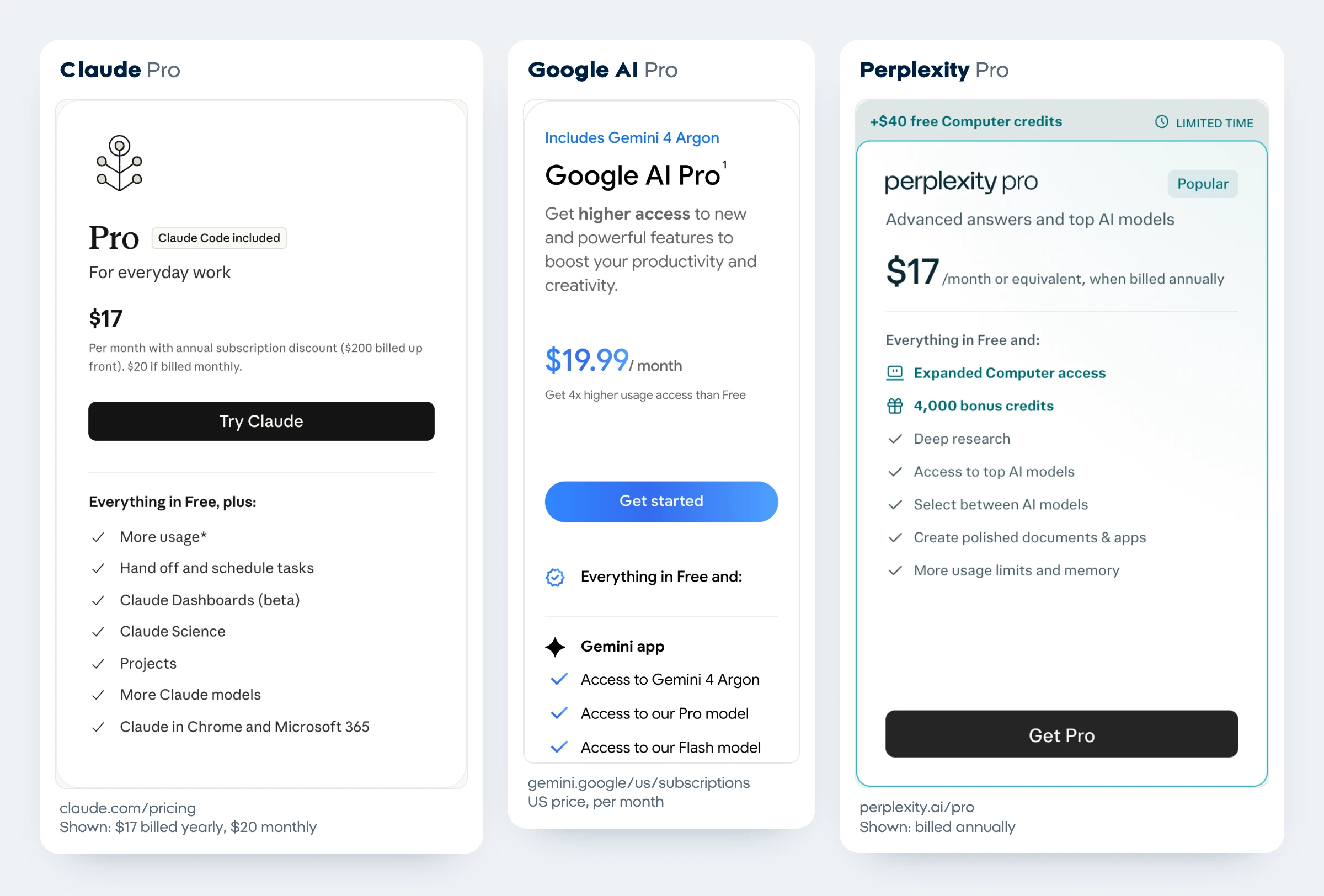
The best ChatGPT alternatives depend on why you want to leave: ads, training on your chats, limits, price or the kind of work you do. Claude (Pro $20 a month) suits writing and long documents, Gemini suits Gmail and Google Docs (Google AI Plus from $4.99), Microsoft Copilot suits Word and Excel (free, or Microsoft 365 Personal at $9.99 a month), and Perplexity gives answers with sources. For privacy, Duck.ai, Proton Lumo or a model on your own computer through Ollama or LM Studio go furthest.
Why people look for a ChatGPT alternative
The reasons to look for a ChatGPT alternative come down to five: ads, training on your chats, the bill, the answers themselves and where your work lives. The first two can be fixed inside ChatGPT.
- Ads. OpenAI started testing ads on Free and Go in the US on February 9, 2026; Plus, Pro, Business, Enterprise and Edu have none, and Free users can switch to an ads-free mode with fewer messages and no image generation or deep research (Ads in ChatGPT).
- Training on your chats. On Free, Plus and Pro, data sharing is on by default. Turn off "Improve the model for everyone" in Settings > Data controls, or use Temporary Chat, which isn't used for training and is kept up to 30 days (Data controls).
- The bill. Go costs $8 a month, Plus $20 and Pro from $100, all month to month: OpenAI offers no yearly billing on these plans (ChatGPT Go).
- The answers. Some people prefer another model's writing, or want a source behind every claim.
- Where your work lives. Gemini sits inside Gmail and Docs, Copilot inside Word, Excel and Outlook.
a month for ChatGPT Go, which may show ads
of the 8 chat tools we tried answered a business prompt with no account
a month for Google AI Plus, tied for the cheapest paid plan here
From OpenAI's help center, Google's US plans page and our own test, all on October 27, 2026.
Pick a ChatGPT alternative by your reason for leaving
Start from the reason, not the tool. Five of the eleven reasons below have something to try inside ChatGPT first.
| Why you're leaving | Try first, inside ChatGPT | Switch to | Cheapest paid start |
|---|---|---|---|
| You don't want ads | Plus ($20) has none; Free has an ads-free mode with fewer messages | Claude, which Anthropic says will remain ad-free | $20 (Claude Pro; $17 billed yearly) |
| You don't want your chats used for training | Turn off "Improve the model for everyone", or use Temporary Chat | Duck.ai, Proton Lumo, Brave Leo, or a local model in Ollama or LM Studio | $0 |
| You want a smaller bill | Go at $8, which may show ads | Google AI Plus, or Microsoft 365 Personal if you also want Office | $4.99 (Google AI Plus) |
| You write and edit long documents | None | Claude | $20, or $17 billed yearly |
| You need sources you can check | ChatGPT's search | Perplexity | $20, or $17 billed yearly |
| You work in Gmail and Google Docs | None | Gemini | $4.99 (AI Plus); $19.99 for Gemini 4 Argon |
| You work in Word, Excel and Outlook | ChatGPT's Word, Excel and PowerPoint extensions | Microsoft Copilot | $9.99 a month (Microsoft 365 Personal) |
| You want news and live posts | None | Grok | $8 (Plus) |
| You want several companies' models in one place | None | Poe, Perplexity or Duck.ai | $4.99 (Poe's starting price) |
| Your files must stay on your computer | None | Ollama or LM Studio | $0 plus your hardware |
| You want your data kept in Europe | None | Mistral Vibe or Proton Lumo | $12.99 (Lumo Plus) |
USD a month, checked on each vendor's page on October 27, 2026. Paying month to month, the cheapest paid plan of each line up like this:
Month-to-month list prices from each vendor's page on October 27, 2026. Yearly billing lowers Claude ($17 a month), Perplexity ($200 a year), Microsoft 365 ($99.99 a year), Lumo ($9.99 a month), Mistral (20% off) and DuckDuckGo ($99.99 a year). DeepSeek has no paid chat plan, and Ollama and LM Studio sell cloud use from $20.
Which ChatGPT alternatives work without an account? Our test
Four of the eight chat tools we tried answered a real business prompt with no account on October 27, 2026: ChatGPT itself, Gemini, Perplexity and Proton Lumo. Microsoft Copilot, Meta AI and Grok asked us to sign in or sign up first, and Duck.ai showed a human check, which we didn't solve, so we stopped there.
Method: a fresh Chrome browser with no account, located in Israel, one run per tool. We typed the same prompt into each public chat box: "Write a 3-line reply to a customer whose order is 5 days late, offering a 10% discount." We saved each page when its answer stopped changing. Claude, DeepSeek and Poe opened on a sign-in page, so we didn't send them the prompt, and Mistral Vibe asked us to accept its terms before the first message, so we stopped there too.
| Tool | Answered without an account? | What happened | Long dash in the reply | Said the discount was already applied |
|---|---|---|---|---|
| ChatGPT | Yes | Three sentences, discount on the next purchase, then offered a warmer or shorter version | No | No |
| Gemini | Yes | A greeting with [Customer Name] and three lines; added "unexpected shipping delays" and "your package is on its way", neither of which we told it | Yes | Yes |
| Perplexity | Yes | Three sentences, and a promise of updates until the order arrives | Yes | Yes |
| Proton Lumo (guest) | Yes | Three sentences, but written as if the order had already arrived | Yes | No |
| Grok | No | Took the prompt, then showed a "Continue your conversation" sign-up card instead of an answer | n/a | n/a |
| Meta AI | No | Sending the prompt opened a Meta login page | n/a | n/a |
| Microsoft Copilot | No | copilot.microsoft.com redirected to a sign-in page with no chat box | n/a | n/a |
| Duck.ai | No | After its privacy consent, a "select all squares containing a duck" check appeared; we didn't solve it | n/a | n/a |
One run each, so read it as a snapshot: answers change from run to run, and logged-out access depends on your country and network.
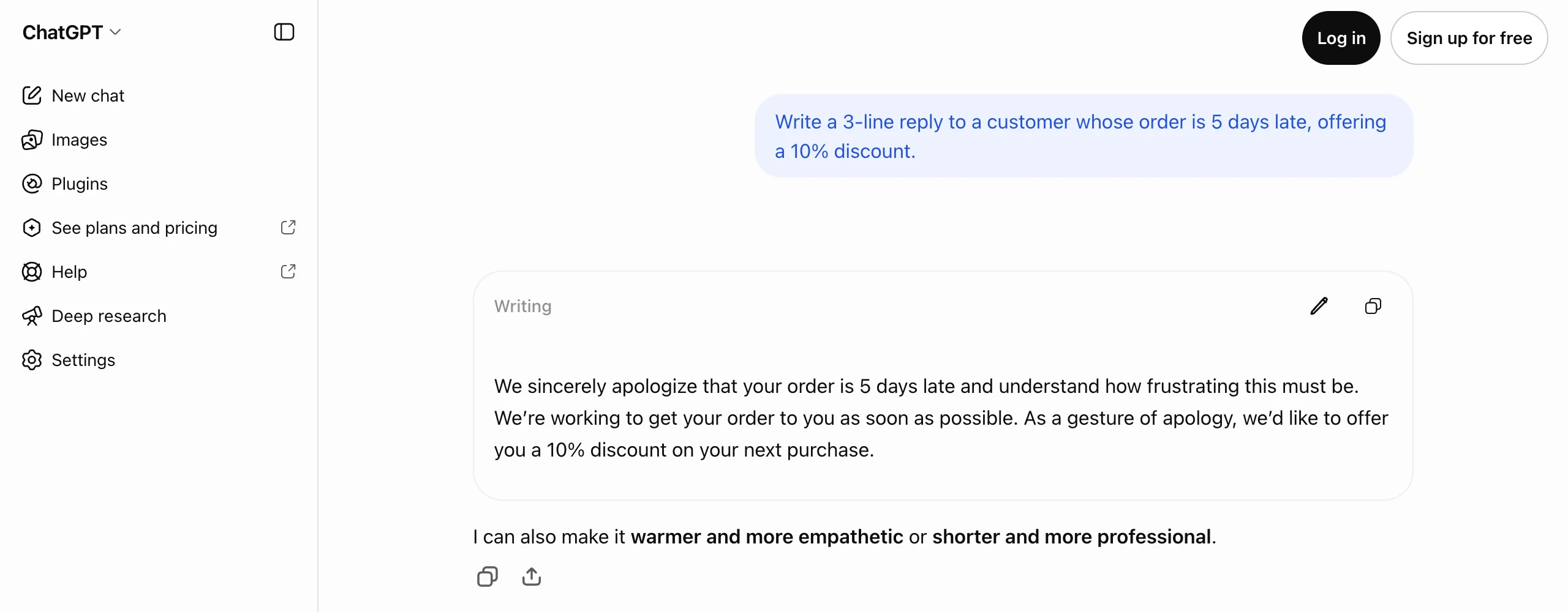
All four drafts were usable after a quick edit, and the free tools wrote about as well as ChatGPT here. The difference was in what they assumed: two told the customer the discount was already applied, and two added facts we never gave. Whichever tool you pick, put the facts and the limits in the prompt:
Write a 3-line reply to a customer whose order [ORDER NUMBER] is [DAYS] days late. Offer a [PERCENT]% discount code, [CODE], for their next order.
Use only these facts: [WHAT YOU KNOW ABOUT THE DELAY]. Don't promise a delivery date, don't say anything is already refunded or applied, and don't use dashes.
Sign it [YOUR NAME], [BUSINESS NAME].
The best ChatGPT alternatives in detail (checked October 27, 2026)
Each tool gets the same questions: the free plan, the cheapest paid plan, what it does better than ChatGPT, the catch and what happens to your data. The numbers follow the decision table and are not a ranking.
1. Claude, for writing and long documents
- Free plan: Sonnet and Haiku models, web search, memory and up to 5 projects, with a limit that resets every five hours (Claude pricing).
- Cheapest paid plan: Pro at $20 a month, or $17 billed yearly ($200 up front), adding the Opus models, Research, Claude Code and Claude in Chrome and Microsoft 365. Max starts at $100.
- Better than ChatGPT at: long files, with a context window (how much text it reads at once) of up to 1M tokens on every plan, depending on the model. And no ads: Anthropic said on February 4, 2026 that Claude will remain ad-free.
- The catch: you need an account (claude.ai opened on a sign-in page), and paid plans add a weekly limit.
- Your data: you choose at sign-up whether chats train Claude; change it under Settings > Privacy > "Help Improve our AI models" (Anthropic privacy center).
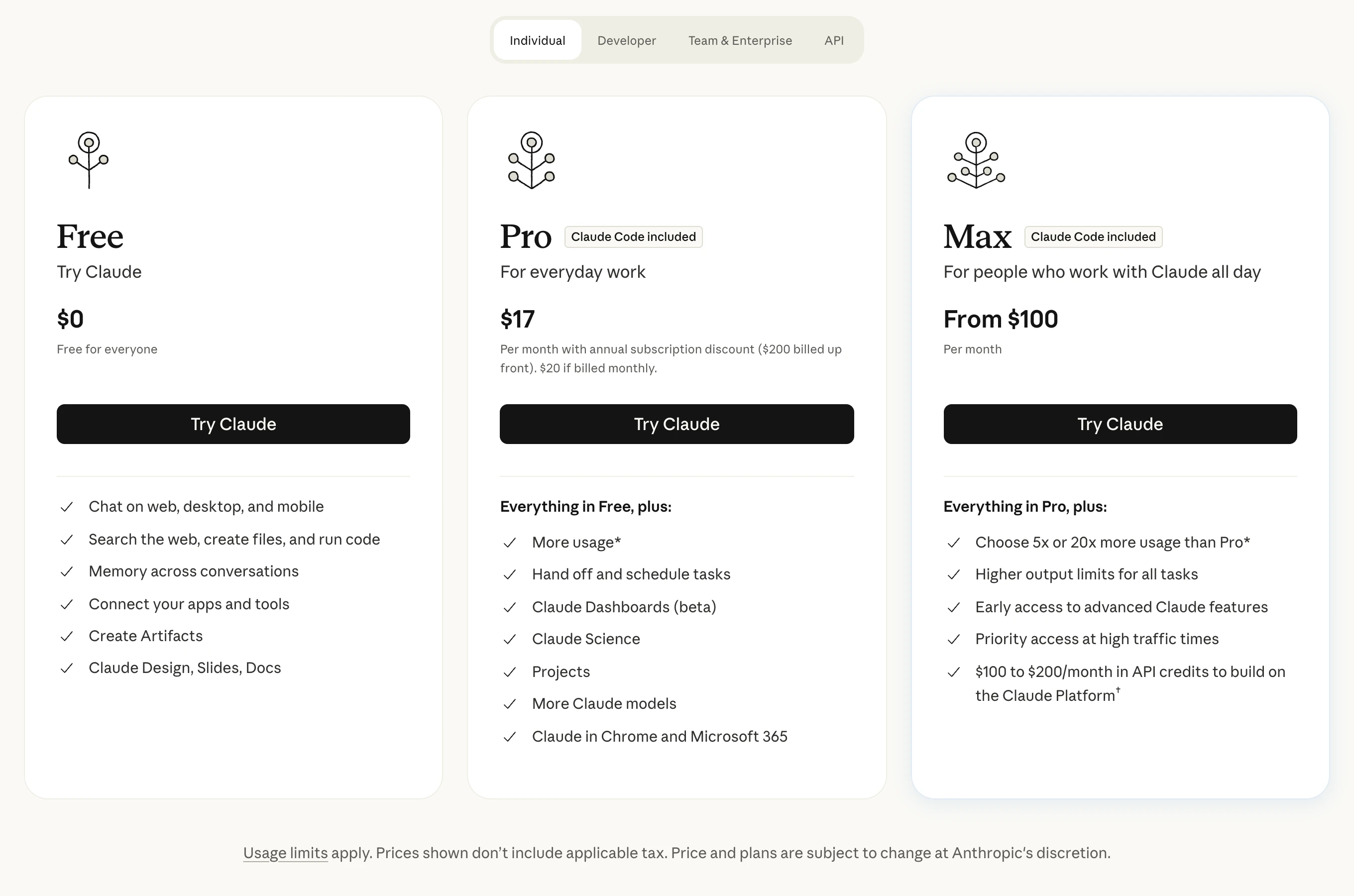
Claude vs ChatGPT compares the two plan by plan for business use.
2. Google Gemini, if you live in Gmail and Google Docs
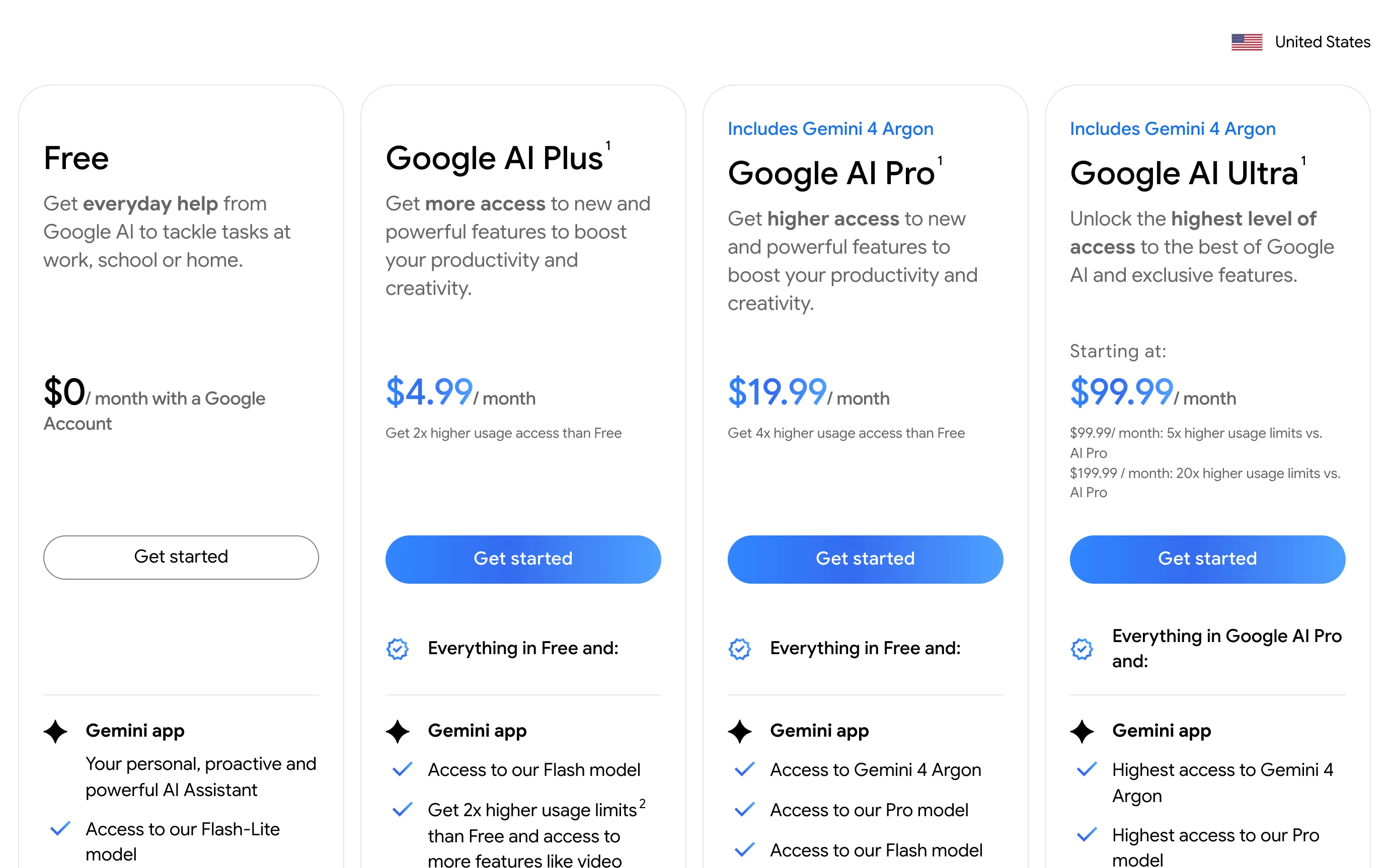
- Free plan: mostly the Flash-Lite model, with Deep Research, Gemini Live, Canvas and Gems, and limits that refresh every five hours up to a weekly cap. Basic text chat works even without a Google account.
- Cheapest paid plan: Google AI Plus at $4.99 a month in the US, with the Flash model and twice the free usage. Google AI Pro ($19.99) adds Gemini 4 Argon, Gemini in Gmail and Docs, and 5 TB of storage (Google AI plans).
- Better than ChatGPT at: working inside Google's own apps, with a 1 million token context window on AI Pro.
- The catch: the free plan's context window is 32k tokens, so it reads far less at once.
- Your data: Keep Activity is on by default for adults, and that activity trains Google's models, with human reviewers (Gemini Apps Privacy Hub).
3. Microsoft Copilot, if your work lives in Word, Excel and Outlook
- Free plan: free with a signed-in Microsoft account; without a Microsoft 365 subscription you may see ads.
- Cheapest paid plan: Microsoft 365 Personal at $9.99 a month or $99.99 a year, with Word, Excel, PowerPoint, Outlook and Copilot inside them, and Copilot chat "with higher usage than free". In Family ($12.99) only the owner gets the AI; Premium ($19.99) adds extensive usage and agent features (Microsoft 365 plans).
- Better than ChatGPT at: working on the Office files you already have. Microsoft names only the sources of its models: Microsoft, OpenAI and other developers.
- The catch: no chat without signing in: copilot.microsoft.com sent us to a sign-in page.
- Your data: since the app version of August 18, 2026, prompts, responses and files "aren't used to train foundation models", Microsoft says (Copilot activity history).
Screen recording of Microsoft's US Microsoft 365 plans page on October 27, 2026: switching from Paid yearly to Paid monthly changes Personal from $99.99 a year to $9.99 a month, Family from $129.99 a year to $12.99 a month and Premium from $199.99 a year to $19.99 a month, while each card says how much a yearly plan saves ($19.89, $25.89 and $39.89).
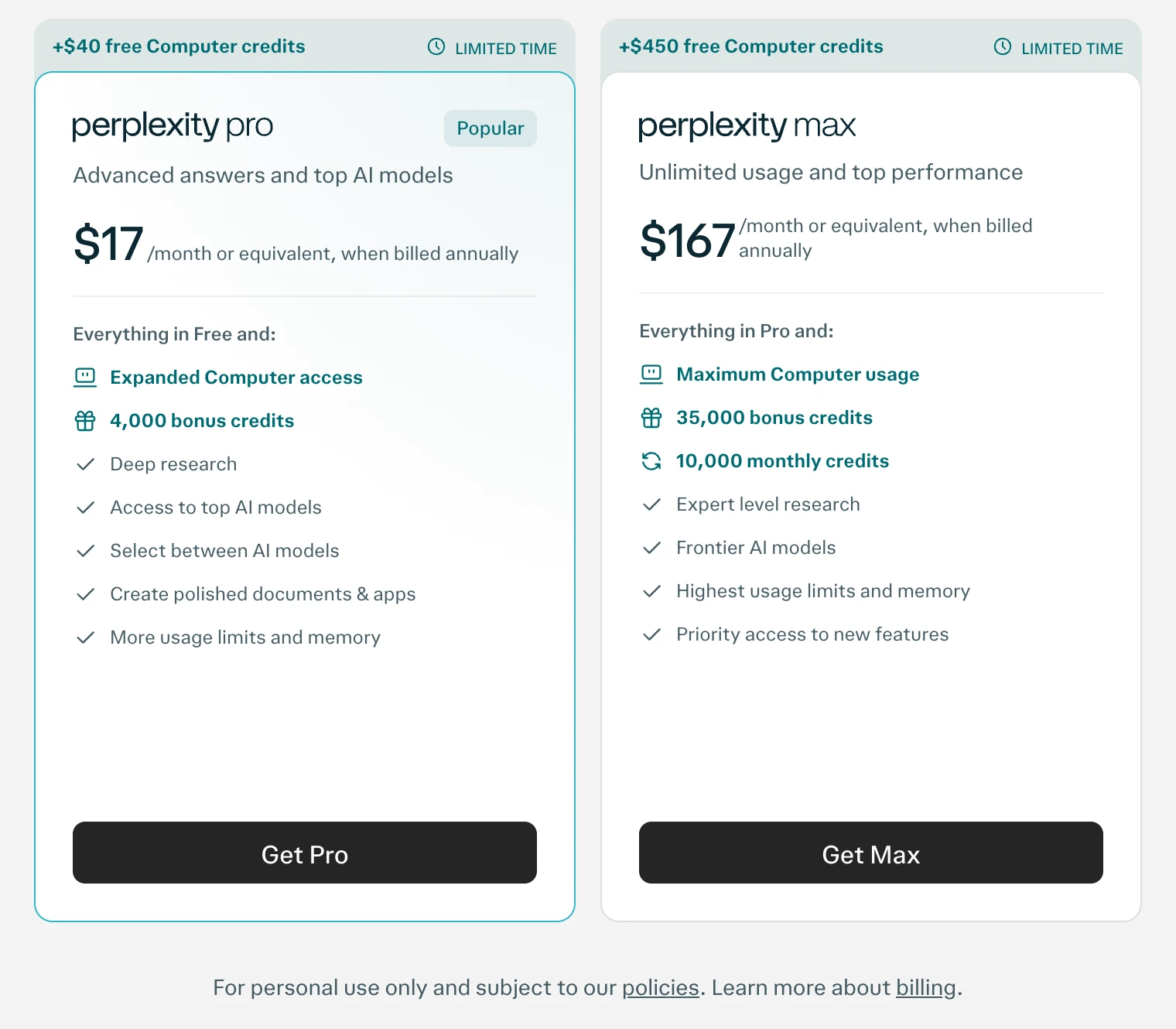
4. Perplexity, for answers with sources
- Free plan: core search, 3 Pro Searches a day and 1 Research query a month, with the model picked for you.
- Cheapest paid plan: Pro at $20 a month or $200 a year, shown as $17 a month on yearly billing (Perplexity). Verified students pay $10; Max is $200.
- Better than ChatGPT at: research: every answer cites its web sources inline, and Pro lets you pick GPT-6.1 Sol, Claude Sonnet 5.5, Gemini 3.8 Flash, Grok 4.7 and others (models by plan).
- The catch: a source link isn't proof, so open the ones your decision depends on. Perplexity itself suggests ChatGPT for creative tasks.
- Your data: "AI Data Retention" is on by default; switching it off in Account settings > Preferences covers only data from then on (data collection).
5. Meta AI, if you already live in WhatsApp and Instagram
- Free plan: free in the Meta AI app, on meta.ai and inside WhatsApp, Instagram, Facebook and Messenger, running Meta's Muse Spark 1.1 model. Meta says the core experience will stay free.
- Cheapest paid plan: Meta One Core at $7.99 a month, for more AI usage, mainly images and video, plus extras in Meta's apps (Meta One plans).
- Better than ChatGPT at: quick help inside apps you already open, and a shopping mode that searches Facebook Marketplace near you.
- The catch: you need a Meta account (our prompt opened a login page), and your Meta AI profile is public.
- Your data: Meta uses your AI chats to improve its AI and, depending on your region, to personalize content and ads; Incognito chats in the app aren't saved (Meta AI privacy).
6. Grok, for news and what's happening on X
- Free plan: limited chat and agent requests, with Grok 4.5, the model xAI says powers Grok on grok.com, X and its apps.
- Cheapest paid plan: Plus at $8 a month, part of The X Subscription launched October 12, 2026, with a shared usage pool for Grok chat, voice and images plus X perks. Premium ($30) gives 4 times Plus's usage and the latest Grok models (xAI pricing). Existing SuperGrok plans keep working.
- Better than ChatGPT at: breaking news, because it searches posts on X live along with the web.
- The catch: in our test it took the prompt, then asked us to sign up instead of answering.
- Your data: chats can train xAI's models unless you turn off "Improve the model" in Settings > Data Controls; Private Chat isn't saved or used for training (xAI consumer FAQ).
7. DeepSeek, for a free chat with open-source models
- Free plan: the web chat and app are free and run DeepSeek V4.1 Flash, updated October 17, 2026, with DeepThink and Search.
- Cheapest paid plan: none for the chat; you pay only for its API.
- Better than ChatGPT at: price, and openness: DeepSeek publishes its models as open source.
- The catch: you need an account, and your data is stored in the People's Republic of China.
- Your data: de-identified inputs may train its models, and the policy gives you a right to opt out without naming the setting (DeepSeek privacy policy).
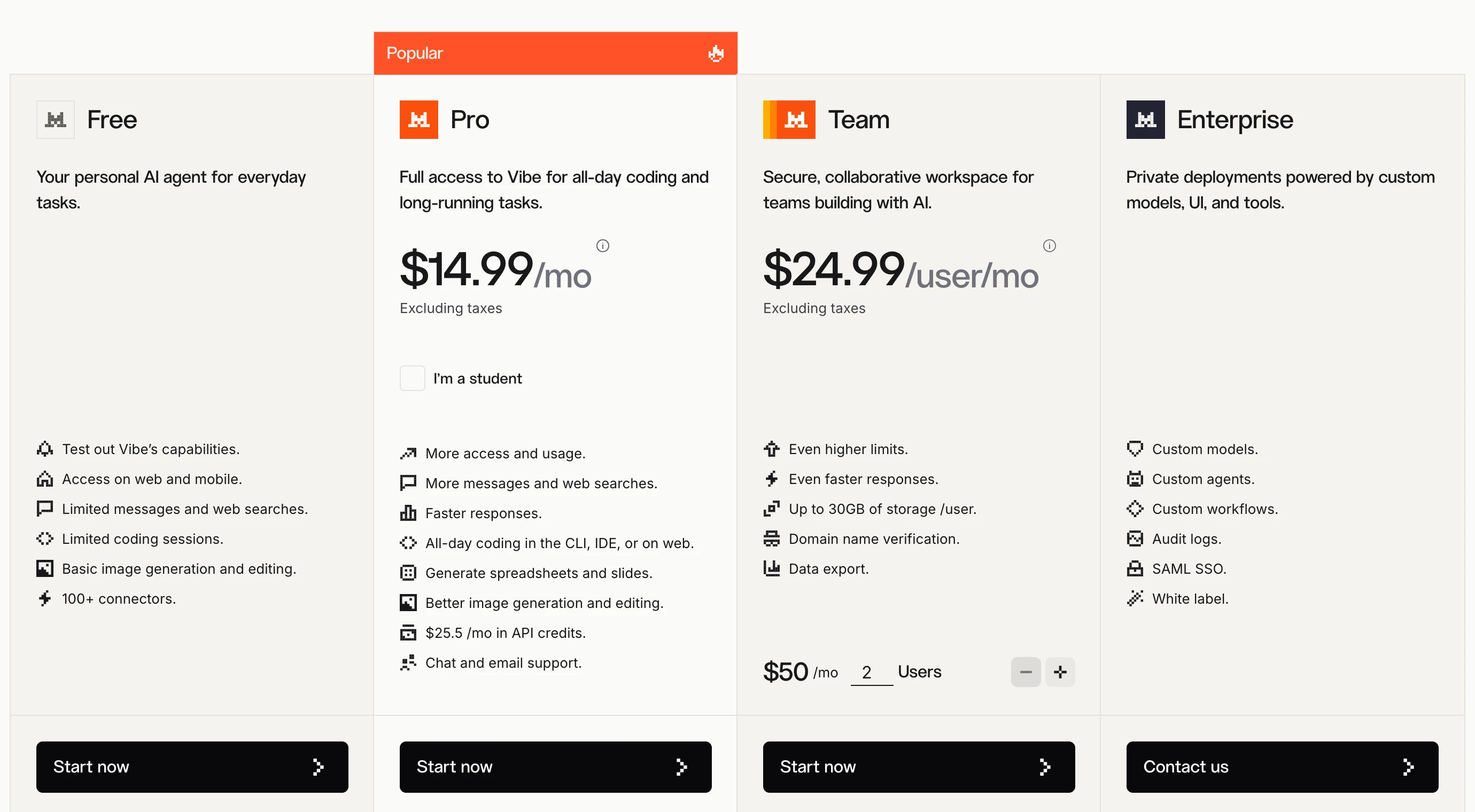
8. Mistral Vibe (formerly Le Chat), for a European assistant
- Free plan: limited messages, web searches and coding sessions. Mistral renamed Le Chat to Vibe in May 2026, at the same address, chat.mistral.ai (Le Chat is now Vibe).
- Cheapest paid plan: Pro at $14.99 a month before tax, with up to 6 times the free messages; yearly billing is 20% cheaper, and verified students pay $5.99 (Mistral pricing).
- Better than ChatGPT at: keeping data in Europe: Mistral hosts it in the EU by default. Its default model, Mistral Medium 3.5, has open weights.
- The catch: it asks you to accept its terms before the first message, and chats train its models unless you opt out.
- Your data: turn off "Allow your interactions to be used to train our models" in the Privacy settings, or use Temporary Chat; Mistral says it doesn't use chats for ads (Mistral help).
9. Duck.ai, for private chats with several models
- Free plan: no account and a daily limit, with six models: Claude Haiku 4.5, Mistral Small 4, GPT-6 Luna, GPT-5.4 mini, gpt-oss-120b and Gemma 4 31B (Duck.ai models).
- Cheapest paid plan: the DuckDuckGo subscription, Plus at $9.99 a month or $99.99 a year, which adds GPT-5.6 Terra and Claude Sonnet 4.6 and includes a VPN.
- Better than ChatGPT at: privacy: DuckDuckGo strips your IP address before a prompt reaches the model company, and recent chats stay on your device.
- The catch: the subscription is sold only in the US, Canada, the EU and the UK, and in our test the free chat wanted a human check first.
- Your data: chats aren't stored or used for training, and the model companies must delete them right after replying (Duck.ai privacy).
10. Proton Lumo, for privacy with no account
- Free plan: guest use with no account and nothing saved, or a free Proton account that keeps your history; Proton doesn't publish the limits.
- Cheapest paid plan: Lumo Plus at $12.99 a month, or $9.99 a month billed yearly ($119.88) (Lumo pricing).
- Better than ChatGPT at: confidentiality: saved history uses zero-access encryption, the code is open source, and it runs open models such as Qwen 3.5 and GLM 5.3 on Proton's servers in Europe.
- The catch: in our test the guest answer wrote as if the late order had already arrived.
- Your data: Lumo doesn't train on your chats and erases the data after each reply (Lumo privacy).
11. Brave Leo, if you browse with Brave
- Free plan: no account, inside the Brave browser on computer and phone, with five models including Claude Haiku 4.5 and GPT 6 Luna (Brave Leo).
- Cheapest paid plan: Leo Premium at $14.99 a month or $149.99 a year, adding Claude Sonnet 5.5, Claude Opus 5.5 and Grok 4.7.
- Better than ChatGPT at: summarizing the page, document or PDF you have open without leaving the tab.
- The catch: it only works in Brave.
- Your data: Brave says Leo doesn't keep or share chats or train on them, and history stays on your device.
12. Poe, for many models under one subscription
- Free plan: daily points that reset every 24 hours, amount not published, and an account is required.
- Cheapest paid plan: "starting at $4.99/month", billed monthly or yearly; the full plan list shows only after sign-in (Poe purchases FAQ).
- Better than ChatGPT at: trying models from OpenAI, Anthropic, Google and xAI, such as GPT-6.1 Sol, Claude Opus 5.5 and Gemini 4 Argon, under one plan.
- The catch: each bot has its own points cost per message, and subscriptions are sold only in listed countries.
- Your data: official bots don't train on your chats, but third-party developer bots may (Poe privacy center).
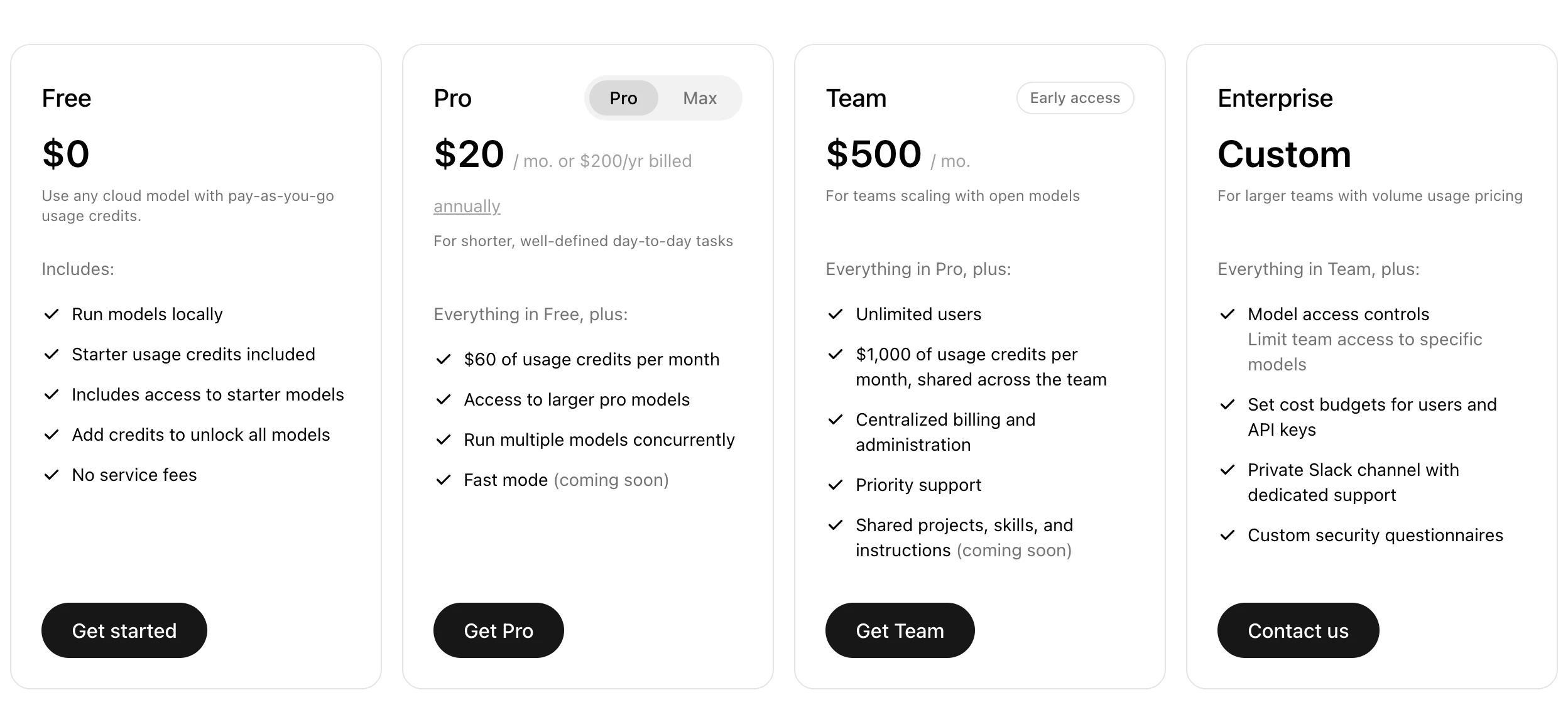
13. Ollama, to run models on your own computer
- Free plan: unlimited use on your own computer with no account: download the app and pick an open model such as Gemma 4 or Qwen3.8 (Ollama pricing).
- Cheapest paid plan: Pro at $20 a month or $200 a year, for $60 a month of credits on bigger models in Ollama's cloud.
- Better than ChatGPT at: keeping files on your machine, and it can run with its cloud features switched off.
- The catch: you need macOS 14 or Windows 10 22H2 or newer, and Ollama says large models are slow without a strong graphics card.
- Your data: Ollama doesn't see local prompts, and says it doesn't store, log or train on cloud ones (Ollama FAQ).
14. LM Studio, a local assistant with a desktop app
- Free plan: free at home and at work, with no account for local models such as Gemma 4, and it works offline once a model is downloaded (LM Studio pricing).
- Cheapest paid plan: Bionic+, for its newer Bionic agent app, at $20 a month for US-hosted open models such as Kimi K3 and GLM 5.3.
- Better than ChatGPT at: private work on documents, since nothing typed into a local model leaves your device.
- The catch: Macs need Apple Silicon and macOS 14, with 16GB of memory recommended; on Windows it recommends 16GB and a 4GB graphics card.
- Your data: local chats stay on your computer, and LM Studio says its cloud services keep no data and never train on it (LM Studio privacy).
Free ChatGPT alternatives, and their catch
The best free ChatGPT alternative is usually the free plan of the assistant that fits your work, and every free option has a catch: a limit, an account, training on your chats or your own hardware.
| Free option | What's free | The catch |
|---|---|---|
| Gemini | Flash-Lite, Deep Research and Gems, with basic chat even logged out | Keep Activity, and so training, is on by default |
| Claude | Sonnet and Haiku, up to 5 projects | Account required, a five-hour limit and no Opus |
| Microsoft Copilot | Copilot chat | Sign-in required, and ads without Microsoft 365 |
| Perplexity | Core search, 3 Pro Searches a day | AI Data Retention is on by default |
| DeepSeek | The full chat app | Account required; data stored in China |
| Duck.ai | Six models, no account | A human check stopped us in our test |
| Proton Lumo | Guest chat, nothing saved | Limits not published |
| Brave Leo | Five models in the browser | Works only in Brave |
| Ollama and LM Studio | Unlimited use on your computer | Needs a capable computer |
For a free ChatGPT alternative that keeps everything on your machine, Ollama and LM Studio are the realistic picks: there's no usage meter on local models, and nothing you type leaves your computer. The trade is speed and model size, which depend on your memory and graphics card.
Which ChatGPT alternatives train on your chats?
Six of the fourteen tools here use your chats to improve their AI by default, as ChatGPT does: Gemini, Perplexity, Meta AI, Grok, DeepSeek and Mistral Vibe. Duck.ai, Proton Lumo, Brave Leo, the new Copilot app and local models don't, and Claude asks you at sign-up. This is from each company's own privacy pages on October 27, 2026.
| Tool | Trains on your chats by default? | How to stop it | How long chats are kept |
|---|---|---|---|
| ChatGPT (for comparison) | Yes, on Free, Plus and Pro | Settings > Data controls > "Improve the model for everyone", or Temporary Chat | Until you delete them; Temporary Chat up to 30 days |
| Claude | You choose at sign-up | Settings > Privacy > "Help Improve our AI models", or Incognito | Up to 5 years, de-identified, if on; 30 days if off |
| Gemini | Yes, Keep Activity is on for adults | Turn off Keep Activity | 18 months by default; 72 hours with it off; reviewed chats up to 3 years |
| Microsoft Copilot | No, in the app version from August 18, 2026 | Not needed | Not stated on the new app's pages |
| Perplexity | Yes, "AI Data Retention" | Account settings > Preferences | While your account is active |
| Meta AI | Yes, and chats can shape ads by region | Incognito chat in the Meta AI app | Not stated |
| Grok | Yes | Settings > Data Controls > "Improve the model", or Private Chat | Deleted and Private Chats removed within 30 days |
| DeepSeek | Yes, de-identified | A right to opt out, setting not named | As long as you have an account, in China |
| Mistral Vibe | Yes, on Free and Pro | "Allow your interactions to be used to train our models", or Temporary Chat | Until you delete them; hosted in the EU by default |
| Duck.ai | No | Not needed | Not stored; providers delete right after replying |
| Proton Lumo | No | Not needed | Erased after each reply; saved history encrypted |
| Brave Leo | No | Not needed | Not kept after the reply; history on your device |
| Poe | Official bots no; third-party bots may | Stick to official bots | Each provider's own rule, such as 30 days at OpenAI and Anthropic |
| Ollama and LM Studio, local | No | Not needed | Only on your computer |
What carries over from ChatGPT
Your chat history leaves ChatGPT as an export file and your memory can move into Claude or Gemini with an import, but custom GPTs and projects don't move. This comes from each vendor's help pages on October 27, 2026.
| Piece of your ChatGPT setup | Carries over? | What to do |
|---|---|---|
| Chat history | Partial | Export it: Settings > Data controls > Export data > Export. The email link can take up to 7 days and works for 24 hours (OpenAI). Gemini imports that .zip file, up to 5 GB; Claude and Perplexity can't import chat history. |
| Memory, what ChatGPT knows about you | Partial | Claude and Gemini each give you a prompt to paste into ChatGPT, then you paste ChatGPT's answer back: in Claude under Settings > Your Claude > "Start import", in Gemini under Settings & help > "Import memory to Gemini" (Claude, Gemini). Claude calls it experimental. |
| Custom GPTs and projects | No | Copy each GPT's instructions and files into a Claude Project (up to 5 on Claude's free plan) or a Gemini Gem (on Gemini's free plan). |
| Images and files ChatGPT made | No | Download the ones you need; Gemini's import leaves out generated images and files. |
Two limits on Gemini's import: it isn't available in the EEA, Switzerland or the UK, and imported memory and chats are saved in your Activity, which Google uses to improve its services, including training.
If your new tool has no import, ask ChatGPT for a summary you can paste into its settings or first message:
List what you know about me and my work from our past chats: my business, my customers, the tone I write in, the tasks I ask for most and any rules I've given you. Write it as short bullet points I can paste into another assistant. Leave out passwords, client names, health details and anything else I wouldn't want to move.Read the list before you paste it anywhere: it's a summary written by ChatGPT, so delete anything wrong or private.
Where Claude and our courses fit
I build client projects with Claude, and ai school teaches Claude in its courses, so read this page with that in mind. That's why nothing here is ranked and Claude answers the same questions as every other tool, catch included. For several reasons above another tool is the better pick: Perplexity for sources, Copilot for Office, Gemini for Google apps, and Duck.ai, Lumo or a local model for privacy.
Our Claude Code course is in early access (pre-order) and teaches people who don't code to build with Claude. If you only want to get more out of Claude's chat, the free 8-lesson Claude course on this site is a good start.
Quick check0 of 3 correct
You want to keep ChatGPT but stop seeing ads. What does OpenAI offer?
Not quite.
OpenAI's help center says ads may appear only on Free and Go, and Free users can switch to an ads-free mode with lower limits. The training switch controls training, not ads.
Which of these answered our business prompt without an account on October 27, 2026?
Not quite.
Perplexity, Gemini, Proton Lumo and ChatGPT answered logged out. Copilot redirected to a sign-in page and Meta AI opened a login page.
You paste client notes into Gemini's free plan. What should you change first?
Not quite.
With Keep Activity on, Google uses your activity to improve its services, including training, with human reviewers. With it off, chats are kept for 72 hours.
What to do next
Find your reason in the decision table and try the fix inside ChatGPT for a week first. If you still switch, export your ChatGPT data, then run three or four of your real tasks in two free plans on the same day before you pay for either; the bonus sheet has ten ready to go. Prompt skills carry over to every tool on this page, so a prompt engineering course pays off whichever you choose, and if you're staying with ChatGPT, the best ChatGPT courses are the better next step. For a wider plan, how to learn AI maps out the first 30 days.
ChatGPT alternatives bake-off sheet and privacy checklist
Ten real business prompts to run in ChatGPT and two alternatives on the same day, a scorecard to compare the answers, and a checklist before you paste client data into any of them.
Enter your email and the full section opens right here. You also get a free lesson from the course.
Frequently asked questions
What is the best free ChatGPT alternative?
It depends on your work: Gemini's free plan for Google users, Claude's for writing, Microsoft Copilot for Office users and Perplexity for answers with sources. For privacy, Duck.ai, Proton Lumo and Brave Leo don't train on your chats, and Ollama or LM Studio run open models on your own computer for free.
Is there a ChatGPT alternative without ads?
Yes. Anthropic said on February 4, 2026 that Claude will remain ad-free. Inside ChatGPT, Plus and higher plans have no ads, and Free users can switch to an ads-free mode with fewer messages. Microsoft Copilot may show ads if you don't have a Microsoft 365 subscription.
Which ChatGPT alternative keeps data in Europe?
Mistral Vibe, formerly Le Chat, hosts your data in the EU by default, and Proton Lumo runs on Proton's own servers in Europe under Swiss law. The difference: Mistral trains on Free and Pro chats unless you opt out, while Lumo doesn't use chats for training.
Is DeepSeek safe to use for business?
Read its privacy policy first: DeepSeek stores your data in the People's Republic of China, may use de-identified inputs to train its models and keeps them for as long as you have an account. Keep client data out of it, or run open models on your own computer with Ollama or LM Studio, where nothing leaves your machine.
Are ChatGPT alternatives as good as ChatGPT?
For a short business reply, yes in our test on October 27, 2026: the free, logged-out versions of Gemini, Perplexity and Proton Lumo each wrote a usable customer reply, as ChatGPT did. They differed in the details they made up, so check every fact and promise before you send, and test your own tasks too: one prompt is a snapshot.
Keep reading
Claude vs ChatGPT for Business: Which to Pay For in 2026?
Claude vs ChatGPT for business: both cost $20 a month, so we compared every plan, writing, long documents, agents, images and privacy. Is Claude better?
Claude Code · 13 min readClaude Course: Learn Claude AI for Work in 8 Free Lessons
A free Claude course in 8 short lessons: better prompts, Projects, Skills, connectors, tasks, Claude Code and plans, each with a prompt to copy and a check.
Claude Code · 18 min readBest ChatGPT Courses (2026): Free, Paid and Up to Date
The best ChatGPT courses in October 2026: OpenAI Academy's free badges, whether a ChatGPT certification exists, and paid picks that teach ChatGPT Work.
Choosing an AI course · 15 min read