AI for Ecommerce: 8 Jobs, Platform Tools and Our Test
AI for ecommerce pays off first on product copy written from your own catalog data. Shopify, BigCommerce, Wix and Squarespace now build an AI writer into the store, WooCommerce retired its own, and in our test Claude Haiku 5.5 wrote copy for 10 products with 0 invented facts, though 6 descriptions described the photo instead of the product.
By Yotam DahanUpdated 15 min readAI by role
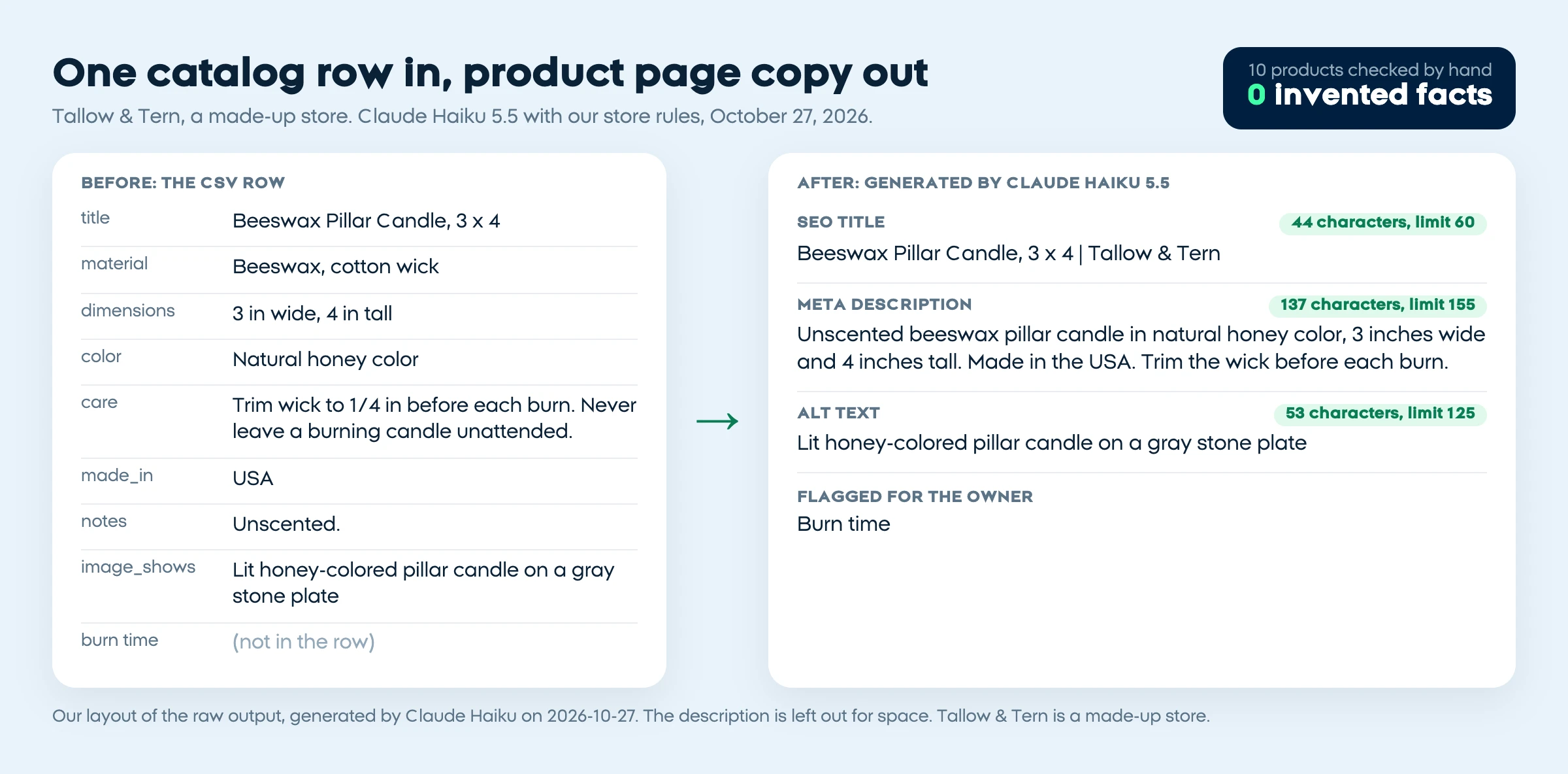
AI for ecommerce saves the most time on product copy: descriptions, SEO titles, meta descriptions and alt text written from the facts already in your catalog. After that come photos, support replies, email flows, ad variations, review summaries and questions about your own sales data. Shopify, BigCommerce, Wix and Squarespace each build some of this into the store today, WooCommerce relies on plugins, and a general assistant at about $20 a month covers the rest.
What AI can do for an online store, job by job
The best AI tools for ecommerce are the ones that fit a job you already do every week. Here are the eight jobs where AI helps most, with the built-in option to try first and the separate tool to add only if you need it.
| Job | What works | Built-in option | Separate tool | Cost, October 27, 2026 |
|---|---|---|---|---|
| Product descriptions and SEO titles | Writing from your catalog fields | Shopify Magic and Sidekick, BigAI Copywriter, Wix, Squarespace AI | ChatGPT, Claude or Gemini with a CSV export | Included in plans or a free app; assistants about $20 a month |
| Product photos | New scenes around your real product | Sidekick, Wix Photo Studio, Squarespace Image Studio | Image generators | Squarespace Image Studio uses AI credits |
| Alt text | A short description of what each photo shows | Squarespace's SEO tool suggests it | Any assistant, imported by CSV on Shopify | CSV import is built into Shopify |
| Support and FAQs | Answers from your own policies, with a handoff to a person | Shopify Inbox suggested replies | A website chatbot | Compared in our chatbot guide |
| Email and abandoned carts | Short flows built on real offers | Shopify Messaging, Wix and Squarespace email AI | Klaviyo | Shopify: 10,000 emails a month free |
| Ads creative | Variations of images and text you already have | Meta Advantage+ creative, Google Performance Max | AI video tools | Inside the ad platforms |
| Review summaries | A summary of all your reviews, with counts | Not among the platform AI features we read | Judge.me, or an assistant with a reviews export | Judge.me Awesome $15 a month |
| Analytics questions | Exact metrics and dates in the question | Sidekick, BigCommerce Companion | An assistant with an orders export | Sidekick is in every Shopify plan |
Built-in AI on Shopify, WooCommerce, BigCommerce, Wix and Squarespace
Every big platform except WooCommerce now offers an AI writer for the product editor, built in or as a free app from the platform itself. The differences are in what else it writes and how it's billed.
| Platform | AI for product copy | Other built-in AI | Cost, read October 27, 2026 |
|---|---|---|---|
| Shopify | Shopify Magic writes descriptions; Sidekick also writes the SEO title and meta description | Sidekick answers store data questions, builds Flow automations and makes images; Inbox suggests replies | In every plan, from Basic at $29 a month billed yearly ($39 monthly); limits vary by plan (pricing, Sidekick) |
| WooCommerce | None built in: the Woo AI plugin that wrote names and descriptions was retired (Woo) | None; plugins add AI | Core plugin free; plugins and AI usage billed separately |
| BigCommerce | BigAI Copywriter, a free app, writes descriptions; Catalog Enrichment writes titles, descriptions, FAQs and SEO metadata, up to 250 products a batch | Companion, an assistant in the control panel | Enrichment is a paid add-on in per-SKU credit blocks; plans from $29 a month billed annually ($39 monthly) (enrichment, pricing) |
| Wix | Three description options from a product name and key details; AI title tags and meta descriptions once the site is upgraded | AI marketing emails and AI photo tools (Wix) | Every paid plan lists monthly AI credits; prices vary by country |
| Squarespace | Squarespace AI writes product descriptions; its SEO tool suggests SEO descriptions and alt text | Clarkson AI chat, Image Studio, email drafts | Text tools use no credits; Image Studio does (AI credits) |
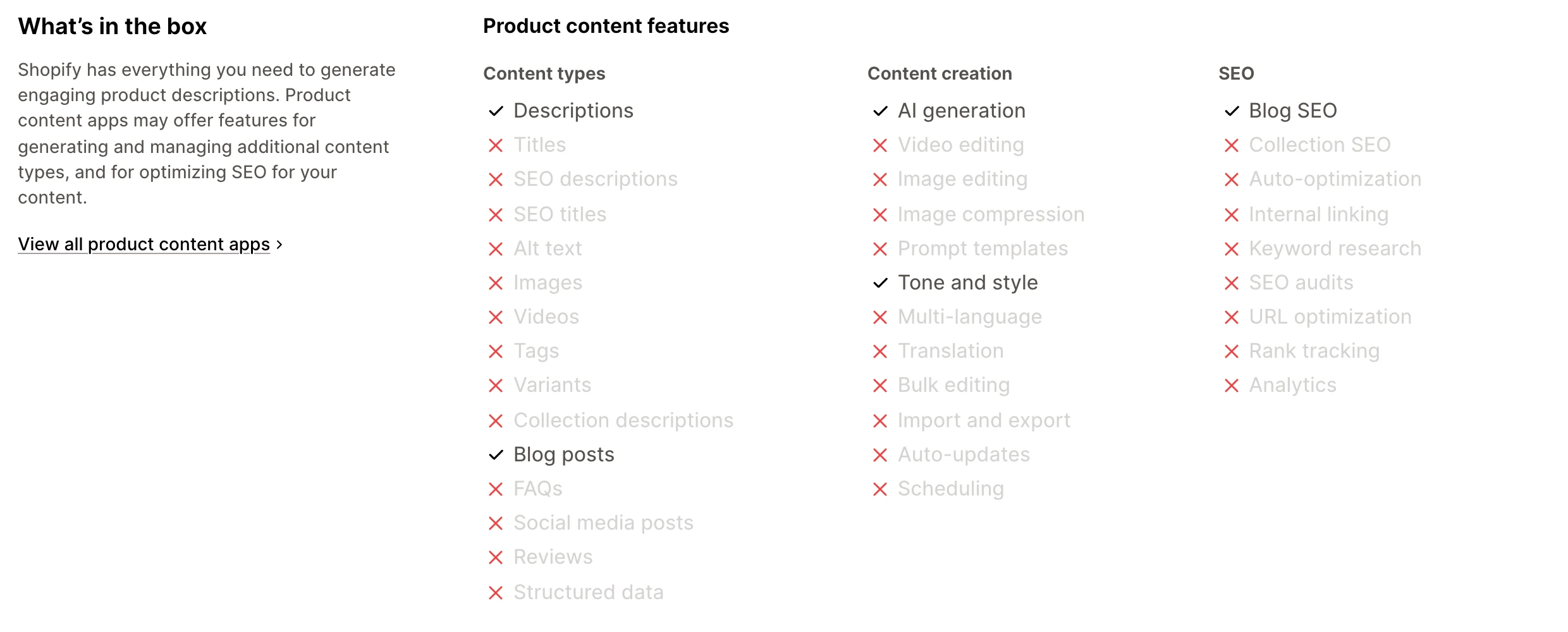
Shopify's App Store listing for its description writer marks descriptions and blog posts as supported, and SEO titles, SEO descriptions and alt text as not:
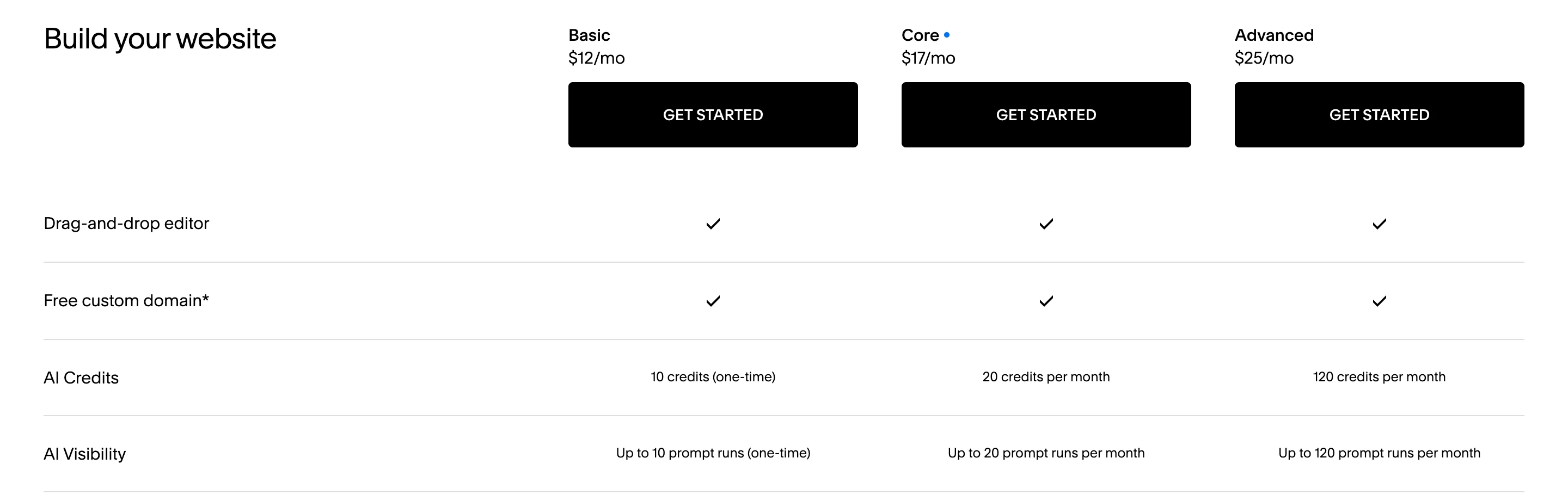
Squarespace bills its image tools in AI credits, and the allowance depends heavily on the plan:
Our test: AI product copy for 10 products
We built a catalog for a made-up home goods store, Tallow & Tern: 10 products, 13 columns, and some facts left blank on purpose (no origin for 7 products, no burn time for the candle, no care line for the planter). On October 27, 2026, Claude Haiku 5.5 wrote an SEO title, a meta description, a description and alt text for each.
Method: the Claude Code CLI with tools off and low effort. A rules prompt with the store's tone and limits (only the row's facts; title 60 characters, meta description 120 to 155, description 60 to 110 words, alt text 125; then a list of missing facts) ran in two calls of 5 products, and a bare prompt with no rules ran once for all 10. We checked every line against the CSV by hand. An invented fact is a claim about material, origin, size, weight, certification, safety, care or contents that the row doesn't state.
Three of the ten, with titles and meta descriptions quoted exactly from the rules prompt:
| Product | Before: the CSV row | After: SEO title | After: meta description | What we'd fix |
|---|---|---|---|---|
| Stoneware mug | Stoneware, 12 oz, 3.5 by 3.3 in, sage glaze, dishwasher and microwave safe, made in Portugal | Stoneware Mug, Sage | Tallow & Tern (35 characters) | Sage green stoneware mug holding 12 oz. Its wide handle fits three fingers, and the glaze varies a little from mug to mug. (122) | Nothing invented. Add the fact it flagged: whether the glaze is food safe or lead free |
| Beeswax candle | Beeswax and cotton wick, 3 by 4 in, unscented, made in USA, no burn time | Beeswax Pillar Candle, 3 x 4 | Tallow & Tern (44) | Unscented beeswax pillar candle in natural honey color, 3 inches wide and 4 inches tall. Made in the USA. Trim the wick before each burn. (137) | Cut "The candle is shown lit on a gray stone plate" from the description, which ran 58 words. Burn time was left out and flagged |
| White planter | Stoneware, 6 by 5.5 in, drainage hole, saucer sold separately, no care line | Stoneware Planter, 6 in, White | Tallow & Tern (46) | White stoneware planter, 6 inches wide and 5.5 inches tall, with a drainage hole. Saucer sold separately. Shown here with a small snake plant. (142) | Cut "Shown here with a small snake plant": a shopper could read the plant as included |
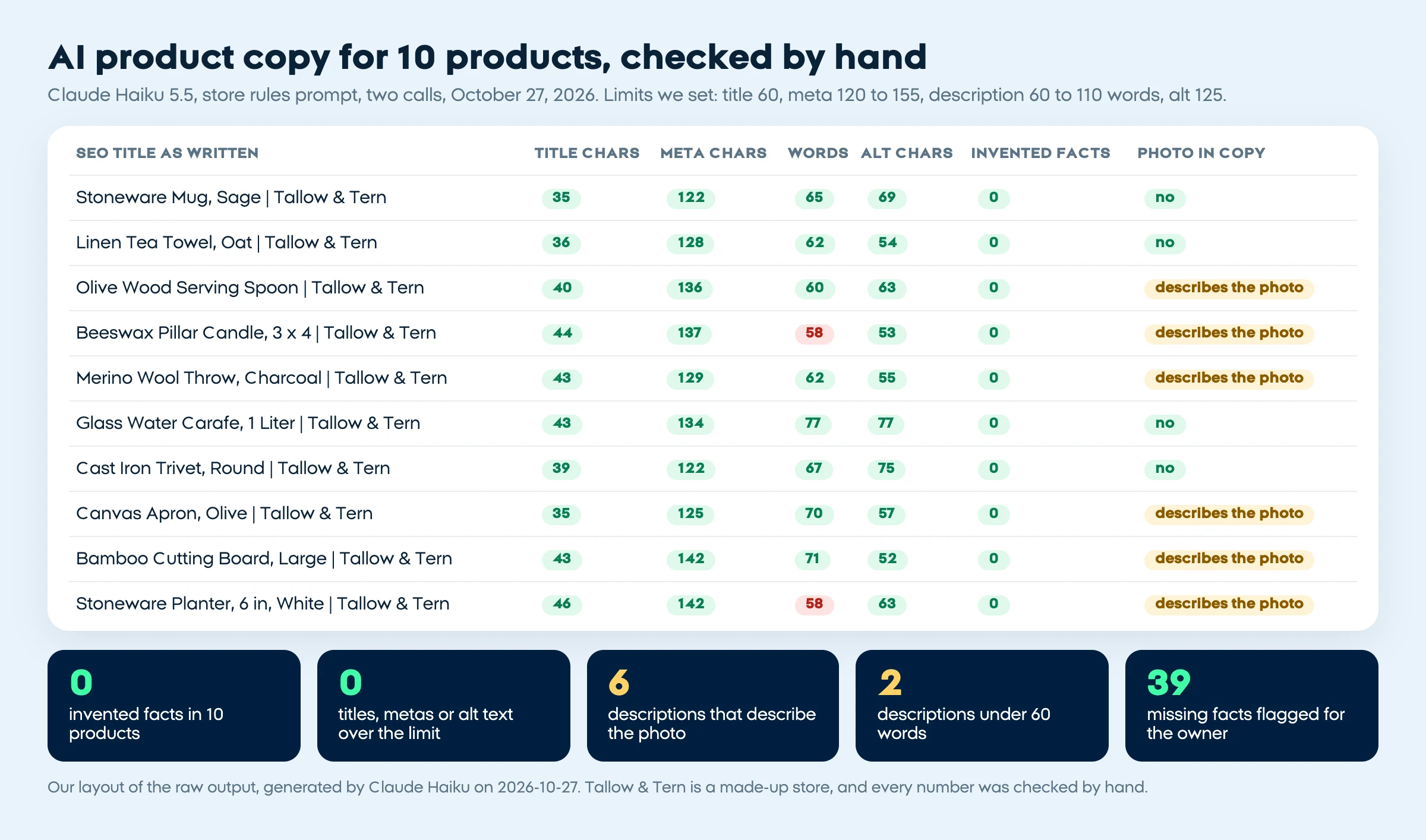
With the rules prompt, nothing broke a character limit and no title or sentence repeated. The fixes were all by hand: delete 6 photo sentences ("It is shown here with sliced tomatoes and a chef's knife"), lengthen 2 descriptions of 58 words, and vary the openings, since all 10 start with "This". The bare prompt invented nothing either, but wrote only 27 to 48 words per product, and since it wasn't asked to, it listed no gaps.
Scroll through all 10 product write-ups from our test, each with its SEO title, meta description and description, and the photo sentences highlighted in yellow, ending on the totals: 0 invented facts, 0 titles, metas or alt text over the limit, 6 descriptions that describe the photo, 2 under 60 words, 39 missing facts flagged
The gap list was the most useful output: "Burn time" for the candle, "Maximum heat or temperature rating" for the trivet, outdoor use for the planter. Those are shoppers' questions, so answer them in the catalog. The rules cost time (53 and 35 seconds per batch of five, against 22 for the bare call), and one model, one run and one made-up catalog make this a method to copy, not a score.
Product descriptions, SEO titles and meta descriptions
AI product copy is only as good as the facts you give it. Shopify and WooCommerce both export and import products as CSV, which is how you move a whole catalog through an assistant.
Export
Download your products as a CSV from the store admin
Fill gaps
Add materials, sizes, care and origin where a row is empty
Write
Paste 5 to 10 rows into the store-rules prompt
Check
Read every claim against the row and cut photo talk
Import
Upload the edited CSV or paste into each product
On Shopify, the product CSV has SEO title (up to 70 characters), SEO description (up to 320) and Image alt text columns, so copy from any assistant can go straight back in (Shopify CSV). Our prompt asks for 60 and 155 to keep both short. Real facts per product matter more than any length: they are what keep 200 descriptions from reading like one.
You write product page copy for [STORE NAME], which sells [WHAT YOU SELL]. Tone: [YOUR TONE IN ONE LINE]. Short sentences, no hype words, no exclamation marks.
Use only the facts in each CSV row. Never add a material, origin, size, weight, certification, safety claim, care instruction or included item the row doesn't state. If a field is empty, leave that topic out.
Don't describe the photo or the props in it; describe the product.
For each product write: an SEO title of at most 60 characters with the product name first; a meta description of 120 to 155 characters; a description of [WORD RANGE] words ending with the care line; alt text of at most 125 characters from the image notes.
Then list the facts a shopper will ask about that the row doesn't give.
Rows: [PASTE CSV HEADER AND 5 TO 10 ROWS]
Product photos and alt text
AI photo tools now sit inside most platforms: Sidekick generates images, Wix's Photo Studio swaps backgrounds, and Squarespace's Image Studio reshoots products against a studio backdrop. Change the scene, never the product; our AI product photography guide covers the shots, the free tools and the platform rules.
Alt text needs the AI to know what the photo shows. In our test it worked from notes we wrote for each image, and every alt text stayed under 125 characters. Squarespace's SEO tool suggests missing alt text for image blocks and galleries, but its scan skips images added to collection items (Squarespace). WooCommerce's built-in CSV importer can't set product image alt text at all, so use the media library or a plugin (Woo).
Customer support and FAQs
Support AI should draft from your own policies and hand off to a person when it doesn't know. Shopify Inbox suggests AI-written answers and replies for you to send (Shopify AI tools), while Sidekick, Shopify says, can't talk to customers or handle support conversations (Sidekick limits). For a bot that answers shoppers on its own, our guide to an AI chatbot for your website compares 11 options and tests when they invent answers.
Email and abandoned carts
Shopify Messaging gives every plan 10,000 free emails a month, and abandoned checkout emails are always free and don't count toward that; extra emails cost $1 per 1,000 (Shopify). Sidekick drafts the text, subject lines and segments, and Wix and Squarespace both generate a full email from your goal and a product. Klaviyo's free plan covers 250 active profiles and 500 sends a month, with an AI subject line generator and $5 a month of Composer, its AI agent for campaigns and flows (Klaviyo).
Keep the offer real: the discount and deadline in an AI email must be ones you'll honor. For the order to build flows in, see AI automation for small business.
Ads creative
Meta's Advantage+ creative generates and enhances variations of your images, video and text in Ads Manager; some enhancements may be on by default, and Meta recommends checking previews and turning off what doesn't fit (Meta). Google's Performance Max can read your product page and generate headlines, descriptions and images, optionally, for accounts using the interface in English, Dutch, French, German, Italian, Portuguese or Spanish (Google Ads). Check every ad against the real product, and for AI presenter videos see how to make AI UGC ads.
Review summaries: where AI miscounts
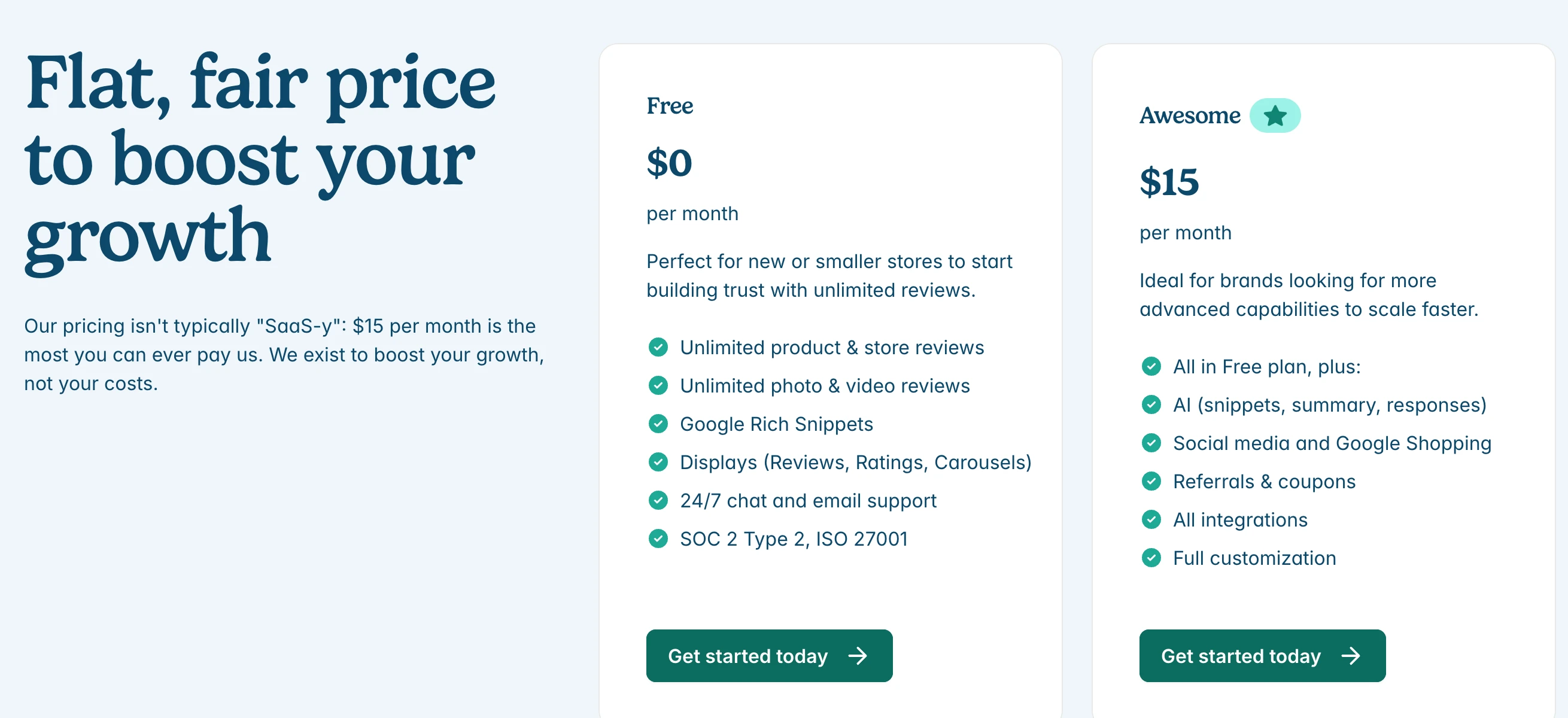
We gave Claude Haiku 5.5 14 made-up reviews of the mug. The count (14), the average rating (4.07) and every theme's review list matched ours, but it made 2 errors: "three reviews report chipped mugs on arrival" when two did (the third had a crushed box and no damage), and it blamed the chips on thin packaging when only one review said so. Summaries sound right while a count drifts, so check the numbers. Judge.me adds AI review snippets, summaries and responses on its $15 Awesome plan:
Summarize real reviews only, never write them. The FTC's final rule, announced August 14, 2024, bans fake reviews, including AI-generated ones, and bars presenting shown reviews as all or most of them when others were suppressed (FTC).
Analytics questions: our 30-order test
Sidekick answers questions from your store data: it writes ShopifyQL queries and charts sales (Sidekick help) and, in stores where it can run code, calculates forecasts and comparisons (Sidekick). BigCommerce's Companion takes questions like "Which of my products had the most sales this month?"
With an export instead, we gave Claude Haiku 5.5 30 made-up September orders and five questions, and every answer matched our calculation: the wool throw led revenue at $632.10, the mug led units with 17, total revenue was $1,871.30, 7 of 30 orders (23.33%) used a code, and 3 refunds came to $191.00. Unasked, it gave the net after refunds, $1,680.30. On a full year of orders, use a tool that runs code or a spreadsheet, and spot-check one number yourself.
Built-in AI or separate AI tools for ecommerce?
Start with what your platform includes, since it already sees your products and fills the fields. Add a general assistant for whole-catalog rewrites: ChatGPT Plus is $20 a month (OpenAI), Claude Pro $20 monthly or $17 billed yearly (Anthropic) and Google AI Pro $19.99 (Google), US prices on October 27, 2026.
Built-in AI
One product at a time, inside the editor, with your store data and no extra bill.
General assistant
Batches of 5 to 10 CSV rows, your own rules, and copy you can paste into any platform.
Specialist app
A job the platform doesn't do, such as AI review summaries or larger email flows.
For AI across the rest of the business, from meetings to bookkeeping, see our list of AI tools for small business.
Before you publish anything AI wrote
0 of 6 done
Where our course fits
ai school's Builders course teaches building a Shopify store with Claude Code, product pages included, and it's in early access (pre-order). We used Claude Code for the test on this page. Nothing above is ranked, and for most stores the AI already in the platform is the right first step.
Quick check0 of 2 correct
In our test, what was the most common problem in AI-written product descriptions?
Not quite.
With every fact in the CSV row, the AI invented nothing, but 6 of 10 descriptions described the photo, such as a snake plant in the planter's picture.
You sell on WooCommerce and want AI-written alt text for product images. What's true of the built-in CSV importer?
Not quite.
WooCommerce's documentation says the core CSV importer can't add, edit or update alt text, so set it in the media library or use a plugin.
What to do next
Export ten of your products as a CSV this week, fill the empty fields that shoppers ask about, and run them through the store-rules prompt above or your platform's built-in writer. Check the output against the checklist, fix the photo sentences and the missing facts, then publish and compare those pages with the rest next month. When you're ready to build or rebuild the store itself with AI, that's what the Builders course covers.
Product copy prompt and pre-publish review checklist
The store-rules prompt we tested on 10 products, ready to fill in, plus a 12-point checklist to run before any AI-written product copy goes live.
Enter your email and the full section opens right here. You also get a free lesson from the course.
Frequently asked questions
What is the best AI for ecommerce?
There isn't one winner. Start with the AI built into your platform for one product at a time, and use a general assistant such as ChatGPT, Claude or Gemini with a catalog export when you need to rewrite dozens of products at once.
Is Shopify Magic free?
Yes, on a paid Shopify plan. Shopify's App Store listing says your plan includes free AI-generated product descriptions, and Shopify says Sidekick is included with every plan, with features and usage limits that vary by plan.
Will AI-written product descriptions hurt my SEO?
Not because AI wrote them. Google's spam policies target pages generated at scale without adding value for users, no matter how they were made, so give each product real facts, check every claim and don't publish near-identical copy.
Can store AI write in languages other than English?
Yes, with checks. Shopify says Sidekick adapts to your store's language settings and points to its Translate & Adapt app for translating descriptions, and BigCommerce's BigAI Copywriter writes in another language if you ask in its special instructions field, with the translation to verify before publishing.
Is it safe to give an AI tool my store data?
Share only what the task needs. Product rows rarely hold personal data, but order and customer exports do, so remove names, emails and addresses before pasting them into a separate assistant. Built-in assistants work under staff permissions: Shopify says Sidekick only reaches data a staff member is allowed to see.
Keep reading
AI Product Photography: Free Tools, Real Product, No Studio
AI product photography from one phone photo, with free tools like Google Product Studio and Shopify's editor. Let AI change the scene, never your product.
AI content creation · 16 min readAI Chatbot for Website: 11 Options, Prices and Our Test
An AI chatbot for website visitors: 11 options by situation, October 2026 prices for 300 chats a month, and our 180-answer test of when chatbots invent.
Automation and agents · 19 min readHow to Make AI UGC Ads: 5 Steps and 4 Generators Compared
How to make AI UGC ads from one product photo: script, presenter, voice and AI label. See HeyGen, Creatify and Higgsfield compared on price and free plans.
AI content creation · 16 min read