Claude Cowork vs Claude Code: Which to Use After the Merge
Cowork now lives inside Claude itself. Here is what changed, which jobs still belong in Claude Code, and how to run your first task in each one.
By Yotam DahanUpdated 14 min readClaude Code
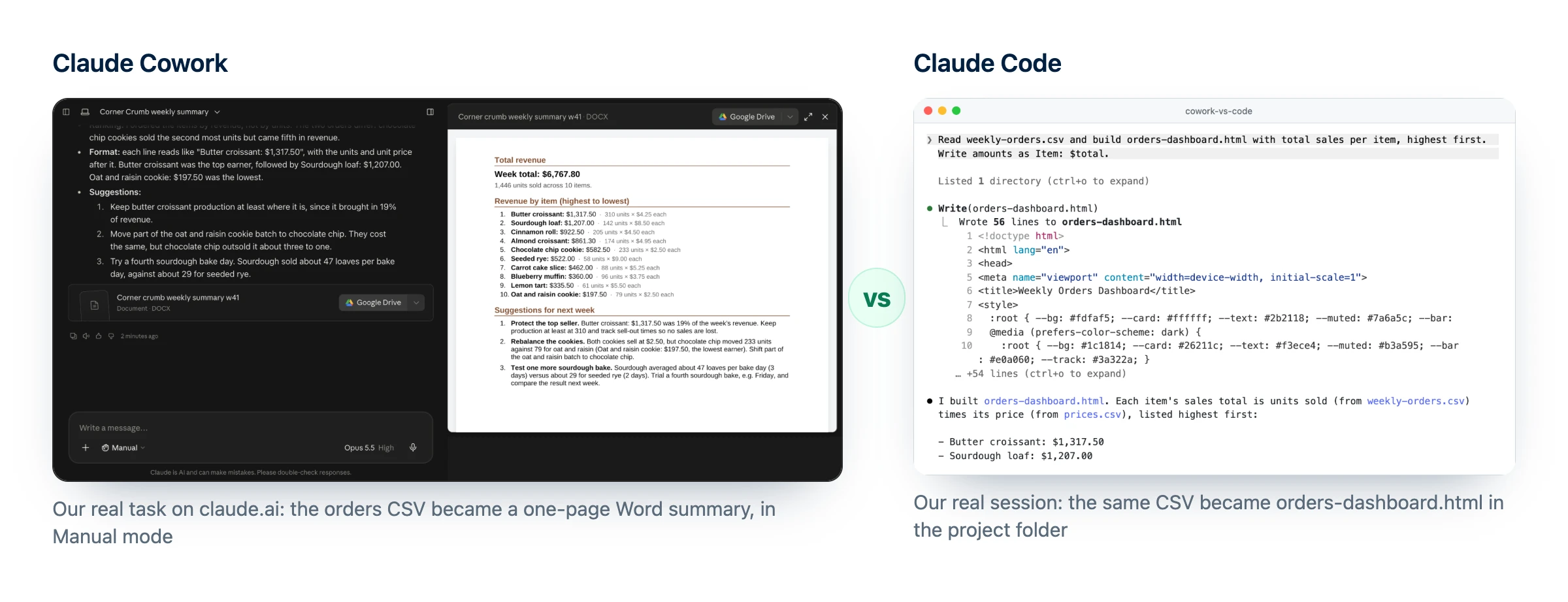
Claude Cowork vs Claude Code comes down to the job. Cowork, which Anthropic began merging into Claude itself on September 16, 2026 (Pro and Max first), hands you finished documents, research and recurring office tasks, while Claude Code builds and changes things in a project folder, such as a website, a script or an automation, and lets you review every change. Both come with the same paid plans and draw from one usage pool, so you can use each where it is strongest: Claude for the deliverable, Claude Code for anything you build and maintain.
What "Claude Cowork" means now
Cowork was Anthropic's agent for office work, a separate place next to chat. You picked Cowork in the message box, described a multi-step job, and Claude worked through it and handed back finished files. On September 16, 2026, Anthropic started merging Cowork and chat into one Claude.
In the merged Claude there is no mode to pick: Claude decides whether to answer or run a task, and bigger work comes back as editable files, says Anthropic's help article on the change. So the old Claude Cowork vs chat question has a new answer: on Pro and Max accounts the rollout has reached, they are the same conversation.
Chats, projects, connectors and skills carried over, and the Code tab did not move, so Claude Code is unchanged. Our news story on the merge has the full timeline.
Claude Cowork not showing up? Check your message box
Chat and Cowork options
You are on the old layout, like Team accounts, most Enterprise accounts and Pro or Max accounts the rollout has not reached. Select Cowork to start a task.
Manual or Auto, but no Cowork switch
You have the merged Claude. Just describe the task; Claude decides when to run it as one.
No tasks at all
The Free plan has no Cowork tasks, though since October 8, 2026 it gets Docs, Slides and Design.
What is the difference between Claude Code and Claude Cowork?
The difference between Claude Code and Claude Cowork is where the work lands. Cowork returns a finished file or a completed chore; Claude Code changes files in a folder you chose, and you review each change. If you searched for Claude vs Claude Code vs Claude Cowork, the first and the last are merging into one Claude.
New to the coding side? Read what Claude Code is first. Here is Claude Code vs Claude Cowork side by side:
| Claude (Cowork built in) | Claude Code | |
|---|---|---|
| Made for | Research, documents, spreadsheets, decks, inbox and file chores | Building and changing sites, apps, scripts and automations |
| Where you use it | claude.ai, Claude Desktop, the mobile apps | Terminal, VS Code, JetBrains, the Desktop Code tab, claude.ai/code |
| What it touches | Folders you allow in Claude Desktop, plus connected apps | The folder you open, or a GitHub repository in the cloud |
| What you get back | Docs, spreadsheets with working formulas, PowerPoint-compatible decks | Changed files with a diff, commits and pull requests |
| Keeps working without you | Yes, cloud tasks run with the laptop closed | Yes, in cloud sessions (needs GitHub) |
| Asks before acting | Manual by default, Auto optional | Several modes; new terminal sessions start in Auto |
| Free plan | No tasks | No |
Claude Cowork vs Claude Desktop is not a real choice: Desktop is the app, and both Cowork tasks and the Claude Code tab live inside it.
Claude Cowork vs Claude Code: route the job, not the tool
For a non-coder, the Claude Code vs Cowork decision rarely needs more than three questions:
- Do you read the result or run it? A report, deck or summary goes to Claude. A page, script or tool you will reuse goes to Claude Code.
- Will you keep changing it? Ongoing projects, such as a website or a price list tool, belong in Claude Code, where every change is reviewable.
- Do you want to approve each step? Both can ask first; Claude Code adds diffs, Plan mode and checkpoints to roll back to.
Here are ten Claude Cowork use cases next to Claude Code jobs:
| Job | Best fit | Why |
|---|---|---|
| Weekly sales summary from a Drive sheet | Claude | A connector plus a finished doc |
| Meeting notes into a short deck | Claude | Returns a PowerPoint-compatible deck |
| Inbox triage with draft replies | Claude | Gmail connector; you approve before sending |
| Competitor brief with sources | Claude | Web search plus a document |
| Landing page for an offer | Claude Code | Files you can preview, change and publish |
| A script that cleans every CSV export the same way | Claude Code | Reusable, and you see what changed |
| Edits to your theme or site files | Claude Code | Works on the real files, with a diff |
| Big spreadsheet analysis | Either | Claude for a one-off, Claude Code if you will rerun it |
| Sorting and renaming a folder of files | Either | Claude needs Desktop open for local folders |
| A design you want built | Both | Design in Claude, then hand off to Claude Code |
Hand-offs between the two
A recent Claude Desktop update added a Hand off to Claude Code option to the menu under a design's name, which opens Claude Code with a prompt to build that design in your project's code. There is no button for the other direction, but the two work well in turn: Claude Code builds a script that cleans your weekly export, and Claude writes the report from the clean file every week.
Claude Cowork tutorial: your first task in Claude
Getting started with Claude Cowork takes about as long as writing a good email. Below is how to use Claude Cowork in the merged Claude, with the one difference on the old layout noted in step 1: Claude Cowork for beginners, in five steps.
Before you start
0 of 4 done
Run the task
- Open Claude on the web, in Claude Desktop or on your phone. On the old layout, select Cowork in the message box.
- Keep the permission setting on Manual for your first run.
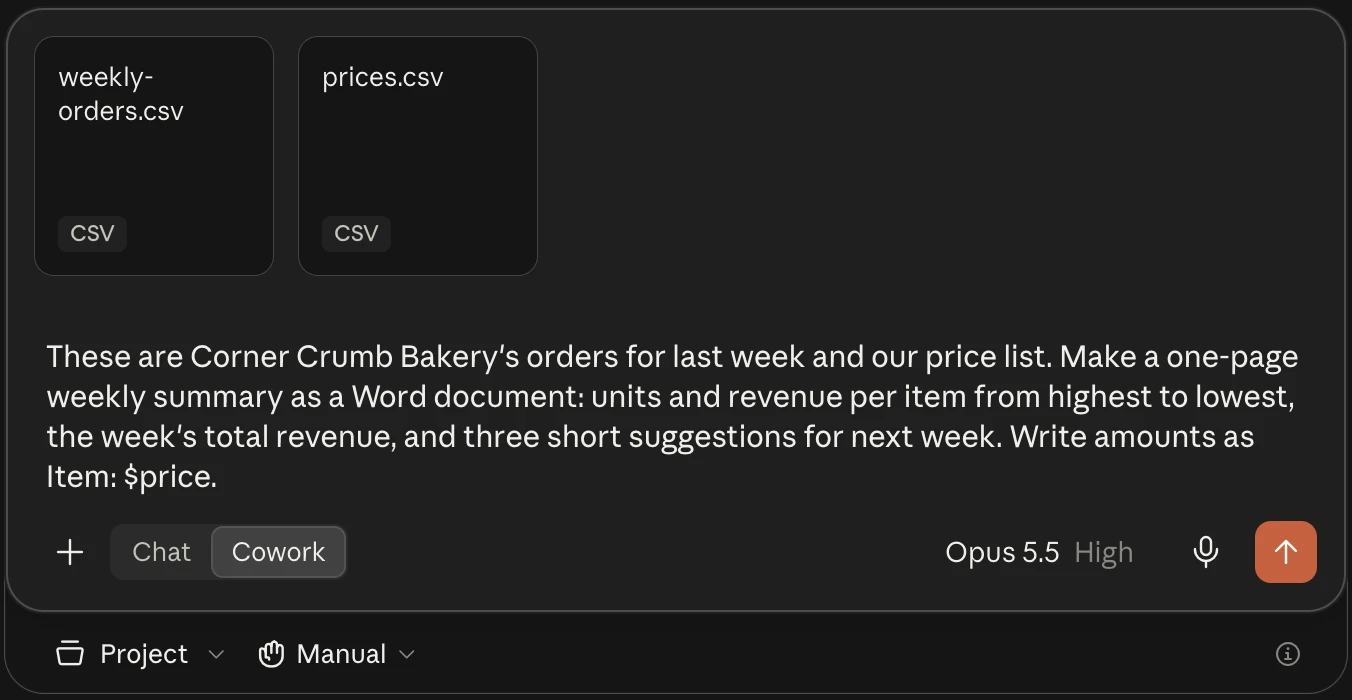
- Describe the outcome, format and inputs as you would to a colleague, and attach the file or name the connected app.
- Approve or deny each action. Files Claude creates appear alongside the conversation.
- Check and download the result. You can also follow and answer a running task from the mobile app.
Use [THE FILE, FOLDER OR CONNECTED APP] to produce [THE OUTCOME, FOR EXAMPLE A ONE-PAGE SUMMARY OF LAST MONTH].
Deliver it as [A WORD DOCUMENT, A SPREADSHEET OR A SHORT DECK] that a busy owner can read in two minutes.
Show me your plan before you start. If something is missing or unclear, ask instead of guessing.
Do not send, delete or share anything without asking me first.
Make it repeat with a scheduled task
In the merged Claude, say in any conversation what to do and how often, answer Claude's questions, review the name, schedule and instructions, and click Schedule. Anthropic's scheduled tasks guide says tasks run hourly, daily, weekly, on weekdays or on demand, and fire with your computer asleep unless they need local files. On the old layout, click Scheduled in the sidebar, then New task, or type /schedule in a Cowork task.
Our merge story walks through setting up a weekly scheduled task on a Google Drive sheet. Handing recurring lead, email and marketing jobs to AI is what our AI automation course teaches.
Claude Code tutorial for non-coders: a first task with no terminal
Claude Desktop includes Claude Code, so the Code tab needs no extra install and no terminal, only a paid plan (Free accounts see an upgrade prompt).
- Install Claude Desktop (Mac, Windows, or Linux in beta) and sign in.
- Click the Code tab at the top of the sidebar.
- Pick Local and open a small folder in the row under the prompt box, such as a copy of last month's exports.
- Check the permission mode in that row: Manual makes Claude propose each change and wait.
- Ask something safe first, like "tell me what the files in this folder are", then one small change. Click the line count (it looks like
+12 -1) to see what changed.
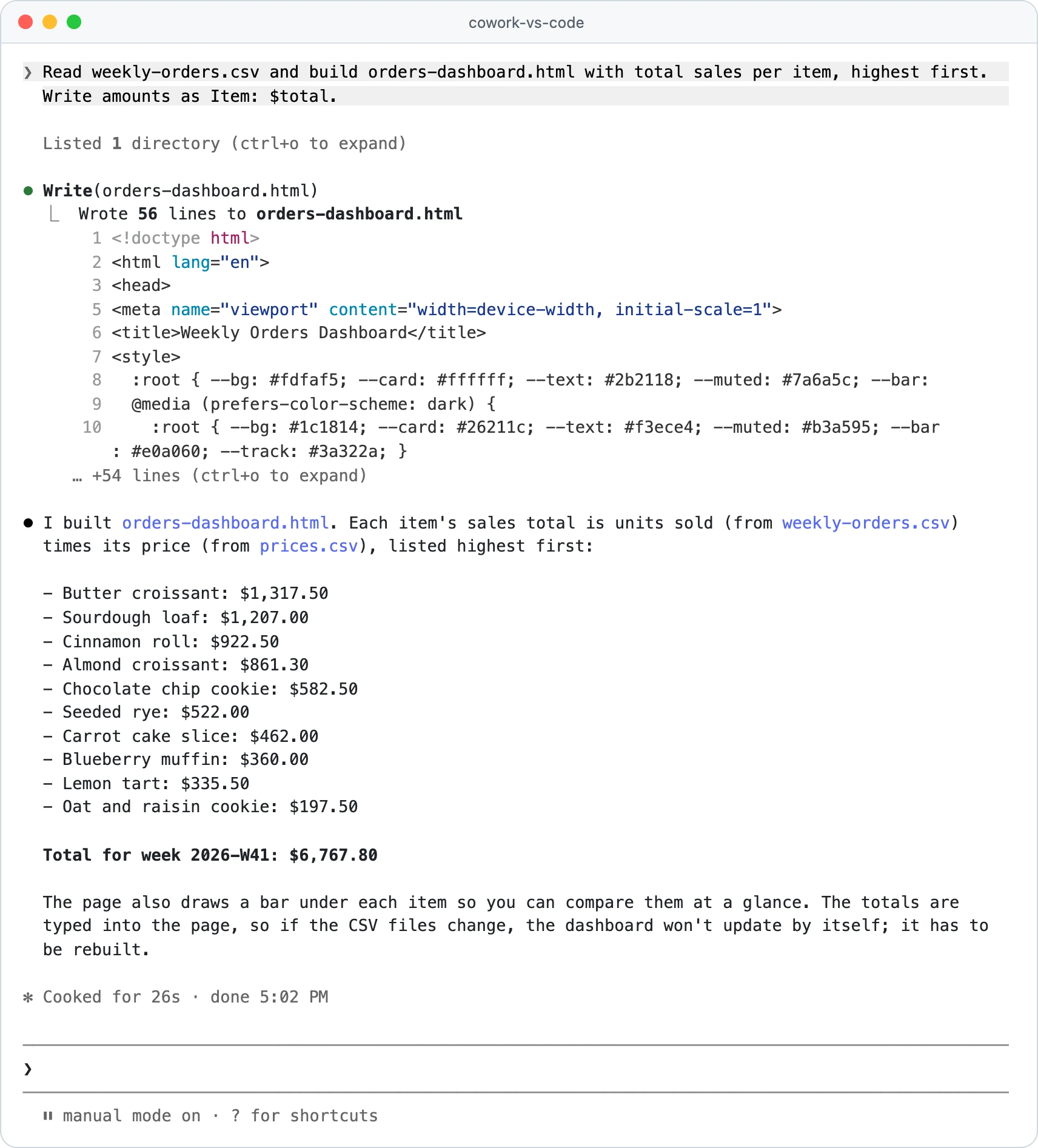
Here is the same kind of job in the terminal version, on a test folder of made-up bakery orders:
- You:
Read weekly-orders.csv and build orders-dashboard.html with total sales per item, highest first. Write amounts as Item: $total.
- Claude Code:
I built orders-dashboard.html. Each item's sales total is units sold (from weekly-orders.csv) times its price (from prices.csv), listed highest first: Butter croissant: $1,317.50, Sourdough loaf: $1,207.00, Cinnamon roll: $922.50 (seven more items follow). Total for week 2026-W41: $6,767.80.
Prefer the terminal?
On Mac, Linux or WSL:
curl -fsSL https://claude.ai/install.sh | bash
# then, in a new terminal window:
claude --version
cd ~/Desktop/my-project
claude
On Windows, in PowerShell:
irm https://claude.ai/install.ps1 | iex
The first claude run asks you to log in, and you finish the login in your browser. Our guide on how to install Claude Code covers the common errors, and how to use Claude Code walks you through a first weekend project.
Is Claude Cowork safe? Approvals side by side
Both start from the same idea: Claude asks before it acts. The settings differ, though, and Claude Code's permission modes page says Cowork does not use Claude Code's modes.
| Claude (Cowork) | Claude Code | |
|---|---|---|
| Asks before each action | Manual (the default) | Manual |
| Acts alone, with safety checks | Auto, which uses more of your limit | Auto, where new terminal and VS Code sessions start (version 2.1.283 or later) |
| Edits files, asks before most commands | No | Accept edits |
| Plans only, changes nothing | No | Plan |
| Skips every check | Skip, only on the classic layout where it is enabled | Bypass permissions, for isolated containers and VMs |
| Deleting files | Always asks | Depends on the mode |
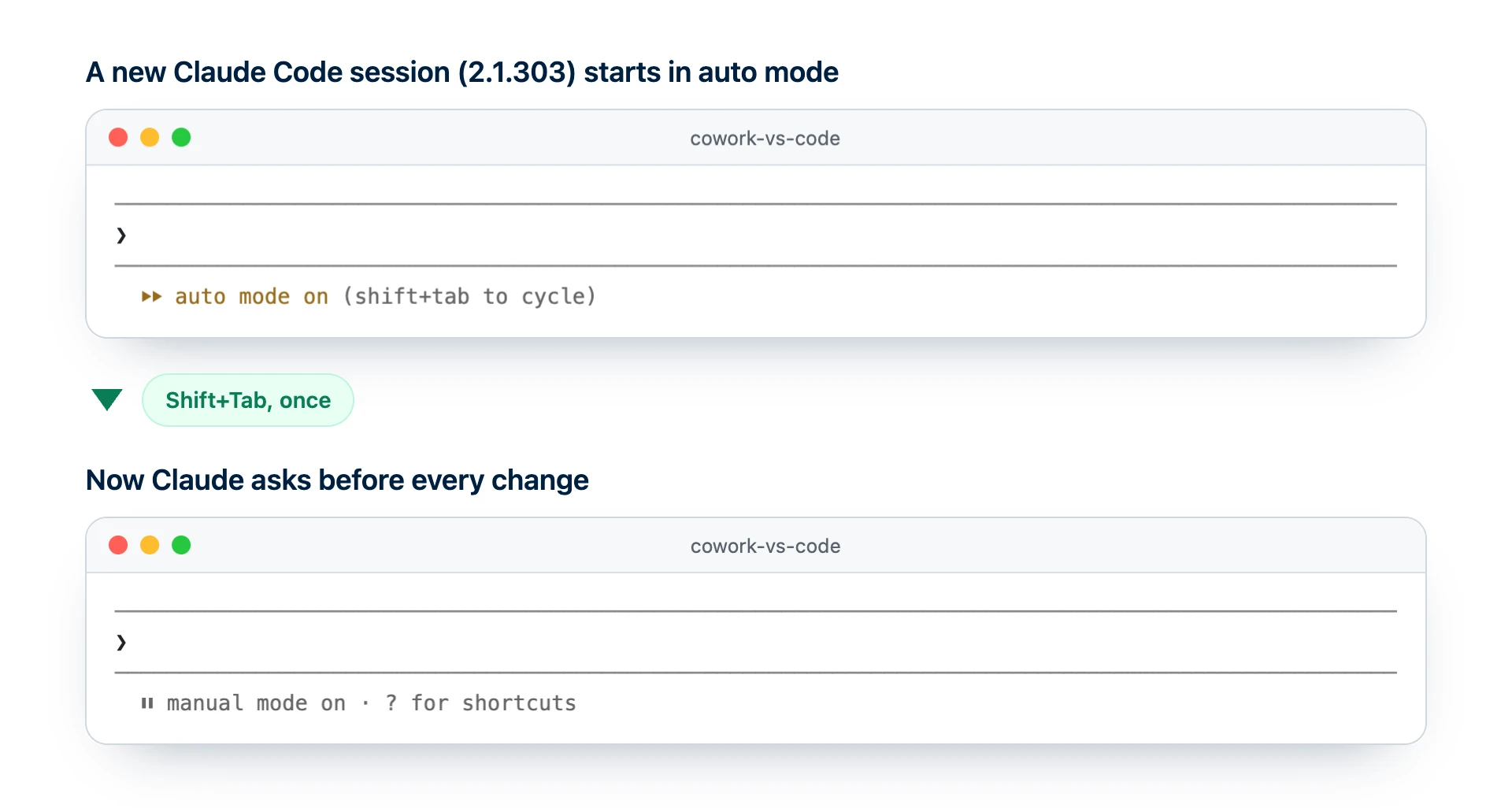
In the terminal, Shift+Tab cycles through the modes. In the Desktop Code tab, the selector under the prompt box remembers your choice for each folder.
Scheduled tasks in Claude and Claude Code, compared
There are three schedulers worth knowing (Claude Code's /loop command also repeats a prompt, but only while that session stays open). Two of them share one setup dialog: if you create one of Claude Code's cloud scheduled tasks with no repository and no GitHub or API trigger, it becomes a claude.ai chat task instead.
| Claude scheduled task | Claude Code cloud task | Claude Code Desktop local task | |
|---|---|---|---|
| Runs on | Anthropic's cloud | Anthropic's cloud | Your computer |
| Computer must be on | Only for local files | No | Yes, with the app open and awake |
| Started by | A schedule, or by hand | A schedule, an API call or a GitHub event | A schedule, or by hand |
| Works on | Connected apps and files | A fresh copy of your GitHub repository | Your local folder |
| Asks for approval | Your permission setting | No, it runs on its own | The task's permission mode |
| Shortest interval in the form | Hourly | Hourly | Hourly (Claude can set shorter if you ask) |
| Plans | All paid plans | Pro, Max, Team, Enterprise (research preview) | Paid plans with the Code tab |
Use Claude's scheduler for reports and inbox summaries, a cloud task for work on a GitHub repository (until recently called routines), and a local task for files that live only on your computer.
Plans, price and plugins: is Claude Cowork free?
No. Cowork tasks, scheduled tasks and Claude Code all need Pro, Max, Team or Enterprise (Claude Code can also bill pay-as-you-go API credits instead). On Claude's pricing page, Pro costs $20 a month, or $17 a month when you pay $200 for the year, and Max starts at $100 a month.
Our Claude Code pricing guide compares every plan. The Free plan does get Docs, Slides and Design, which left beta for every plan on October 8, 2026.
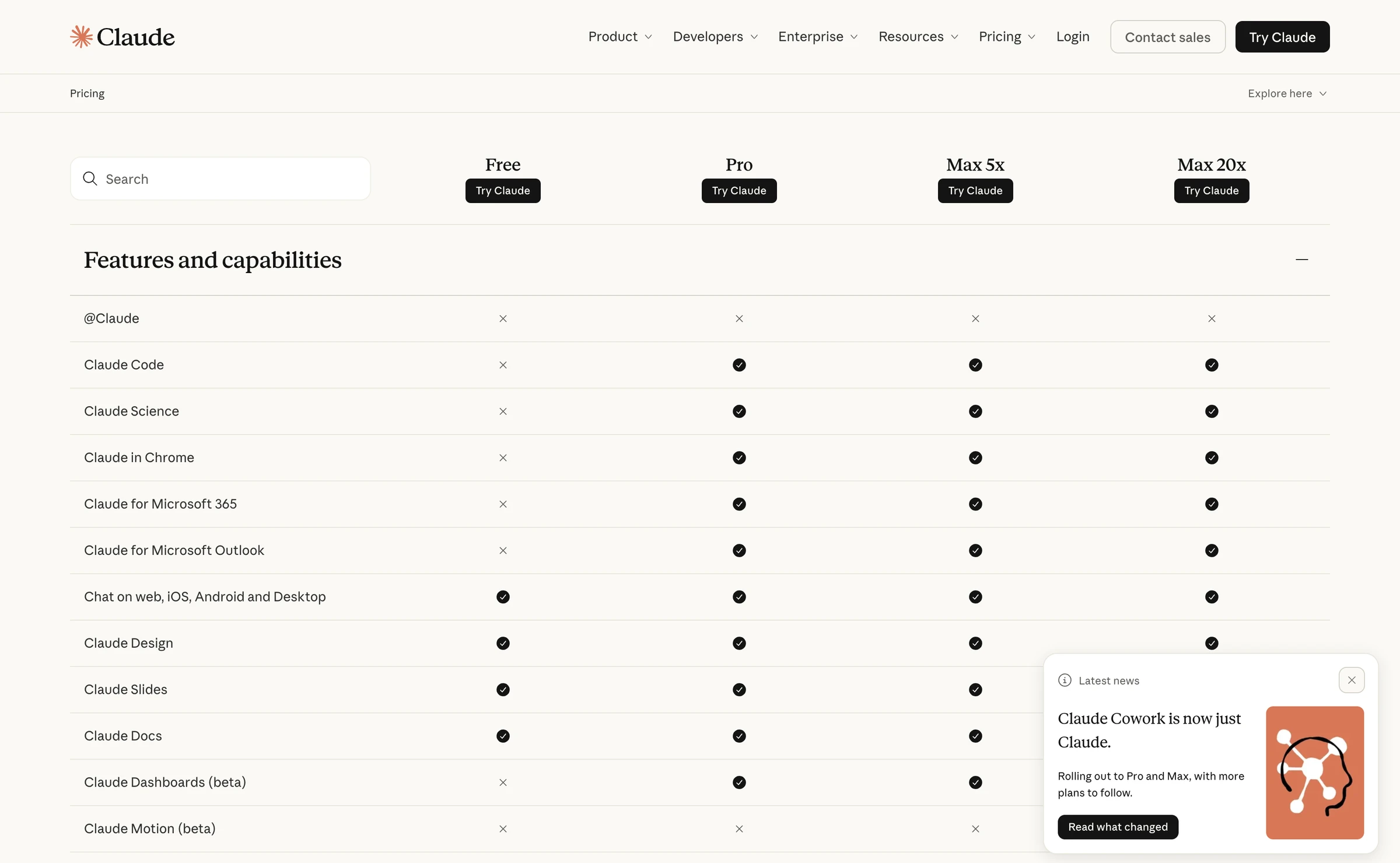
| Plan | Claude tasks (Cowork) | Merged layout | Claude Code | Docs, Slides, Design |
|---|---|---|---|---|
| Free | No | Not yet, promised "soon" | No | Yes |
| Pro | Yes | Rolling out | Yes | Yes |
| Max | Yes | Rolling out | Yes | Yes |
| Team | Yes | Not yet, promised "soon" | Yes | Yes |
| Enterprise | Where an admin turns it on | Admins get 30 days' notice | Yes | Yes, on by default from October 15, 2026 |
It all comes out of one allowance: Claude's pricing page says activity on the web, desktop, mobile and in Claude Code "draws from the same pool".
Plugins, skills and connectors: what carries over
- Account installs travel: a plugin added in Customize > Plugins also appears in Claude Code when your next session starts.
- Command-line installs stay put: a plugin installed with
/pluginstays on that computer, and Claude's tasks do not read Claude Code's~/.claudefolder. - Not every part works everywhere: skills load everywhere, hooks and agents only in Cowork and Claude Code, and plugins with their own programs only in Claude Code.
Deciding what to install? See our pick of the best Claude Code and Claude Cowork plugins.
Quick check0 of 2 correct
Your Pro account shows one message box with Manual and Auto, and no Cowork button. What happened?
Not quite.
Since September 16, 2026 Anthropic has been merging Cowork into Claude itself, starting with Pro and Max.
You want a landing page you will keep editing for months. Which tool fits?
Not quite.
Claude Code changes real files in a folder and shows each change, so the page stays yours to maintain.
What to do next
Pick one office job from the ten above and run it in Claude this week, with Manual on. Then start one thing you will keep changing, such as a landing page or a price list, in the Code tab of Claude Desktop. Our Claude Code course teaches that second half step by step, for people who have never written code.
Claude or Claude Code? The job router
25 everyday business jobs routed to Claude or Claude Code, two copy-paste brief templates, and a safety checklist for your first scheduled task.
Enter your email and the full section opens right here. You also get a free lesson from the course.
Frequently asked questions
Can I use Claude Code and Cowork at the same time?
Yes. Claude Desktop holds both, so a task can run in a Claude conversation while Claude Code works in the Code tab. They draw from the same usage pool, so running both at once uses up your limit faster.
Does Cowork or Claude Code use more of my usage limit?
Anthropic publishes no head-to-head figure. Long tasks that search the web, run code or create files use more than quick questions on either side, and Auto mode in Cowork uses more than Manual, so check Settings, then Usage, after your first week.
Is Claude Cowork built on Claude Code?
In a sense, yes: Anthropic says Cowork uses the same agentic architecture that powers Claude Code, packaged inside the Claude app with no terminal. They are still separate products, with their own permission settings and their own place to install plugins.
Can Claude Cowork write code?
It runs code behind the scenes to build spreadsheets, charts and files, but Anthropic positions it for non-coding work: changing a code project with diffs, commits and pull requests is Claude Code's job. For a site or app, a design made in Claude can go straight to Claude Code with the Hand off to Claude Code option in Claude Desktop.
Does Claude Cowork work on Windows?
Yes. Cowork runs in Claude Desktop on Mac and Windows on every paid plan, and the Windows app must be on its latest version. It also works on the web and in the mobile apps on Pro and Max, in beta on Team, and on Enterprise where an admin turns it on.
Keep reading
What Is Claude Code? A Plain-English Guide for 2026
What is Claude Code? Anthropic's AI agent that edits files on your computer: how it differs from chat, what it costs, 6 business uses and a real invoice test.
Claude Code · 13 min readClaude Code for Non-Developers: 15 Real Examples by Job
Claude Code for non-developers: 15 real examples for marketing, sales, ops, finance and content, each with a copy-ready prompt. No coding or terminal needed.
Claude Code · 12 min readWhat Is an MCP Server? Model Context Protocol + 10 Examples
What is an MCP server? The Model Context Protocol in plain English, MCP vs API, 10 servers worth connecting, and safe setup in Claude Code and Claude Desktop.
Claude Code · 16 min read