Ollama for Claude Code: Run Free Local Models (2026 Setup)
Four steps to run Claude Code on a free open model with Ollama, the model that fits your computer, and what we measured on a 48 GB Mac in October 2026.
By Yotam DahanUpdated 17 min readClaude Code
Ollama for Claude Code lets you run Claude Code on a free open model on your own computer instead of on Claude: install Ollama, raise its context length to 64K, and run ollama launch claude. It works, but it is Ollama's setup, not Anthropic's: Anthropic doesn't support Claude Code on non-Claude models, and a local model is far weaker and slower than Claude. Use it for private experiments and simple jobs, not as a drop-in replacement for a Claude plan.
How Claude Code runs on Ollama
Claude Code is the agent: the program that reads your files, runs commands and asks before it changes anything. The model is the brain behind it, normally Claude on Anthropic's servers.
Since version 0.14.0 in January 2026 (per Ollama's release notes), Ollama answers in the same message format as Anthropic's API, on your own computer at port 11434. Point Claude Code there and it works with an open model (one anyone can download and run): that is all a Claude Code local LLM setup is. Claude Code itself doesn't change, and it stays under Anthropic's terms whatever model sits behind it.
You
Ask Claude Code for a change in plain English
Claude Code
Reads your files and sends the request to Ollama on port 11434
Ollama
Runs the open model on your computer's graphics chip
Your files
Claude Code applies the edits the model asks for, with your permission
What you need
Memory decides almost everything: a model must fit in the memory your graphics chip can use, with room for the conversation, or it crawls. You need no Claude plan or API key, and Ollama can install Claude Code for you (or see how to install Claude Code). The best Ollama model for Claude Code is the largest one that fits your memory with room for a 64K context. Where to start with a Claude Code local model:
| Your computer | Start with | Download | Ollama's memory hint |
|---|---|---|---|
| 16 GB or less | qwen3.5:4b | 3.3 to 4.0 GB | About 6 GB |
| 24 to 32 GB | gemma4:12b | 7.7 to 8.0 GB | About 11 GB |
| 48 GB or more | qwen3.8:27b | 18 GB | About 28 GB |
| Any computer, with an ollama.com account | gemma4:cloud | Nothing | Runs on Ollama's servers |
Hints are what Ollama's launcher shows and downloads come from the Ollama library, both checked October 22, 2026. On a PC, compare the hint with your graphics card's memory. The Mac app is about 214 MB.
Step 1: Install Ollama on Mac, Windows or Linux
The Claude Code Ollama setup starts with the installer from ollama.com/download: an app that runs a small server in the background, plus the ollama command.
- Mac (macOS 14 or newer): download Ollama.dmg, drag Ollama to Applications and open it; it offers to add the
ollamacommand to your terminal. - Windows 10 (22H2) or 11: run OllamaSetup.exe, which needs no administrator rights.
- Linux: run the install script below; it sets Ollama up as a background service.
- Check it: open a new terminal window and run
ollama -v.
The official one-line installers, for Mac or Linux:
curl -fsSL https://ollama.com/install.sh | sh
On Windows, in PowerShell:
irm https://ollama.com/install.ps1 | iex
ollama -v
ollama version is 0.40.8
For a Claude Code Ollama Windows setup, run every command in this guide in PowerShell. On Windows, NVIDIA cards need driver 551.61 or newer, and AMD Radeon cards run through ROCm or Vulkan, according to Ollama's Windows docs.
Step 2: Set the context length to 64K
Context length is how much of the conversation the model can see at once, in tokens (small chunks of text). Claude Code's opening request alone, its instructions plus a description of every tool, was about 20,300 tokens in our runs with no plugins, and users report up to 36,000. That's why Ollama asks for 64K.
Ollama picks a default from your graphics memory, and most computers land below that. On a Mac it counts the share the graphics chip may use, and our 48 GB MacBook Pro's log shows the result: vram-based default context total_vram="37.4 GiB" default_num_ctx=32768, so 32K.
default under 24 GB of graphics memory
default from 24 to 48 GB, including our 48 GB Mac
default at 48 GB and above
what Ollama asks for Claude Code
Tiers from Ollama's context length docs, checked October 22, 2026. Our Mac's 32K comes from its own Ollama log.
You can raise the Claude Code Ollama context length in four ways, all on the Ollama side:
- The Ollama app (Mac and Windows): open Settings and set Context length to 64k, which the app saves as 65,536 tokens.
- A terminal, with the app closed: run
OLLAMA_CONTEXT_LENGTH=65536 ollama serveand leave the window open (what we did). - A Linux service: run
sudo systemctl edit ollama, add the two lines below, then restart the service. - One model, any system: save a copy of the model with a bigger window and use its new name (here
qwen3.8-64k) instead ofqwen3.8:27b.
[Service]
Environment="OLLAMA_CONTEXT_LENGTH=65536"sudo systemctl daemon-reload && sudo systemctl restart ollama
For the copy, put these two lines in a plain text file called Modelfile (Notepad works), then create the model from that folder:
FROM qwen3.8:27b
PARAMETER num_ctx 65536ollama create qwen3.8-64k -f Modelfile
Then load a model and check what Ollama actually gave it:
ollama ps
NAME ID SIZE PROCESSOR CONTEXT RUNNER UNTIL
qwen3.8:27b 47951e4a6661 22 GB 100% GPU 65536 mlx 4 minutes from now

CONTEXT should be 64K or more and PROCESSOR 100% GPU; a split such as 48%/52% CPU/GPU means part of the model spilled into slower memory. On a Mac, RUNNER mlx means Apple's MLX engine.
Step 3: Start Claude Code with ollama launch claude
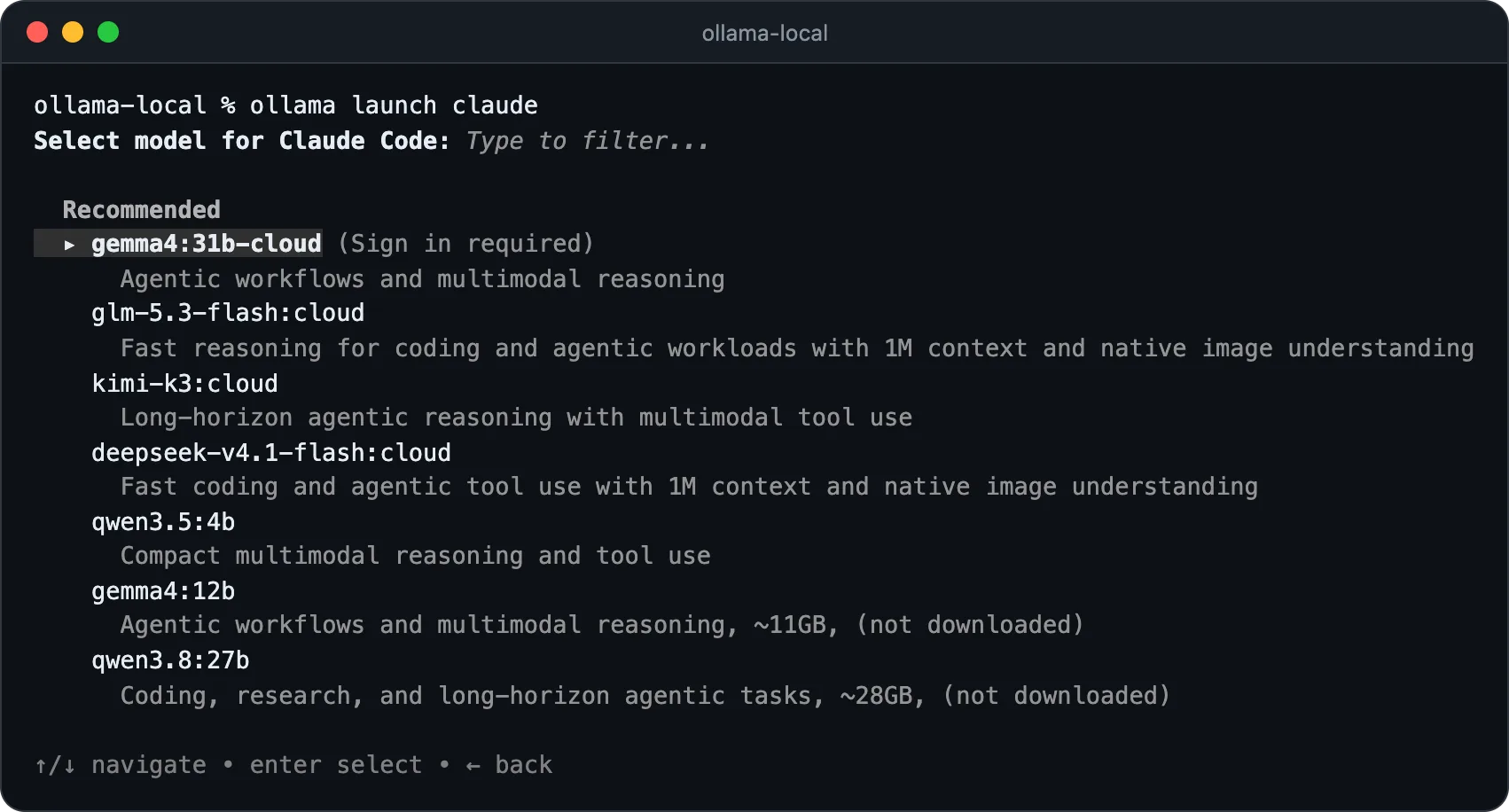
Open a terminal in the folder you want Claude Code to work on (Terminal on a Mac, PowerShell on Windows) and run:
ollama launch claude
- Pick a model. Under "Recommended", the list shows Ollama's cloud models first (they need an ollama.com sign-in), then the local ones with the memory they need, marked "not downloaded" until you have them.
- Let it download. If the model isn't on your computer yet, Ollama downloads it first. The 18 GB qwen3.8:27b took 6 minutes 43 seconds on our connection.
- Install Claude Code if asked. If it's missing, Ollama asks "Claude Code is not installed. Install now?" and runs Anthropic's official installer.
- Trust the folder. A first-time Claude Code asks for a theme and whether you trust the folder, with no login screen. Then the header shows the model that answers:
qwen3.8:27b · API Usage Billing.
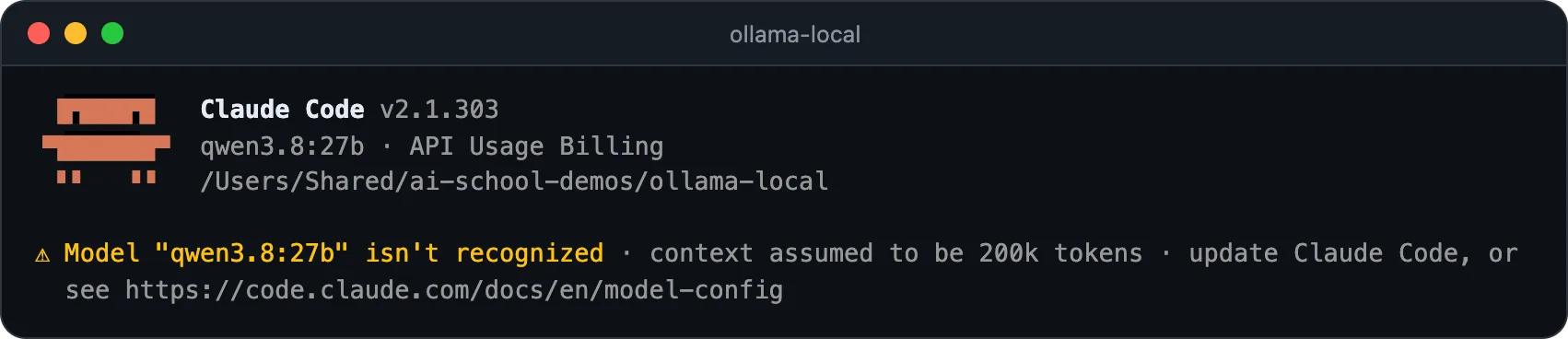
That yellow line matters. Claude Code knows Claude models' context sizes, not qwen3.8:27b's, so it printed Model "qwen3.8:27b" isn't recognized · context assumed to be 200k tokens, as Anthropic's model docs describe, and would wait far too long to compact (summarize) a long conversation. Start it with a size just under Ollama's and the warning goes away:
CLAUDE_CODE_MAX_CONTEXT_TOKENS=64000 ollama launch claude --model qwen3.8:27b
$env:CLAUDE_CODE_MAX_CONTEXT_TOKENS = "64000"
ollama launch claude --model qwen3.8:27b
For that one session, the launcher points Claude Code at Ollama with a placeholder token, so no Claude login is needed, and sends every model slot, helper agents included, to your model. It writes no Claude Code settings: plain claude in a new window is back on your Claude plan. --yes (with --model) skips every question, and anything after -- goes to Claude Code, as in ollama launch claude --model qwen3.8:27b -- --resume.
The manual route: environment variables
To start plain claude instead, set the variables yourself. Ollama's Claude Code docs list the first three; the model lines are what the launcher adds, because some Claude Code helpers otherwise ask Ollama for a Claude model and get "model not found". On Mac or Linux:
export ANTHROPIC_BASE_URL=http://localhost:11434
export ANTHROPIC_AUTH_TOKEN=ollama
export ANTHROPIC_API_KEY=""
export ANTHROPIC_DEFAULT_OPUS_MODEL=qwen3.8:27b
export ANTHROPIC_DEFAULT_SONNET_MODEL=qwen3.8:27b
export ANTHROPIC_DEFAULT_HAIKU_MODEL=qwen3.8:27b
export CLAUDE_CODE_SUBAGENT_MODEL=qwen3.8:27b
export CLAUDE_CODE_MAX_CONTEXT_TOKENS=64000
claude --model qwen3.8:27b
On Windows, in PowerShell:
$env:ANTHROPIC_BASE_URL = "http://localhost:11434"
$env:ANTHROPIC_AUTH_TOKEN = "ollama"
Remove-Item Env:ANTHROPIC_API_KEY -ErrorAction SilentlyContinue
$env:ANTHROPIC_DEFAULT_OPUS_MODEL = "qwen3.8:27b"
$env:ANTHROPIC_DEFAULT_SONNET_MODEL = "qwen3.8:27b"
$env:ANTHROPIC_DEFAULT_HAIKU_MODEL = "qwen3.8:27b"
$env:CLAUDE_CODE_SUBAGENT_MODEL = "qwen3.8:27b"
$env:CLAUDE_CODE_MAX_CONTEXT_TOKENS = "64000"
claude --model qwen3.8:27b
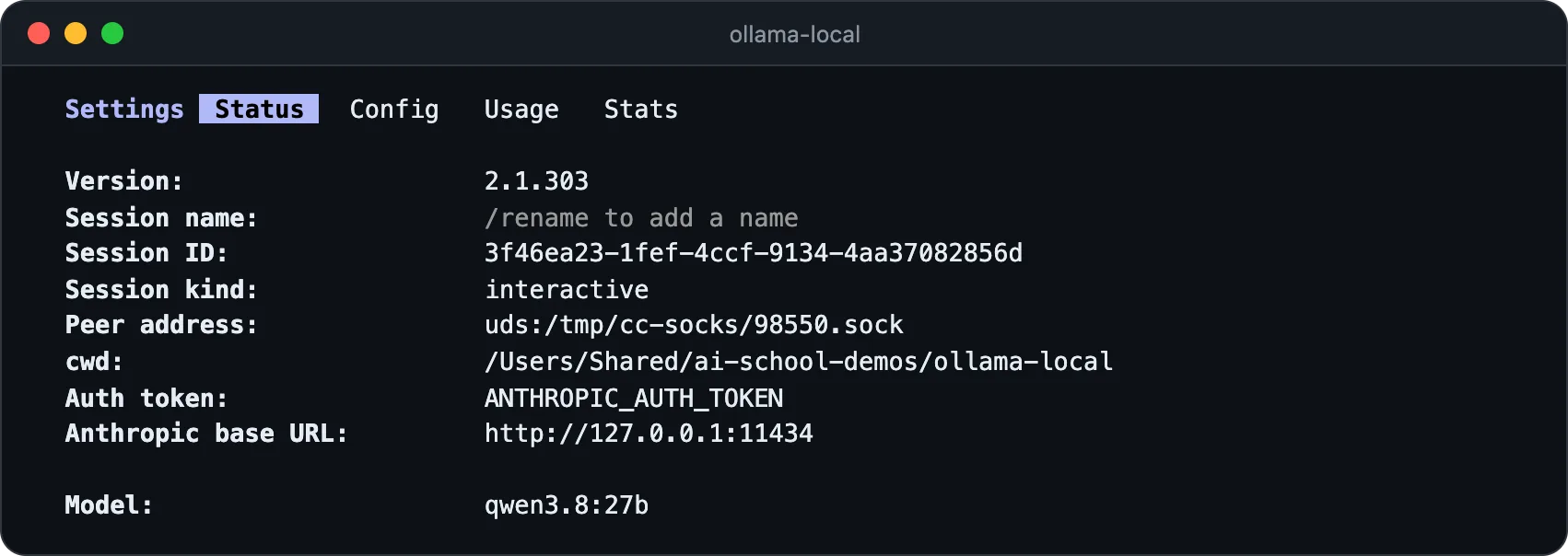
PowerShell can't hold an empty variable, so the Windows version removes ANTHROPIC_API_KEY, with the same effect. The settings last until you close the window. To confirm either route, type /status: the auth token line should name ANTHROPIC_AUTH_TOKEN and the base URL your own computer on port 11434.
Best Ollama models for Claude Code
The Ollama models for Claude Code that the launcher recommends change over time. On October 22, 2026 the local picks were the three in the table above: all can call tools, which Claude Code depends on (read a file, edit it, run a command), all reach a 256K maximum context and all use the Apache 2.0 license. The cloud picks:
| Cloud model | Context | Plan |
|---|---|---|
gemma4:cloud | 256K | Free plan starter credits |
glm-5.3-flash:cloud | 1M | Pro or bought credits |
kimi-k3:cloud | 1M | Pro or bought credits |
deepseek-v4.1-flash:cloud | 1M | Pro or bought credits |
Now the honest part. Terminal-Bench 4.0 is a set of real terminal tasks that Artificial Analysis runs the same way for every model:
From Artificial Analysis, checked October 22, 2026. These are full-size hosted models; the compressed versions you download to a laptop shouldn't be expected to do better. Gemma 4 has no score on this test.
GLM-5.3-Flash and DeepSeek V4.1 Flash, both on Ollama's cloud, score about six times what Qwen3.8 27B does, and Claude stays far ahead of all of them. Our AI model leaderboard has the wider picture.
What we saw on a 48 GB Mac
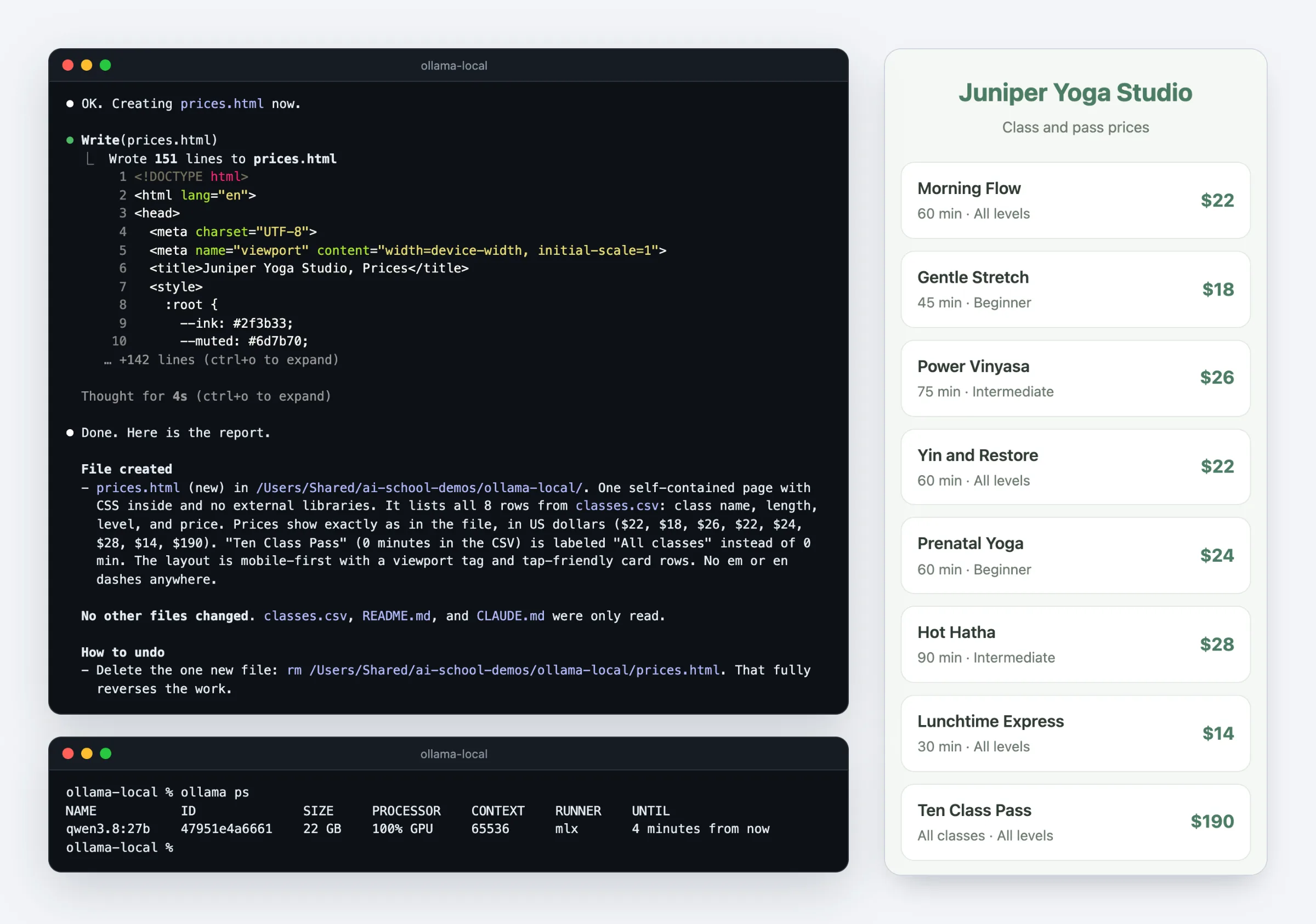
To see the gap on a small, real job, I gave both local models a demo yoga studio's class list and the test prompt from our guide to AI coding agents, which you can run on your own files:
Work only inside this folder. Read [FILE WITH YOUR PRICES OR SERVICES] and build a one-page price list called prices.html that looks good on a phone. Before you change anything, tell me your plan in three bullet points and wait for my OK. When you finish, list every file you created or changed and how I can undo it.| Model and context | First reply after | Whole task | Page worked? | Tool errors |
|---|---|---|---|---|
| qwen3.8:27b, 64K | 3 min 27 s | 5 min 30 s | Yes | 0 |
| qwen3.5:4b, 64K | 43 s | 1 min 39 s | Partly | 0 |
| qwen3.5:4b, 32K default, first run | 7 min 10 s, after an API error | 8 min 7 s | Partly | 0, plus 1 automatic retry |
tokens per second written, qwen3.8:27b
tokens per second written, qwen3.5:4b
tokens per second read by qwen3.8:27b, about
of memory used by qwen3.8:27b after the task
Our measurements on a MacBook Pro with M4 Pro and 48 GB, Ollama 0.40.8, October 22, 2026. Writing speeds are warm runs of ollama run --verbose; the reading speed is from Ollama's log for Claude Code's opening request. Times count the model's work, not our typing.
qwen3.8:27b got it right: a clean page, all eight prices exact, an accurate plan, no tool errors. Its first reply took 3 minutes 27 seconds because it read Claude Code's 20,300-token opening request at about 117 tokens a second; then Ollama's cache made each step quick.
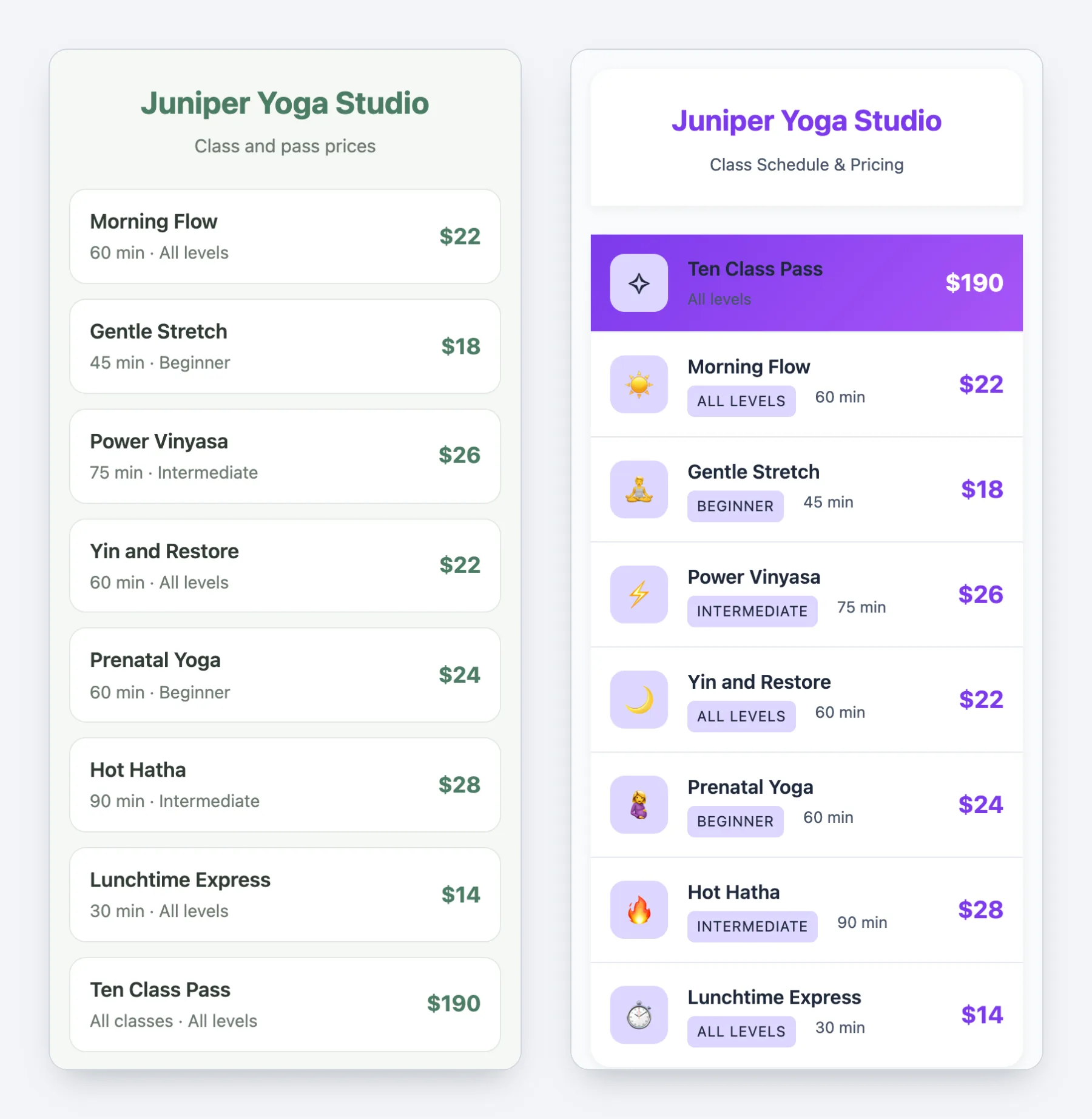
qwen3.5:4b read the same request in about 28 seconds and finished in under two minutes, but it's a fast demo, not a reliable worker: right prices, one hard-to-read row, and an em dash in its reply that the folder's CLAUDE.md forbids. On its first run, at the 32K default, its plan priced a class at $29 (the file says $28), after this:
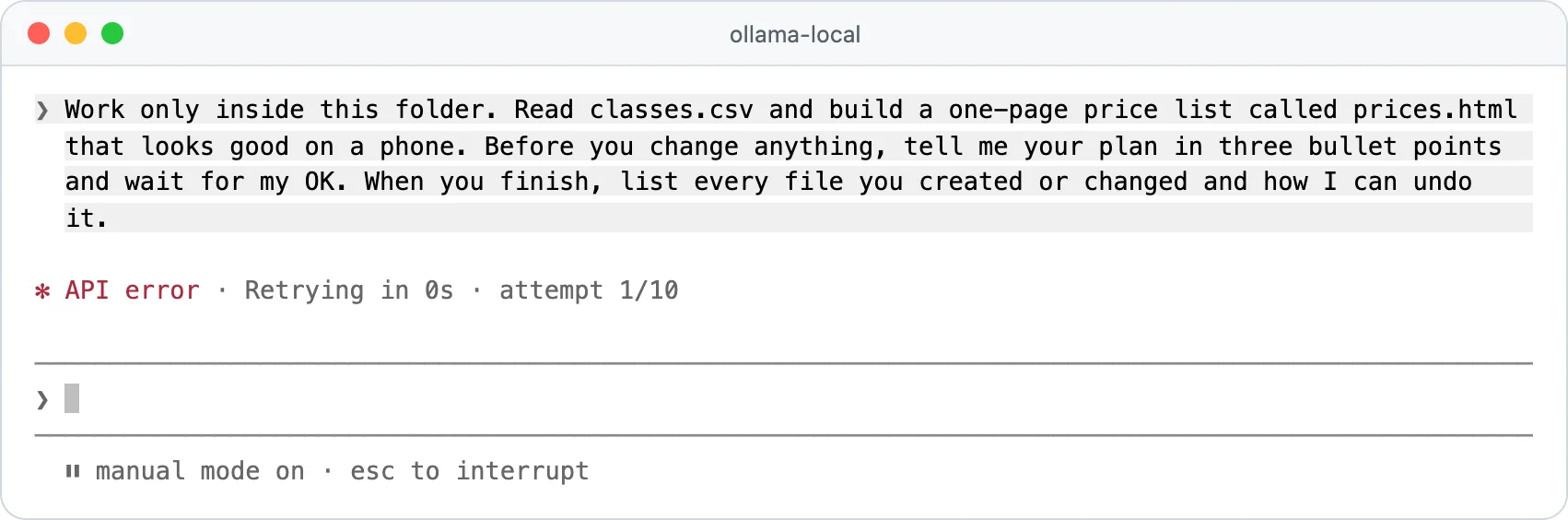
Ollama sent an HTTP 500 error after 5 minutes 22 seconds while the model was still busy with a small side request; Claude Code showed API error · Retrying in 0s · attempt 1/10 and retried by itself. We fixed nothing by hand in any run.
What stops working without Claude
The agent is the same program, so most of Claude Code keeps working. What depends on Anthropic's servers or a Claude login changes:
Works
Reading and editing files, running commands with your permission, plans you approve, and helper agents, which Ollama supports.
Changes
Claude's own web search is off. With Ollama's cloud models, Ollama's web search fills in, which needs an ollama.com account.
Gone
Remote Control, voice dictation, cloud sessions and the desktop app's Code tab, which all need a Claude login.
Rougher
No Anthropic prompt caching, estimated token counts in /context, no PDF reading, and a model that may ignore your CLAUDE.md rules.
Sources: Anthropic's feature availability page and Ollama's Anthropic compatibility list.
Ollama cloud models for Claude Code
The Claude Code Ollama cloud route uses models ending in :cloud, which run on Ollama's servers: no download, no strong graphics chip, much higher scores. The catch: they need an ollama.com account (ollama signin), and your prompts leave your computer.
ollama launch claude --model gemma4:cloud
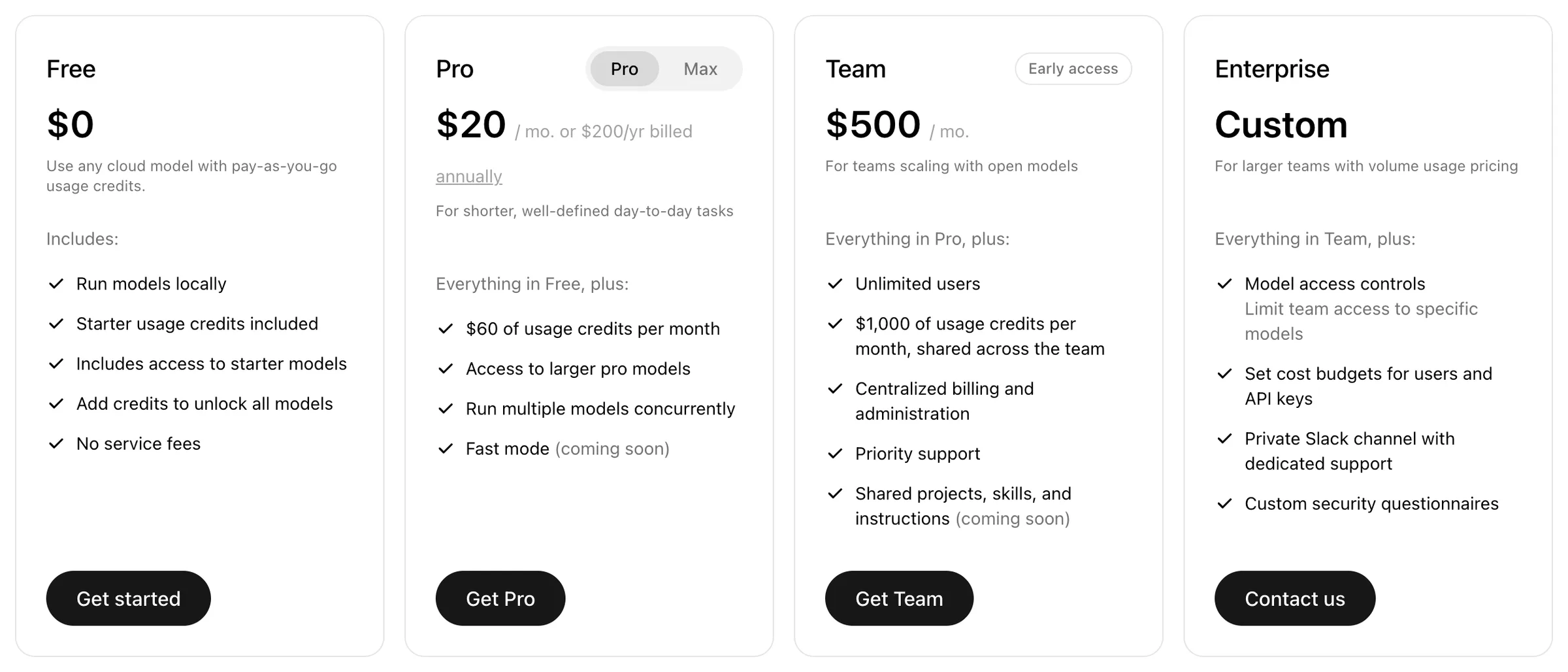
The free plan has starter usage credits, in an amount Ollama doesn't publish, for a few starter models such as gemma4:cloud. Pro is $20 a month ($200 a year) with $60 of usage a month, and Max $100 with $300, per Ollama's pricing. Ollama says it doesn't store, log or train on cloud prompts, and hosts mainly in the United States.
What leaves your computer
0 of 5 done
Troubleshooting Claude Code with Ollama
Most Claude Code Ollama API errors come down to Ollama being off or busy, a wrong model name, too little context or too little memory.
| What you see | What it means | Fix |
|---|---|---|
| Claude Code asks you to log in | It got no token before starting | Use ollama launch claude, or set ANTHROPIC_AUTH_TOKEN=ollama before claude |
| A "Connection refused" or "Unable to connect to API" error | Ollama isn't running | Open the Ollama app (on Linux, ollama serve), then check ollama -v |
API Error: 404 ... model '...' not found | Model not downloaded, wrong name, or Claude Code asked for a Claude model | Run ollama ls, ollama pull the exact name; on the manual route, set the four model lines |
The first answer takes minutes, or API error · Retrying in 0s | The model is reading Claude Code's long opening request, or Ollama is still busy with an earlier one | Wait: Claude Code retries by itself. Keep Ollama updated (0.33.1 and later resume an interrupted start) |
It forgets your request, stops early, or says no user query found in messages | The context is too small, so Ollama cut the start of the conversation | Set 64K, check ollama ps, then type /clear |
model requires more system memory ... than is available, or a CPU/GPU split in ollama ps | The model plus its context don't fit in graphics memory | Pick a smaller model or a cloud one, and close other apps |
| "Invalid tool parameters" or "Error editing file" again and again | The model writes broken tool calls | Use a recommended model at 64K and update Ollama |
403 ... this model requires a subscription | That cloud model isn't on the free plan | Use gemma4:cloud, buy credits, or upgrade |
The login and connection rows follow Anthropic's gateway troubleshooting docs; for the rest, Ollama's log on a Mac is ~/.ollama/logs/server.log.
Other ways to run Claude Code on a local model
LM Studio
Version 0.4.1 added the same Anthropic-style endpoint. Start its server on port 1234 and point ANTHROPIC_BASE_URL at it.
llama.cpp
Its llama-server speaks Anthropic's format too and counts tokens exactly, but you download model files and run it yourself.
OpenRouter
Cloud, not local: free models stop at 50 requests a day, and OpenRouter only guarantees Claude Code with Anthropic's own models.
Claude Desktop on a Mac
The Ollama app's Apps menu can connect Claude Desktop to Ollama models, and disconnecting restores your setup.
Details are from LM Studio's and OpenRouter's docs. For an agent built to work with any model, read Claude Code vs OpenCode.
Quick check0 of 3 correct
You set up Claude Code with Ollama and it keeps forgetting your request. What do you check first?
Not quite.
Most computers start Ollama at 4K or 32K tokens, and Claude Code's opening request alone was about 20,000 tokens in our runs, so a small window fills fast and Ollama cuts the start of the conversation.
After using ollama launch claude, you type plain claude in a new window. Which model answers?
Not quite.
The launcher sets its variables only for the session it starts and changes no Claude Code settings.
Who supports running Claude Code on non-Claude models?
Not quite.
Anthropic's docs say it doesn't support routing Claude Code to non-Claude models; Ollama documents and maintains the integration.
What to do next
Install Ollama, set the context to 64K and give qwen3.8:27b (or qwen3.5:4b on a smaller computer) our small job on a copy of a real folder. Time it and check the result yourself before trusting it with more. If the gap to Claude is too wide for your work, compare plans in our Claude Code pricing guide, and if you want a guided path through real projects, the Claude Code course is open for early access.
Local model test kit for Claude Code
A model-by-memory chooser, three timed test tasks with pass or fail checks, every setting in one table, and the steps to switch back or remove Ollama.
Enter your email and the full section opens right here. You also get a free lesson from the course.
Frequently asked questions
Do I need a Claude account to use Claude Code with Ollama?
No. When ANTHROPIC_AUTH_TOKEN is set before Claude Code starts, which ollama launch claude does for you, Claude Code skips the Claude login and sends every request to Ollama. Features that need a claude.ai login, such as Remote Control, cloud sessions and voice dictation, are not available in that session.
Does Claude Code work offline with Ollama?
With a local model, yes: Claude Code offline works once Ollama and the model are on your computer, because the model needs no internet connection. Claude Code still tries to reach Anthropic for updates and usage metrics unless you set CLAUDE_CODE_DISABLE_NONESSENTIAL_TRAFFIC=1, and web search or fetching a web page needs a connection.
How do I switch Claude Code back to Claude models?
Run plain claude in a new terminal window. ollama launch claude sets its variables only for the session it starts, so your Claude plan is untouched; if you exported the variables yourself, close that window or remove them from your shell profile.
Can I use Claude Code with Ollama in VS Code?
Yes. Put the same variables (ANTHROPIC_BASE_URL, ANTHROPIC_AUTH_TOKEN and the model names) in claudeCode.environmentVariables in VS Code's user settings, then restart the Claude Code panel. Ollama's own VS Code extension is a different thing: it adds Ollama models to VS Code's built-in chat.
Can I use Ollama models in the Claude desktop app?
On a Mac, yes: open the Ollama app, choose Apps and connect Claude, and Ollama sets up Claude Desktop to use its models; disconnecting restores your normal setup. Ollama lists Windows support as coming soon.
Keep reading
Claude Code vs OpenCode (2026): Cost, Models and Privacy
Claude Code vs OpenCode in 2026: OpenCode is free and open source, but Claude Pro won't work in it. Compare benchmarks, real costs, local models and privacy.
Claude Code · 12 min readClaude Code Pricing 2026: Pro vs Max ($20-$200), Team & API
Claude Code pricing, checked October 2026: Pro $20 a month, Max $100 or $200, Team seats from $20 and API per token, plus Pro vs Max and which plan to pick.
Claude Code · 14 min readInstall Claude Code on Windows and Mac in 4 Steps (2026)
Install Claude Code on Windows or Mac with Anthropic's official installer or the desktop app, sign in, run a safe first task and fix errors. No coding needed.
Claude Code · 17 min read